
Roku Streaming Stick HD Review: Simple, Affordable Streaming for Any HD TV
Overview
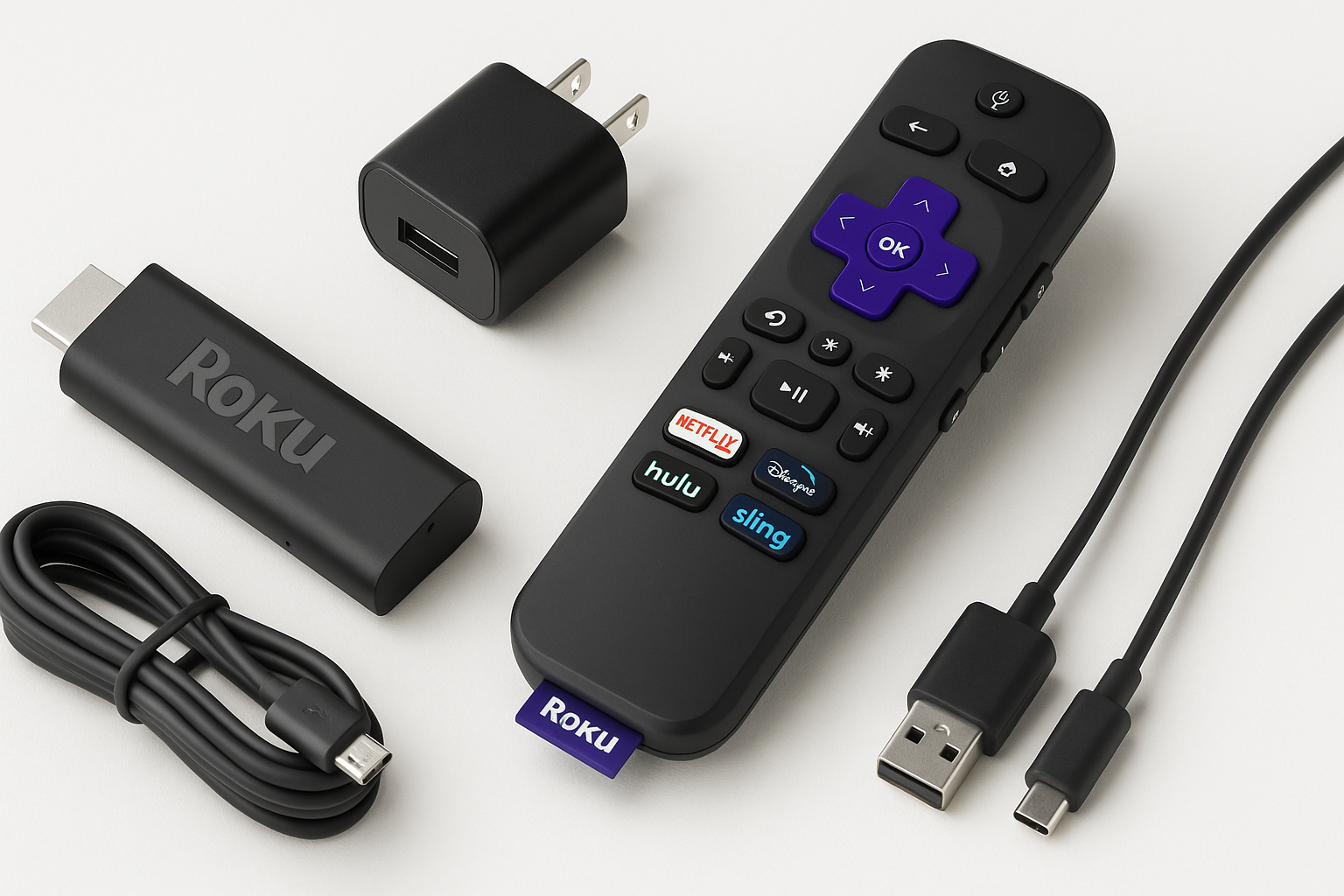
The Roku Streaming Stick HD — HD Streaming Device for TV with Roku Voice Remote, Free & Live TV is Roku’s compact option for users who primarily watch in 1080p and don’t need 4K or HDR. It plugs directly into an HDMI port, hides neatly behind the TV, and is powered via USB. While Roku’s lineup now features several 4K sticks and set-top players, this model targets budget-conscious households, secondary TVs, guest rooms, and older HDTVs that don’t support 4K.
In this review, we’ll cover the Roku Streaming Stick HD’s core capabilities, how it performs day to day, and how it compares conceptually to Roku’s 4K-oriented siblings so you can decide if this HD stick is the right fit for your setup.
Note: Pricing can fluctuate based on promotions and retailers. At the time of writing, the Roku Streaming Stick HD is typically available around $29.99, making it one of the more affordable name-brand streaming sticks for HD televisions.
Key Highlights
- Full HD (1080p) streaming: Designed for HD TVs, with support for up to 1080p resolution.
- Compact HDMI stick form factor: Plugs directly into the TV’s HDMI port; ideal for wall-mounted or space-constrained setups.
- Roku Voice Remote included: Voice search, app launching, and standard navigation, plus TV power and volume controls on compatible TVs.
- Extensive app ecosystem: Access to major streaming services (subscription required where applicable) plus thousands of niche channels.
- Free & live TV integration: Direct access to The Roku Channel with hundreds of free live channels and on-demand movies and shows.
- Low power usage: USB-powered, with modest energy consumption compared to full-size set‑top boxes.
Core Features
Design and Hardware
The Roku Streaming Stick HD uses a “dongle” design: a small bar that plugs into your TV’s HDMI port and is powered by an included USB cable and power adapter. This design keeps clutter down and is especially useful when the TV is wall-mounted or placed in a tight media cabinet.
Key hardware characteristics include:
- HDMI connectivity: Standard HDMI connection for both audio and video.
- USB power: Typically powered from the TV’s USB port or from the included wall adapter.
- Internal Wi‑Fi: Dual-band Wi‑Fi (2.4GHz and often 5GHz support) for wireless streaming from your home network.
- No Ethernet port: Like most sticks, it relies solely on Wi‑Fi; wired connections require a compatible USB Ethernet adapter (sold separately in many cases).
Video and Audio Support
This HD stick is tuned for up to 1080p Full HD playback. It is not designed for 4K or HDR formats, which is appropriate for older or budget HDTVs that do not support those standards. Typical supported formats include:
- Video resolution: Up to 1080p (1920×1080) at standard streaming frame rates.
- Color and dynamic range: Standard dynamic range (SDR) only; no HDR10, HDR10+, or Dolby Vision.
- Audio output: Digital audio over HDMI, with support for stereo and pass-through of multi-channel audio formats when supported by the app and TV/receiver.
Roku Voice Remote
In the box, you get the Roku Voice Remote, which adds convenience over Roku’s basic remotes:
- Voice search and commands: Press and hold the microphone button to search for movies, shows, actors, or launch specific apps.
- TV controls: Power, volume, and mute buttons that work with most modern TVs via HDMI-CEC or IR.
- Simple layout: Directional pad, home, back, options, and playback controls.
The inclusion of a voice-capable remote at this tier is a strong value-add, making navigation and content discovery faster than with basic, non-voice remotes.
Software Experience and Content
Roku’s primary strengths are its straightforward interface and wide app catalog:
- Clean grid-based home screen: Apps ("channels") are laid out in a simple grid you can reorder to your preference.
- Universal search (varies by region): Voice or text search across multiple apps helps you find where a title is streaming.
- Major services supported: Typically includes Netflix, YouTube, Prime Video, Disney+, Hulu, and many more (subscriptions not included).
- The Roku Channel: Roku’s own hub for free, ad-supported movies and TV shows, plus a growing selection of live linear channels.
- Frequent software updates: Roku OS receives regular updates that may add apps, improve performance, or refine the interface over time.
Usage Experience
Setup
Setting up the Roku Streaming Stick HD is straightforward for most users:
- Plug the stick into an HDMI port on your TV.
- Connect the USB power cable to a USB port on the TV or to the included wall adapter.
- Select the correct HDMI input on your TV.
- Follow on-screen prompts to connect to Wi‑Fi, create or sign in to a Roku account, and add channels.
Roku’s setup flow is polished, with clear guidance and automatic software updates during the initial configuration. For many users, the entire process takes 10–20 minutes.
Day-to-Day Performance
In everyday use, the Roku Streaming Stick HD is designed to handle typical HD streaming workloads comfortably:
- Menu navigation: Responsiveness is generally adequate for moving through home screens, launching apps, and browsing content. Compared with more powerful 4K models, transitions may be a bit slower, but still acceptable for most casual viewers.
- Streaming stability: On a solid Wi‑Fi network, 1080p streams load quickly and remain stable with minimal buffering. As with any Wi‑Fi–only device, performance can degrade if the router is far away, the signal is obstructed, or the network is congested.
- App behavior: Most mainstream apps are well-optimized for Roku. Occasional app-specific slowdowns or glitches are more often due to the app or service than the hardware itself.
Voice Control and Search
The voice remote significantly improves the user experience:
- Faster content discovery: Saying a movie or show name is usually faster than typing it out.
- Actor/genre search: You can search by actor or keywords (e.g., “comedies” or “action movies”) where supported.
- Launching apps: Commands like “Open Netflix” or “Launch YouTube” streamline navigation.
Voice recognition accuracy is typically strong in quiet rooms and with clear speech, though background noise or heavy accents can occasionally require repeats.
Strengths
-
Excellent value for HD-only setups
For users with 1080p TVs, the Roku Streaming Stick HD delivers a full-featured streaming platform at a cost-effective level, especially when found around $29.99 or during sales. -
Compact, clutter-free design
The stick form factor keeps cables and boxes out of sight, which is great for wall-mounted TVs or clean minimal living rooms. -
Roku’s mature ecosystem
With one of the largest app libraries and a stable, familiar interface, Roku devices are easy for most users to learn and use. -
Included voice remote with TV controls
Getting a voice-enabled remote with integrated TV controls at this price point reduces the need for multiple remotes and improves usability. -
Strong free and live TV options
The Roku Channel and other free apps provide a wide range of ad-supported entertainment without additional monthly hardware fees, making this device attractive for cord-cutters. -
Low power consumption
USB power and modest hardware demands mean the stick is energy-efficient, an advantage over some bulkier streaming boxes.
Weaknesses
-
No 4K or HDR support
On a 4K TV, this stick will only output up to 1080p SDR. If you want to fully utilize a 4K or HDR-capable display, a Roku 4K or 4K+ model is a better long-term choice. -
Wi‑Fi only, no built-in Ethernet
Users in crowded wireless environments or with distant routers may encounter buffering or lower bitrates. A separate USB Ethernet adapter, where supported, adds extra cost and complexity. -
Less headroom than higher-end models
While adequate for typical HD streaming, the internal hardware is not as powerful as Roku’s 4K sticks or premium players. Heavy app hoppers or those pushing lots of background processes might notice slower transitions. -
Limited future-proofing
As streaming services continue to emphasize 4K and HDR, an HD-only stick may feel dated sooner, especially if you upgrade your TV. -
Potential codec limitations
As an HD-focused device, it may not support every advanced video codec (such as some HEVC/4K-focused formats) used in local media setups, which can matter for users streaming from a home media server rather than from mainstream apps.
Suitable Scenarios
The Roku Streaming Stick HD is particularly well-suited to the following use cases:
-
Older or budget 1080p TVs
If your primary display is a 1080p set with no plans for near-term replacement, this stick delivers everything you need without paying for 4K capabilities you can’t use. -
Secondary rooms
Ideal for bedrooms, guest rooms, kids’ rooms, dorms, and kitchens where casual viewing dominates and ultra-high picture quality is less critical. -
Travel and temporary setups
Its compact size and USB power make it an easy travel companion for vacations, short-term rentals, or temporary living situations (assuming you can connect to the local Wi‑Fi and have HDMI access). -
Cord-cutters on a budget
Combined with free channels and your choice of a few key subscriptions, this stick is a low-cost entry point into streaming, especially when priced around $29.99. -
Users who prioritize simplicity
The straightforward interface and minimal hardware make it a good option for less tech-savvy family members who just want to turn on the TV and start watching.
Final Evaluation
The Roku Streaming Stick HD — HD Streaming Device for TV with Roku Voice Remote, Free & Live TV is a focused product: it aims to deliver reliable HD streaming at a budget-friendly price in the familiar Roku ecosystem. It succeeds by combining a compact form factor, a capable voice remote, and Roku’s broad app support and free content options.
However, the limitations are clear. Without 4K or HDR support and with reliance on Wi‑Fi only, this stick is best suited to HD-only environments and typical streaming needs rather than enthusiast-grade home theaters or future-proof 4K setups.
You should choose the Roku Streaming Stick HD if:
- You have a 1080p TV and don’t plan to upgrade soon.
- You want a simple, inexpensive way to access major streaming services and plenty of free content.
- You value a compact design and a voice remote with basic TV controls.
You should look at Roku’s 4K models instead if:
- You already own or plan to buy a 4K/HDR TV.
- You want the best possible image quality and more robust hardware for heavier use.
For its intended audience—HD TV owners and budget-conscious streamers—the Roku Streaming Stick HD is an easy recommendation, especially when found near $29.99. It may not be flashy or future-proofed for 4K, but it’s a practical, dependable tool for bringing smart streaming capabilities to almost any HDTV.