
Roku TV Remote Control (Official) Review: A Simple, Reliable Replacement for Roku TV Owners
Roku TV Remote Control (Official) Review: A Simple, Reliable Replacement for Roku TV Owners
Introduction
Losing or wearing out a TV remote is almost inevitable, especially when a Roku TV is the main screen in the house. The Roku TV Remote Control (Official Manufacturer Product) is built specifically as a drop-in replacement for Roku TV models—not Roku streaming players or sticks. It focuses on ease of use, essential TV controls, and quick access to streaming apps, aiming to restore the original out‑of‑the‑box Roku TV experience with minimal setup.
If you own a Roku TV and want an official, no‑nonsense remote that works much like the one that shipped with your television, this model is one of the most straightforward options on the market.
Note: This remote is designed for Roku TV models only and is not compatible with standalone Roku streaming players or Roku audio devices.
Product overview and key features
The Roku TV Remote Control is an infrared (IR) remote intended to work with all Roku TV models from brands that integrate Roku OS into the television (such as TCL, Hisense, and others). It mirrors the layout of Roku’s standard “simple” TV remotes, offering familiar navigation and app access.
Design and layout
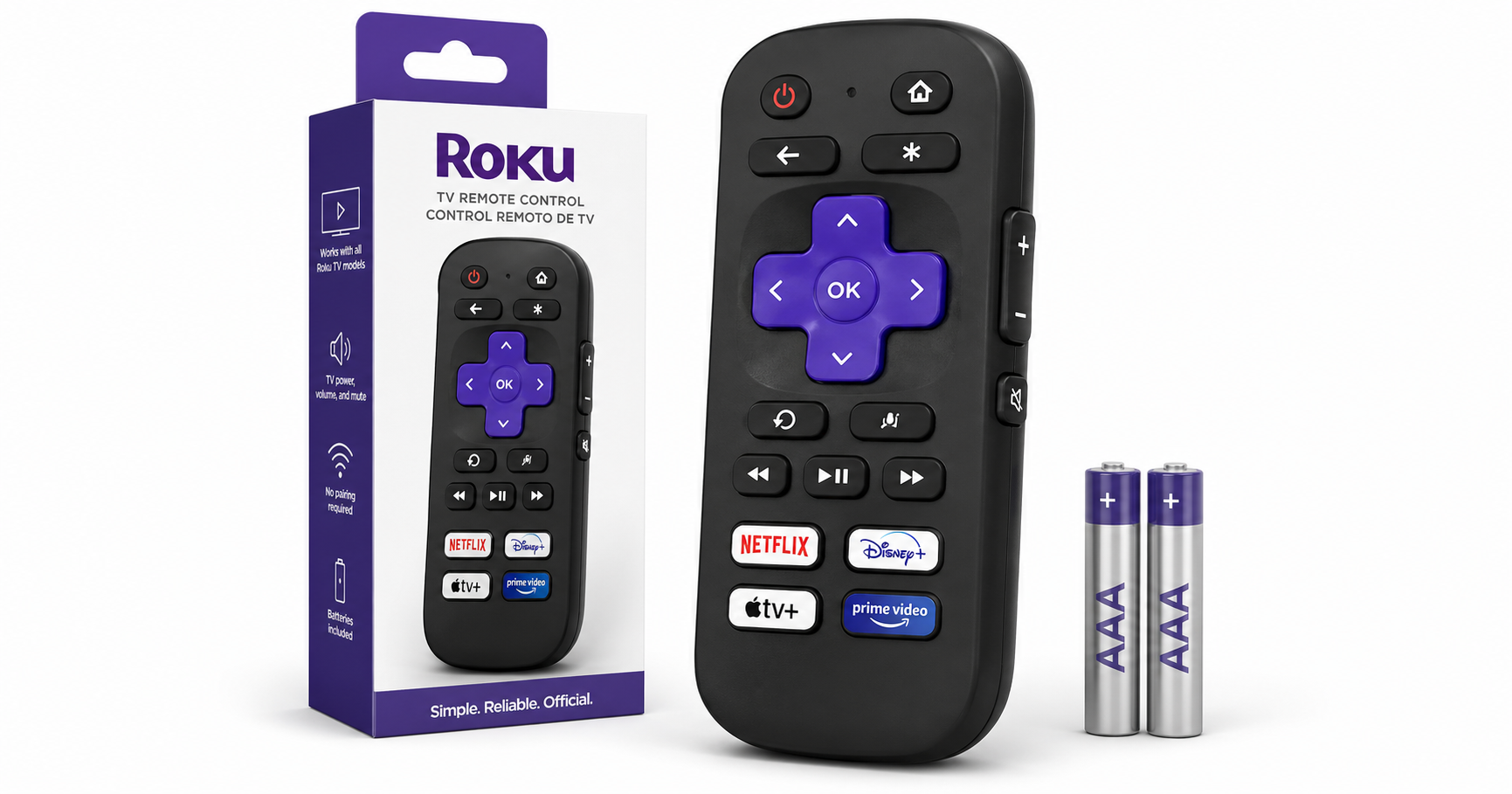
- Compact, lightweight body: The remote follows Roku’s typical rounded, compact design, making it comfortable to hold and intuitive for one‑handed use.
- Directional pad (D‑pad): A large central directional pad with an OK/Select button provides primary navigation within the Roku interface.
- Home and Back buttons: Dedicated buttons for Home and Back enable quick navigation without drilling through menus.
- Playback controls: Standard play/pause, fast forward, and rewind buttons support on‑screen media control.
- TV power and volume: Integrated TV power, volume up/down, and mute buttons mean you can control basic TV functions without juggling multiple remotes.
- Pre-set streaming app shortcuts: Four pre‑set app shortcut buttons (such as Netflix and other major services, depending on batch/region) allow single‑press launching of popular apps.
Key features
-
Official Roku TV compatibility
- Designed specifically for Roku TV models, with factory‑programmed IR codes that match Roku’s own TV implementations.
- Not intended for Roku streaming players (Express, Premiere, Ultra, Streaming Stick, etc.) or Roku audio devices.
-
Simple setup
- For most Roku TVs, there is no complex pairing required. Because it’s an IR remote, setup typically consists of inserting the included AAA batteries and pointing it at your Roku TV.
- No Bluetooth or Wi‑Fi Direct pairing is involved, reducing potential connectivity issues.
-
Pre‑installed batteries
- The bundle generally includes two pre‑installed AAA batteries, meaning it is usable right out of the box once you remove any battery tab.
-
Single‑remote convenience
- Power, volume, and mute buttons are integrated, reducing or eliminating the need for the original TV manufacturer’s remote in everyday use.
-
Affordable, official replacement
- Positioned as a budget‑friendly official accessory, allowing you to restore full Roku TV control for around $9.99 without turning to unbranded alternatives.
Performance and user experience
Setup experience
For most users, setup is effectively plug‑and‑play:
- Open the battery compartment on the back of the remote.
- Ensure the AAA batteries are correctly seated (or remove any pull tab protecting battery contacts).
- Point the remote at your Roku TV and press the Home or Power button.
Because the remote uses IR rather than a wireless pairing protocol, it typically begins working immediately with compatible Roku TVs that recognize Roku’s standard IR codes.
Responsiveness and reliability
- Line‑of‑sight required: As an IR remote, it needs a clear line of sight to the TV’s IR receiver. Obstructions (soundbars, cabinet doors, or people) can block the signal.
- Low latency: Button presses generally register quickly, with responsiveness similar to the original Roku TV remote.
- Consistent behavior across Roku TV models: For most modern Roku TVs, navigation, volume, and app shortcuts behave as expected, matching the built‑in Roku OS interface.
In day‑to‑day use, scrolling through menus, launching apps, and controlling playback feels familiar to anyone who has used a basic Roku TV remote before. There are no advanced features (like voice commands or headphone jacks) to configure, which simplifies the experience.
Ergonomics and usability
- The rubberized buttons and distinct shapes make it easy to locate Home, OK, and playback buttons by feel, useful when watching in low light.
- The volume rocker and mute are positioned on the side or front edge (depending on revision), allowing quick on‑the‑fly adjustments.
- The pre‑set app buttons are clearly labeled, but cannot be reprogrammed; they are locked to the printed services. This is normal for Roku remotes, but worth noting if you don’t use the specific apps featured.
Battery life
- IR remotes are generally power‑efficient, and this model follows that pattern.
- Typical usage should allow months of operation on a single set of AAA batteries, assuming normal daily viewing.
While exact battery life varies by usage and battery brand, most users can expect to replace batteries infrequently compared with Wi‑Fi or voice‑enabled remotes.
Compatibility limitations
The most important aspect of this product is what it doesn’t support:
- Not compatible with Roku players: It will not control dedicated Roku streaming devices such as Roku Express, Roku Streaming Stick, Roku Ultra, or other standalone boxes.
- Not compatible with Roku audio devices: Soundbars and wireless speakers from Roku generally require remotes compatible with Roku players or voice remotes.
- No universal TV control beyond Roku TVs: This is not a universal remote. It is not intended to control non‑Roku TVs, AV receivers, or Blu‑ray players.
Because of these constraints, it’s essential that buyers confirm they specifically own a Roku TV (a TV with Roku built in) rather than a separate Roku streaming device connected to a non‑Roku television.
Pros and cons
Pros
- Official Roku accessory designed specifically for Roku TV models, reducing compatibility guesswork.
- Simple, nearly instant setup with no Bluetooth or Wi‑Fi pairing required.
- Integrated TV controls (power, volume, mute) eliminate the need for multiple remotes in most setups.
- Pre‑set app shortcut buttons allow quick access to popular streaming services.
- Familiar Roku layout keeps navigation intuitive for existing Roku TV users.
- Lightweight and compact design that fits easily in the hand.
- Budget‑friendly replacement at around $9.99, often cheaper than voice‑enabled alternatives.
Cons
- Roku TV only: Not compatible with Roku streaming players, sticks, or most non‑Roku devices.
- No voice control: Lacks a microphone and associated voice search or voice command features.
- No headphone jack or advanced features: Unlike Roku’s premium remotes, there is no private listening via wired headphones directly from the remote.
- IR limitations: Requires direct line of sight; won’t work reliably if the TV’s IR sensor is obstructed.
- Fixed app shortcuts: Pre‑set app buttons can’t be reprogrammed, which may be wasted if you don’t use those specific services.
Conclusion and recommendation
The Roku TV Remote Control (Official Manufacturer Product) is a focused, purpose‑built replacement remote for Roku TV owners who value simplicity and reliability over advanced features. It restores full Roku TV navigation, playback, and basic TV controls with minimal setup, using a familiar layout that mirrors most stock Roku TV remotes.
If you:
- Own a Roku TV (not just a Roku streaming player), and
- Need a straightforward replacement for a lost, damaged, or failing remote, and
- Don’t require voice commands, a headphone jack, or universal control features,
then this official Roku TV remote is an easy recommendation. At around $9.99, it offers a cost‑effective way to get your Roku TV fully usable again without experimenting with off‑brand alternatives or more complex universal remotes.
For users who want additional capabilities—such as voice search, private listening, or control of multiple devices—Roku’s voice‑enabled or pro remotes, or a high‑quality universal remote, will be a better fit. But for most households that simply want their Roku TV to work the way it did on day one, this simple, official Roku TV remote delivers exactly what’s needed with minimal fuss.
Product page: Roku TV Remote Control (Official Manufacturer Product) on Amazon