
Amazon Fire TV Stick HD Review: Slim, Simple HD Streaming with Alexa Built In
Introduction
The Amazon Fire TV Stick HD, free and live TV, Alexa Voice Remote, smart home controls, HD streaming is Amazon’s latest compact streaming stick aimed at people who want to modernize an older HDTV or add an easy travel‑friendly streamer. Sitting below the company’s 4K models, this device focuses on Full HD (1080p) output, streamlined setup, and tight integration with Alexa and the broader Amazon ecosystem.
In this review, we’ll examine its design, core features, day‑to‑day performance, and ideal use cases, then wrap up with clear pros and cons and a recommendation to help you decide if it’s the right streamer for your setup.
Note: At the time of writing, the Fire TV Stick HD is typically available around $19.99, which positions it as an entry‑level to mid‑range streaming option.
Product overview and key features
Design and hardware
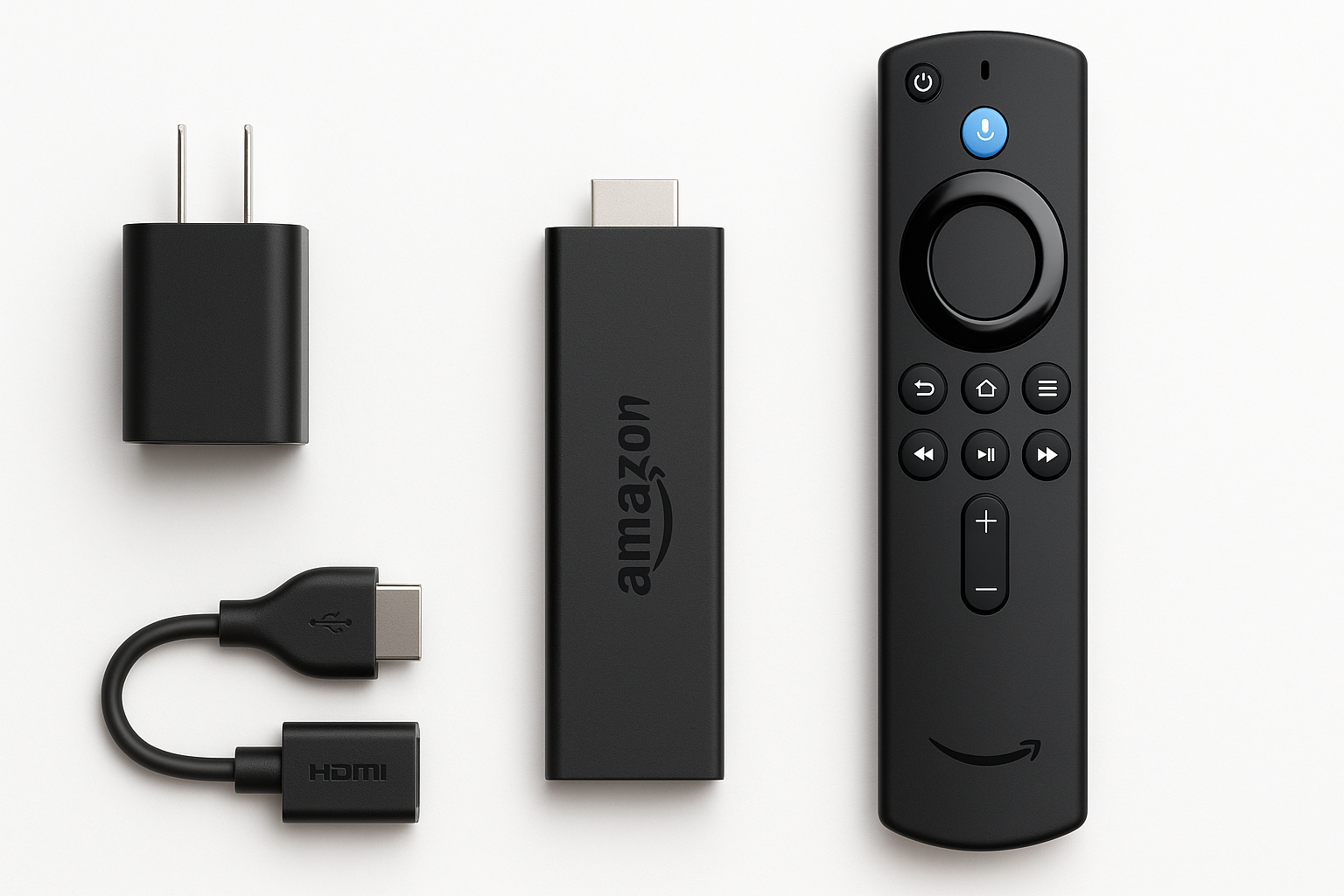
The Fire TV Stick HD is a small HDMI dongle that plugs directly into your TV’s HDMI port and hides neatly behind the screen. This generation is noticeably slimmer and more compact than earlier HD sticks, which helps when HDMI ports are crowded or close to the TV’s edge.
Key hardware and design highlights:
- Full HD streaming (up to 1080p): Designed for HD TVs rather than 4K displays.
- Quad‑core processor: Provides responsive navigation and smoother app loading compared with older HD Fire TV models.
- 8 GB of internal storage: Used for apps, games, and system files—sufficient for a typical mix of major streaming apps but not ideal for very app‑heavy setups.
- Dual‑band Wi‑Fi: Supports modern Wi‑Fi standards for stable streaming on both 2.4 GHz and 5 GHz networks.
- Bluetooth support: Allows pairing with wireless headphones, game controllers, and some other accessories.
- USB power: The stick runs off a USB power source; many TVs can power it from a USB port (or you can use the included power adapter if needed).
Alexa Voice Remote and smart home integration
Included in the box is the Alexa Voice Remote, which combines traditional navigation with voice commands:
- Microphone button for Alexa: Hold to search for shows, launch apps, control playback, or ask general questions.
- Standard navigation keys: Directional pad, select, back, home, and menu buttons.
- Media and volume controls: Play/pause and volume buttons (capabilities may depend on your TV and audio setup).
With Alexa integration, the Fire TV Stick HD also doubles as a simple smart‑home control hub while the TV is on. You can:
- Turn compatible smart lights on/off or dim them.
- Adjust some smart thermostats.
- Check smart cameras and doorbells that support Fire TV integration.
- Use Alexa routines you’ve set up in the Alexa app (e.g., “movie night” scenes).
Content and apps
The device runs Fire OS with the Fire TV interface, giving you access to:
- Major streaming services like Prime Video, Netflix, Disney+, Hulu, and others (availability varies by region).
- Free, ad‑supported channels and live TV aggregations for news, movies, and shows.
- Music apps, including Amazon Music and others.
- A selection of casual games and utilities from the Amazon Appstore.
If you’re already invested in Amazon services—especially Prime Video and Alexa smart speakers—the ecosystem integration is a clear advantage. Recommendations, watch lists, and voice control tend to work best when you’re primarily using Amazon and major third‑party apps.
Performance and user experience
Setup and interface
Setting up the Fire TV Stick HD is straightforward:
- Plug the stick into an HDMI port on your TV.
- Connect the included USB power cable to the TV’s USB port or the provided power adapter.
- Follow the on‑screen prompts to connect to Wi‑Fi and sign in with (or create) an Amazon account.
Once configured, you’re dropped into the Fire TV home screen, which is organized into rows of apps, recommended content, and categories like live TV, movies, TV shows, and more. The interface is visually dense but familiar if you’ve used previous Fire TV devices.
Navigation is generally snappy for an HD‑class streamer. Launching major apps, moving between rows, and bringing up search feel responsive. The combination of a newer processor and up‑to‑date Fire TV software makes this stick feel noticeably faster than aging built‑in smart TV platforms or older Fire TV models that may have slowed down over time.
Streaming quality
The Fire TV Stick HD targets 1080p resolution, which is ideal for older or mid‑range HDTVs that don’t support 4K. Video quality is crisp for HD content, and mainstream apps typically default to the best available streaming quality based on your bandwidth.
What to expect:
- Sharp Full HD video on compatible content.
- Stable playback when paired with a solid broadband connection and a decent Wi‑Fi signal.
- Support for modern streaming codecs and HDR on select content and displays (though this device is not intended as a high‑end HDR showcase; its main value is HD clarity and simplicity).
For viewers with a 4K TV sitting relatively close to the screen, a 4K‑capable Fire TV device may offer a more detailed image, especially on large (55" and up) displays. But on smaller or strictly 1080p TVs, the Fire TV Stick HD looks clean and is usually indistinguishable from 4K devices when both are outputting HD streams.
Voice control and smart home usage
Alexa integration is one of the Fire TV Stick HD’s standout features:
- Voice search: Quickly find shows, movies, actors, or apps. You can search across multiple supported services instead of opening each app separately.
- Hands‑on shortcuts: Commands like “open Prime Video,” “pause,” or “rewind 30 seconds” work well and reduce reliance on manual navigation.
- Smart home control: You can control compatible devices with your voice while the Fire TV interface is active, making it easy to dim the lights or adjust a smart thermostat before starting a movie.
Voice recognition quality is generally strong, and results are fast as long as your internet connection is stable.
Storage limits and app management
With 8 GB of internal storage, the Fire TV Stick HD has enough room for the major streaming apps most people rely on. However, space can become tight if you:
- Install a large number of niche apps and games.
- Regularly download large app updates without managing storage.
The device includes tools to:
- View how much space apps are using.
- Offload or uninstall apps you’re not using.
- Clear cache/data for individual apps.
If you plan to keep only a core set of streaming services installed, storage will rarely be a problem. Power users with many specialty apps may need to manage space more actively.
Reliability and day‑to‑day use
In regular use, the Fire TV Stick HD aims to be a “set it and forget it” streamer:
- It wakes quickly from sleep when you power on the TV.
- System updates are automatic and mostly unobtrusive.
- App stability is generally good across mainstream services.
Like other Fire TV devices, performance can occasionally feel slower if many apps are installed or if background processes build up over time, but periodic restarts or removing unused apps usually keeps things smooth.
Pros and cons
Pros
- Compact, slim design that fits easily behind most TVs.
- Full HD (1080p) streaming ideal for non‑4K TVs.
- Alexa Voice Remote included, with intuitive voice search and playback control.
- Integrated smart home controls for compatible lights, thermostats, and other Alexa devices.
- Access to major streaming platforms and free, ad‑supported channels through the Fire TV interface.
- User‑friendly setup that most people can complete in minutes.
- Portable form factor, convenient for travel, dorm rooms, or second TVs.
Cons
- HD‑only resolution: Not the best match for large 4K TVs or viewers who want the sharpest possible picture.
- Limited 8 GB storage, which can fill up if you install many apps and games.
- Interface leans heavily into Amazon’s ecosystem, which some users may find too promotional or cluttered.
- Best experience requires an Amazon account and stable broadband, which may be a barrier for some households.
Conclusion and recommendation
The Amazon Fire TV Stick HD, free and live TV, Alexa Voice Remote, smart home controls, HD streaming is a well‑rounded, compact streaming device that brings a modern interface, extensive app support, and powerful voice control to virtually any HDTV. It’s easy to set up, performs reliably for day‑to‑day streaming, and integrates smoothly with Alexa‑enabled smart homes.
It’s an especially strong fit if:
- You have a 1080p TV and don’t need 4K support.
- You want an affordable, portable streamer for secondary TVs, dorms, or travel.
- You’re already invested in Amazon Prime Video and Alexa devices and want a cohesive ecosystem.
On the other hand, if you own a large 4K TV and are sensitive to picture quality, or if you anticipate installing many apps and games, you may want to consider one of Amazon’s 4K Fire TV models with higher resolution and more storage.
For its target audience—viewers looking for a simple, Alexa‑powered HD streaming solution—the Fire TV Stick HD offers strong value at around $19.99 and should comfortably handle everyday streaming needs for years to come.