
Amazon Fire TV Stick 4K Plus (Newest Model) Review: Smarter 4K Streaming With Alexa+ and Wi‑Fi 6
Introduction
The Amazon Fire TV Stick 4K Plus (newest model) is Amazon’s latest 4K streaming dongle, built to sit behind your TV and turn almost any HDMI display into a smart TV. It combines 4K Ultra HD output with support for Dolby Vision, HDR10+, and Dolby Atmos audio, along with Wi‑Fi 6 for more stable streaming in busy households. On the software side, its headline addition is AI-powered Fire TV Search and Alexa+, which are designed to make it easier to find what you want to watch across multiple apps.
If you’re considering upgrading from an older Fire TV Stick or adding streaming to a non‑smart or slow smart TV, this model aims to strike a balance between performance, picture quality, and convenience—while staying in the compact stick form factor and at a relatively accessible price point of $29.99.
Setup / Getting Started
What’s in the box
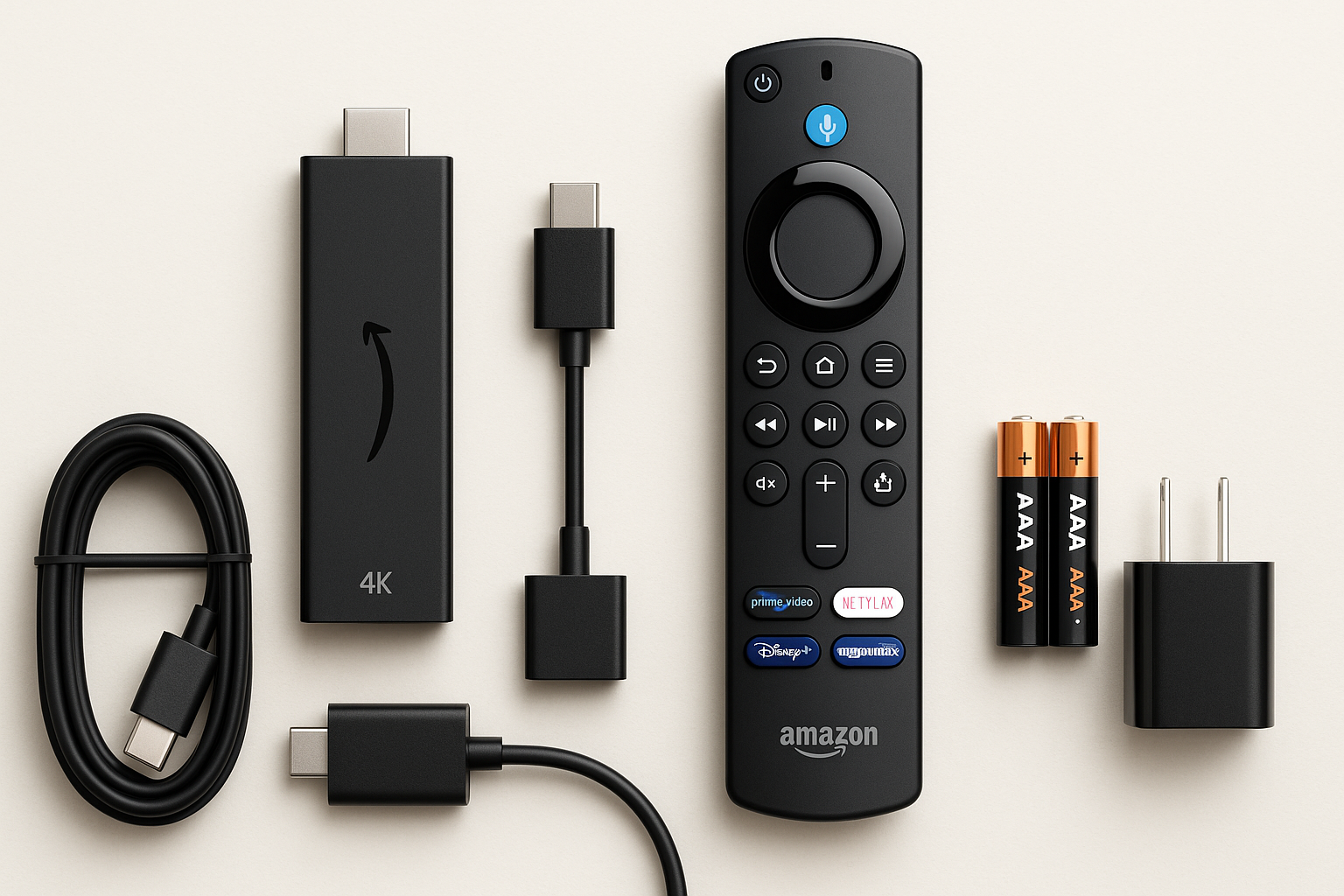
Typically, the package includes:
- Fire TV Stick 4K Plus dongle
- Alexa Voice Remote (latest-generation, with app shortcut buttons and a live TV button)
- USB power cable and power adapter (varies by region/bundle)
- HDMI extender (useful if your TV’s HDMI port is recessed or crowded)
- Two AAA batteries for the remote
Physical setup
- Connect to TV: Plug the Fire TV Stick 4K Plus into an available HDMI port on your TV. If space is tight, attach the included HDMI extender first.
- Power it: Connect the USB cable to the stick and to the included power adapter, then plug it into a wall outlet for the most reliable power. Some TVs can power it via USB, but using the adapter is generally more stable, especially with Wi‑Fi 6 and 4K playback.
- Select input: Turn on your TV and switch to the HDMI input you used.
Initial configuration
Once powered, the Fire TV Stick 4K Plus walks you through a straightforward setup process:
- Language & region: Choose your language and region so app recommendations and live TV options match your location.
- Wi‑Fi connection: Connect to your home network. The support for Wi‑Fi 6 helps maintain higher throughput and stability if you have a newer router and multiple devices online.
- Sign in to Amazon: Log in with your Amazon account (or create one). This is required for app downloads, purchases, watchlists, and Alexa integration.
- Software updates: The device usually downloads and installs updates on first run; allow several minutes for this.
- App selection: You can pre‑select popular services (Netflix, Prime Video, Disney+, Max, and more) to install automatically. Others can be added later from the Appstore.
The included remote also needs to be paired and configured to control your TV’s power and volume. The wizard will play audio and ask you whether you can hear it while it cycles through IR codes for your TV or soundbar.
Daily Usage
Interface and navigation
The Fire TV home screen centers on rows of content recommendations, recently used apps, and pinned favorites. If you’re familiar with older Fire TV models, this will feel familiar, though recent updates place more emphasis on personalized suggestions and Amazon’s own services.
Navigation with the Alexa Voice Remote is responsive, and the stick’s processing power is sufficient to move through menus, open apps, and switch between streams without the kind of sluggishness that plagues many built‑in smart TV platforms. For most users, the learning curve is minimal.
AI-powered Fire TV Search and Alexa+
The key differentiator for this generation is AI-powered Fire TV Search, integrated with Alexa+. Instead of having to remember which app has which show, you can use more conversational voice commands, such as:
- “Alexa, show me sci‑fi movies from the 90s.”
- “Find that series where two chefs travel across Asia.”
- “What should I watch if I liked [similar show]?”
The system attempts to interpret your intent and surface options across multiple installed services, not just one app. In practice, this:
- Reduces time spent manually searching in each app.
- Makes discovery easier if you don’t know an exact title.
- Helps casual users who may only use voice instead of on‑screen keyboards.
Alexa also ties into smart home functions: you can view compatible camera feeds, adjust lights or thermostats, and ask for weather or sports scores, all from the same remote.
Streaming apps and free/live TV
The Fire TV Stick 4K Plus supports the major streaming platforms most buyers expect: Netflix, Prime Video, Disney+, YouTube, Max, Hulu, and many others. Amazon also promotes its free and live TV options via:
- Free ad‑supported channels: Through services like Freevee and other FAST (Free Ad‑Supported TV) apps.
- Live TV guide: A unified guide that aggregates supported live services into a channel grid. This is more convenient than hopping app to app, though not every provider integrates equally.
Overall, daily usage is well suited to a “lean‑back” living room environment, especially if you rely heavily on voice search and recommendations instead of manually browsing.
Performance & Reliability
Video and audio quality
With support for 4K Ultra HD, Dolby Vision, HDR10+, and HDR10, the Fire TV Stick 4K Plus is capable of delivering high‑quality visuals on compatible TVs. In good network conditions, 4K streams look crisp, and HDR content shows strong contrast and color, provided your TV can display it accurately.
On the audio side, Dolby Atmos support allows for immersive sound when connected to a compatible soundbar or AV receiver. If your setup is stereo‑only, the device will down‑mix appropriately; you won’t need to change hardware, though you won’t fully experience Atmos.
Network performance with Wi‑Fi 6
Wi‑Fi 6 is particularly beneficial if:
- Your household has many concurrent devices (phones, laptops, consoles, smart home gadgets).
- You’ve experienced buffering or quality drops on older sticks or built‑in apps.
In practice, a strong Wi‑Fi 6 connection can reduce buffering when jumping quickly between apps or when multiple 4K streams are active on your network. Users on older Wi‑Fi 5 routers will still see good performance, but the full benefit of Wi‑Fi 6 only appears once you upgrade your router.
Responsiveness and stability
Compared with earlier non‑4K or first‑generation 4K sticks, the 4K Plus feels noticeably more responsive for:
- Opening and switching between streaming apps.
- Fast-forwarding and rewinding within a show.
- Returning to the home screen and launching AI search.
Most mainstream apps run smoothly. As with any streaming stick, long‑term performance can depend on how many apps you install and whether you periodically clear cache or remove rarely used apps, especially given the modest built‑in storage.
What Works Well
-
Strong 4K HDR feature set
Support for 4K, Dolby Vision, HDR10+, and Atmos means the Fire TV Stick 4K Plus is capable of taking full advantage of modern TVs and sound systems. -
AI-powered Fire TV Search and Alexa+
Natural‑language queries across apps and smarter recommendations make finding content faster and more intuitive than many traditional on‑screen search menus. -
Wi‑Fi 6 for busy networks
If you have a compatible router, Wi‑Fi 6 brings more reliable performance when several devices compete for bandwidth—helpful in multi‑user households. -
Compact, TV‑agnostic design
The small stick form factor works well for wall‑mounted TVs or setups where you want the hardware hidden. It’s also easy to move between TVs or take when traveling. -
Well-integrated Alexa ecosystem
Voice control for playback, app launching, and smart home routines can reduce the need to juggle remotes or separate smart speakers. -
Value for features at $29.99
Considering the combination of 4K HDR support, Wi‑Fi 6, and AI‑powered search, the feature‑to‑price ratio is competitive within the streaming stick category.
What Could Be Improved
-
Limited storage for apps
The internal storage is sufficient for core streaming apps, but heavy app users may find themselves uninstalling or clearing cache periodically. There’s no simple expandable storage option in the stick form factor. -
Interface can feel ad-heavy
The Fire TV home screen prominently features promoted content and Amazon’s own services. Users who prefer a cleaner, app‑grid‑driven interface might find this cluttered. -
Best experience depends on Amazon ecosystem
While you can use a wide range of third‑party services, deep integration, personalized recommendations, and certain features are clearly optimized around Prime Video and Amazon’s content and services. -
No Ethernet port out of the box
Unlike some streaming boxes or cubes, the stick doesn’t have a built‑in Ethernet port. You can add a separate Ethernet adapter, but it’s an extra accessory and cable. -
AI search still evolving
The AI‑powered search is a meaningful step forward, but results are not always perfect. Some queries may surface narrower selections than expected, or favor certain apps. Over time, software updates may refine this, but it’s not infallible.
Overall Impression
The Amazon Fire TV Stick 4K Plus (newest model) is a well‑rounded 4K streaming stick that meaningfully upgrades the experience with Wi‑Fi 6, broad HDR support, and the addition of AI-powered Fire TV Search and Alexa+. For households already invested in the Amazon ecosystem—or anyone with an older TV or sluggish built‑in apps—it offers a straightforward path to faster, higher‑quality streaming.
If you want a compact, affordable device capable of 4K HDR, with robust voice control and smarter discovery features, the Fire TV Stick 4K Plus is an easy recommendation at its typical price of $29.99. Power users who want more storage, Ethernet built in, or even faster performance may still prefer a higher‑end streaming box, but for most living rooms and secondary TVs, this stick delivers a strong blend of capability, convenience, and value.