
Nelko P21 Bluetooth Label Maker (White) Review: Compact, App-Driven Labeling for Home, School, and Office
Overview
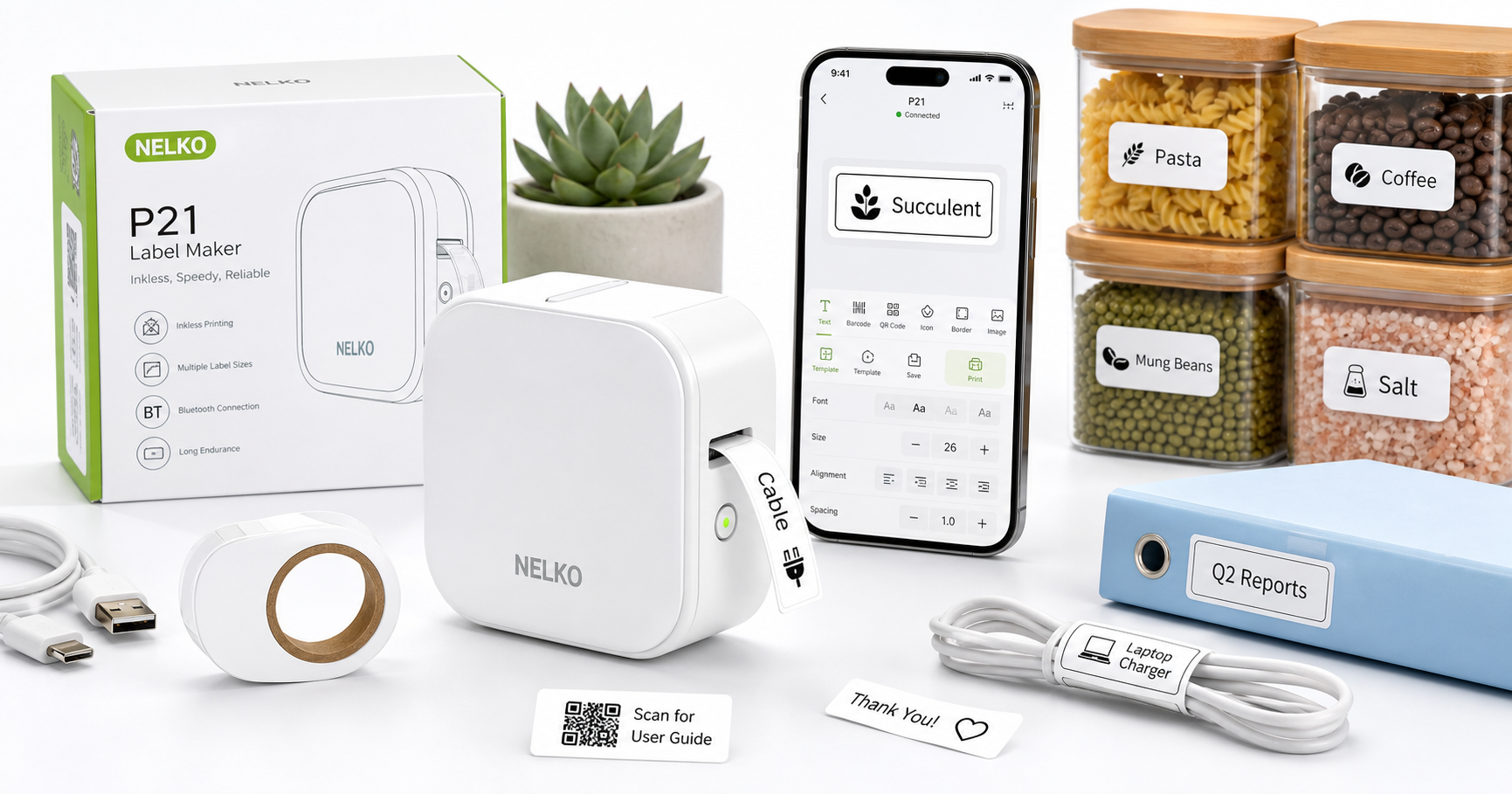
The Nelko Label Maker Machine with Tape, P21 Bluetooth Label Printer (White) is a palm-sized, wireless thermal label maker built around smartphone control. Instead of relying on a built-in keyboard and screen, it pairs with the Nelko app on iOS and Android via Bluetooth, letting you design labels on your phone and print them instantly.
Using direct thermal printing, the P21 does not require ink, toner, or ribbons. It ships with a roll of self-adhesive label tape already installed, a USB-C charging cable, and a quick-start guide, so you can begin printing shortly after unboxing.
Positioned as an affordable, entry-level label maker around $16.99, the P21 is aimed at students, home organizers, teachers, and small offices that need flexible labeling without investing in a larger desktop printer.
Standout Features
1. Bluetooth App Control (iOS & Android)
The P21 connects to your smartphone or tablet via Bluetooth and is controlled entirely through the Nelko app. From the app, you can:
- Choose fonts, font sizes, and text alignment.
- Insert icons, borders, and basic graphics.
- Use predefined templates for common tasks like file folders, cable tags, name tags, and price labels.
This app-first design makes it more flexible than traditional keyboard-based label makers and easier to update or expand with new templates.
2. Inkless Thermal Printing
Instead of using ink cartridges or ribbons, the P21 relies on thermal label paper. This offers several benefits:
- Lower ongoing maintenance: no ink to replace.
- Cleaner operation: no risk of smudged ink.
- Consistent monochrome output suitable for barcodes, QR codes, and text.
Thermal labels typically hold up well for many indoor uses, especially for bins, drawers, and office files.
3. Compact, Lightweight Design
With a compact body and a weight of roughly 11.5 ounces, the P21 is easy to slip into a backpack, desk drawer, or tote. It’s designed as a truly portable label printer, which is useful for:
- Teachers moving between classrooms.
- Small business owners labeling inventory on shelves.
- Students organizing dorm rooms or study materials.
4. Multiple Label Sizes and Built-In Cutter
The P21 accepts several narrow label widths (commonly around 12–14 mm with various lengths). This makes it a good fit for:
- Cable and charger labels.
- Spice jars and kitchen containers.
- File folders, storage bins, and small parts drawers.
A built-in cutter lets you quickly trim each label after printing for clean edges.
Supporting Features
Beyond the headline capabilities, the Nelko P21 includes several supporting features that enhance everyday use:
- USB-C Charging: Uses a modern USB-C interface for charging, making it convenient to recharge using common phone chargers or power banks.
- On-Device Power Button and Status Light: Simple controls to turn the device on or off and check basic status at a glance.
- Included Starter Tape: Ships with a roll of white label tape so you can start printing immediately.
- Template Library in App: Pre-made templates for barcodes, QR codes, price tags, and text-only labels help speed up layout creation.
- Basic Memory and Fast Startup: The printer wakes quickly from power-on, so you can print a label within seconds of connecting.
These additions don’t radically change what the P21 can do, but they make it more practical as an everyday tool.
Usability
Setup
Getting started with the P21 is straightforward:
- Charge the printer using the included USB-C cable.
- Install or verify label tape (a roll is preloaded; replacement rolls install via a simple bay mechanism).
- Download the Nelko app from the iOS App Store or Google Play.
- Power on the printer and pair via Bluetooth from within the app.
Once paired, the printer is remembered by the app, so subsequent connections are usually automatic as long as Bluetooth is enabled.
App Experience
The app-centric workflow is the centerpiece of the user experience:
- Designing labels feels similar to working in a simple mobile design tool.
- Templates provide a quick way to create uniform labels (for example, matching labels for multiple storage bins).
- Options such as text size, orientation, and simple icons are easy to access.
Users who are comfortable with smartphones will likely find the interface intuitive. Those accustomed to hardware keyboards on older label makers may need a short adjustment period, but benefit from much greater layout flexibility once used to the app.
Everyday Use
For daily labeling tasks, the P21 is convenient:
- Power on the printer.
- Open the Nelko app, select a template or design a label.
- Tap print; the label feeds and is cut to size.
Because the device is small and cordless during use, it’s easy to bring it directly to the area you’re organizing (pantry shelves, cable drawers, classroom supply areas) rather than carrying items back to a desk.
Performance
Print Quality
The P21 prints at up to 203 dpi, which is standard for compact thermal label makers. In practice:
- Text is clear and legible at typical label sizes.
- Barcodes and QR codes are scannable when created with appropriate size and contrast.
- Fine decorative elements and very small fonts may lose sharpness, but are sufficient for basic decorative labels.
Speed
As a small-format device designed for narrow labels, the P21 prints quickly:
- Simple text labels appear in roughly a second or two.
- Longer labels or those containing graphics take slightly longer, but still remain fast enough for small batches.
This makes it suitable for tasks like labeling multiple containers or creating a series of price tags for a small retail display.
Reliability and Connectivity
Once paired, Bluetooth performance is generally stable as long as the printer and phone are within a typical indoor range. Reliability can depend on:
- Keeping the app and firmware up to date.
- Ensuring the battery is adequately charged.
- Using compatible label rolls designed for the P21.
For typical home and small-office scenarios, the P21 should handle intermittent, light-to-moderate label printing without issue.
Pros and Cons
Pros
- Compact and portable: Easy to carry, store, and use in tight spaces.
- App-controlled design: More flexible than traditional standalone label makers; convenient template library.
- Inkless thermal printing: No ink or toner replacements; straightforward maintenance.
- Multiple label sizes: Good fit for cables, storage bins, office files, price tags, and small containers.
- USB-C charging: Uses a modern, widely available connector.
- Starter tape included: Ready to print out of the box.
- Budget-friendly: Positioned at an accessible price point (around $16.99) considering its wireless and app-driven features.
Cons
- Smartphone required: Cannot operate independently; you must use the Nelko app.
- Monochrome only: Thermal printing supports black-on-white (or similar) labels, not full color.
- Narrow tape format: Best suited for small labels; not a replacement for large-format shipping label printers.
- Thermal label longevity: Like other thermal media, labels may fade over long periods in high heat or direct sunlight.
Summary
The Nelko P21 Bluetooth Label Maker (White) is a compact, smartphone-controlled thermal label printer that brings app-based flexibility to everyday labeling tasks. Its combination of Bluetooth connectivity, inkless printing, multiple label sizes, and an accessible price point via $16.99 makes it particularly appealing for home organizers, teachers, students, and small offices.
It is not designed for high-volume industrial use or large shipping labels, but excels at everyday organization—labeling cables, containers, files, and personal items. If you’re looking for a portable, low-maintenance label maker that works seamlessly with your phone, the Nelko P21 offers a practical, modern solution.