
CiBest Mini Projector (B0G58L5BHW) Review: Ultra‑Portable Big Screen on a Budget
Quick Summary
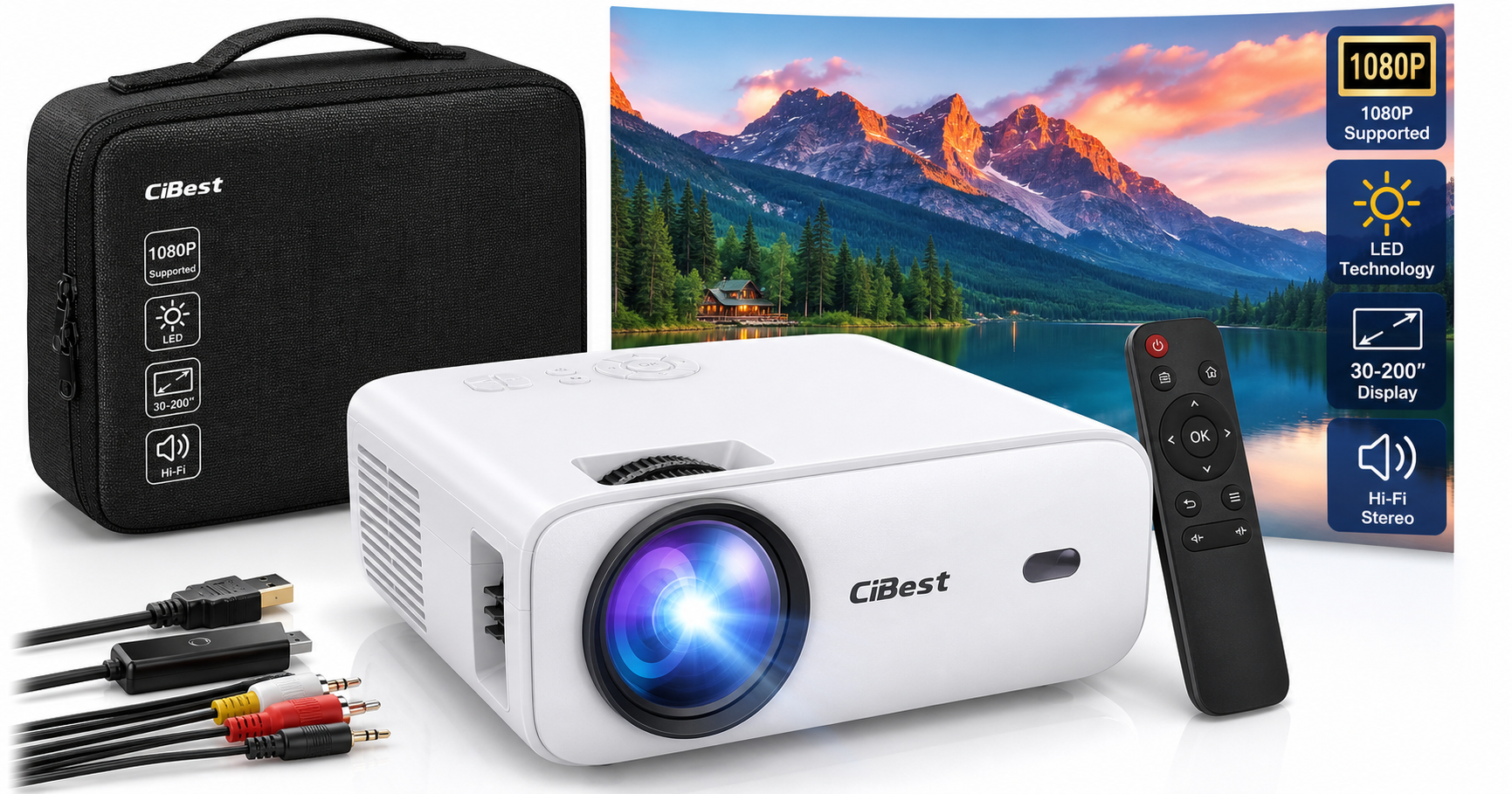
The CiBest Mini Projector (B0G58L5BHW) is a 2025‑upgraded, ultra‑portable projector that supports Full HD 1080p input and projects images from 30 up to 200 inches (CiBest recommends 60–130 inches for best clarity). It uses LED technology with a uniform illumination design intended to keep brightness more consistent across the screen and reduce eye strain through diffuse reflection.
This model is best suited for:
- Budget‑minded users wanting a first projector for movie nights
- Students, renters, or anyone in small spaces where a TV isn’t practical
- Occasional use outdoors or for travel, thanks to the compact 5.5 × 2.36 × 4.33‑inch body and ~0.52 kg weight
It is not ideal if you need strong daylight performance, native 1080p sharpness, or fully integrated streaming (there is no Wi‑Fi, no Bluetooth, and HDCP‑protected apps like Netflix must be accessed via a compatible TV stick).
From a value standpoint, at around $39.99, it offers a lot of screen real estate and versatility for the cost, provided you understand its limitations as an entry‑level, lamp‑limited mini projector.
Detailed Analysis
Design and Build Quality
The CiBest Mini Projector is clearly designed for portability and casual use:
- Dimensions & weight: About 5.5 × 2.36 × 4.33 inches and roughly 0.52 kg, making it smaller than many hardback books and easy to slip into a backpack.
- Chassis: A plastic housing with basic physical controls on the top and ports on the side/back. It feels like a typical budget projector—light and not particularly premium, but adequate if handled with care.
- Lens & focus: A manual focus ring allows you to dial in sharpness. Keystone correction, if available, is manual and limited, so you’ll get the best results when the projector is placed roughly perpendicular to the screen.
Portability is a highlight: it’s compact enough for dorm rooms, travel, or moving between rooms for impromptu viewing sessions. There is no built‑in battery, so you’ll always need an AC outlet or an appropriately rated power source.
Image Quality
Key display characteristics:
- Resolution: Supports Full HD 1080p input, but like most mini projectors in this price range, the native resolution is typically lower (commonly 720p class). Upscaled content still looks reasonably sharp at moderate screen sizes.
- Screen size: Rated for 30–200 inches, with 60–130 inches being the sweet spot for clarity and brightness.
- Brightness: LED brightness is adequate for dark or dim rooms but will struggle in bright daylight or strongly lit spaces—typical for budget minis.
- Color & contrast: The upgraded LED and uniform illumination technology are designed to reduce dim corners and provide more even brightness. Colors are reasonably vibrant for movies and casual TV, though you should not expect the punch or black levels of higher‑end home theater projectors.
- Eye comfort: The projector uses diffuse reflection, which can be gentler on the eyes than staring at a backlit TV or phone screen, especially for long sessions in a dark room.
For movies, streaming via a TV stick, or console gaming at 720p/1080p, the overall image is quite watchable for the class, as long as you keep the image size moderate and the room darkened.
Connectivity and Compatibility
One of the strengths of this CiBest model is broad physical connectivity:
- HDMI: For laptops, desktop PCs, gaming consoles, TV sticks (Fire TV, Roku, etc.), and many streaming boxes.
- USB: For media playback from USB drives (exact supported formats vary) and possibly power for small streaming sticks, depending on their requirements.
- AV (3‑in‑1 composite): Useful for older DVD players, legacy consoles, or analog sources.
- Audio out: A 3.5 mm output enables connection to external speakers or headphones.
Compatibility highlights:
- Works with iOS and Android phones, generally via appropriate HDMI adapters or MHL/USB‑C to HDMI solutions and data‑capable cables.
- Supports connections to Windows and macOS laptops, TV boxes, and consoles.
Limitations to note:
- No Wi‑Fi, no Bluetooth. All connections are wired.
- Due to HDCP copyright protection, you cannot play Netflix, Amazon Prime Video, or Hulu directly from some mobile device screen‑mirroring methods. To access these services reliably, you’ll typically want a TV stick (Fire TV, Roku, Chromecast with Google TV, etc.) plugged into the HDMI port.
Audio Performance
The projector includes built‑in Hi‑Fi stereo speakers, so you can use it without any external audio gear. For a small portable device:
- Volume is generally sufficient for a bedroom or small living room.
- Sound quality is serviceable for dialogue and casual viewing, though bass is limited and dynamic range is modest.
If you want more cinematic sound, the 3.5 mm output makes it easy to connect a soundbar, powered speakers, or headphones.
Noise and Cooling
CiBest uses an updated temperature‑control fan system claimed to reduce fan noise by up to 80% compared with older designs, while improving heat dissipation.
In practice, users can expect:
- Audibly present fan noise, especially in very quiet scenes, but often masked once volume is set at typical viewing levels.
- Reasonable thermal performance for long movie sessions, provided the projector has adequate ventilation and is not enclosed in a tight space.
User Experience
Setup and Everyday Use
Getting started is straightforward:
- Place the projector on a stable surface or tripod facing a screen or blank wall.
- Connect power (remember, there is no internal battery).
- Plug in your source (HDMI for laptops/TV sticks/consoles, USB for stored media, AV for older devices).
- Power on, adjust focus and, if available, keystone.
The on‑device controls and basic on‑screen menus are simple, though not as refined as smart projectors with built‑in streaming interfaces.
Using With Phones and Streaming
- Phones/tablets: Expect to use a wired connection via an appropriate adapter and data‑capable cable. Wireless casting is not built in.
- Streaming services: For Netflix, Prime Video, Disney+, and similar platforms, a small HDMI streaming stick is the most reliable solution, both for content support and convenient app interfaces.
Portability Scenarios
The size and weight make this projector particularly flexible:
- Dorm rooms or small apartments: Easy to store and deploy when needed without dedicating permanent space to a TV.
- Travel and camping: With the right power source and a portable screen or light‑colored wall, you can set up pop‑up movie nights.
- Kids’ rooms: A low‑cost option for cartoons and family movies, with less worry about damage compared to a large TV.
You’ll just need to account for the always‑required power connection and relatively low brightness, which means it’s best after sunset or in well‑shaded areas.
Pros
- Very compact and lightweight, easy to carry and store.
- Supports 1080p input with recommended projection size up to ~130 inches for good clarity.
- Multiple ports (HDMI, USB, AV, audio out) enable a wide range of devices.
- Built‑in stereo speakers reduce the need for extra gear in small rooms.
- Diffuse reflection and uniform illumination help with eye comfort and more even brightness.
- Improved cooling and reduced fan noise versus older low‑cost models.
- Attractive entry‑level cost around $39.99 for a large‑screen experience.
Cons
- No Wi‑Fi or Bluetooth—all connections are wired, and no wireless casting is built in.
- Likely lower native resolution than 1080p, so fine text and UI elements are not as crisp as on true Full HD projectors.
- Limited brightness confines optimal use to dark or dimly lit environments.
- Manual focus and basic keystone mean more setup effort and less flexibility in placement.
- HDCP restrictions complicate streaming directly from some mobile devices; a TV stick or similar is often required for popular apps.
- Plastic build and light weight feel less premium and may be less rugged.
Value Assessment
In the entry‑level projector segment, the CiBest Mini Projector (B0G58L5BHW) is positioned as a low‑cost, highly portable big‑screen solution. For roughly $39.99, you get:
- A compact projector capable of handling 1080p sources
- Flexible connectivity to phones, laptops, consoles, and TV sticks
- Usable built‑in audio and manageable fan noise
When evaluating value, consider what you prioritize:
- If you want native 1080p resolution, higher brightness, smart TV features, and robust HDR performance, you’ll need to spend considerably more on a mid‑range home theater or smart projector.
- If you primarily want an affordable way to watch movies and shows in a dark room or on the go, and are comfortable using an HDMI streaming stick for services like Netflix, this CiBest model offers strong value for its category.
The cost of an additional streaming stick and, optionally, external speakers should be factored into your total budget, but even with those, the combined setup often remains cheaper than many larger smart TVs or premium projectors.
Final Thoughts
The CiBest Mini Projector (Upgraded Full HD 1080p Support, B0G58L5BHW) is a practical, no‑frills mini projector aimed at users who want maximum screen size from a very small, travel‑friendly device at an accessible price.
It delivers:
- Respectable image quality for movies and casual gaming in dark environments
- Broad wired connectivity across modern and older devices
- A form factor that suits dorms, small apartments, and outdoor movie nights
It falls short if you expect the sharpness, brightness, and integrated streaming of more expensive projectors, or if you need robust daytime performance. But as an entry point into projection and a compact companion for occasional big‑screen entertainment, it’s a compelling option—especially if you’re conscious of space and budget.