
MoKo Slim Stand Case for iPad (A16) 11th Gen / iPad 10th Gen: Lightweight Protection with Smart Cover Convenience
Introduction
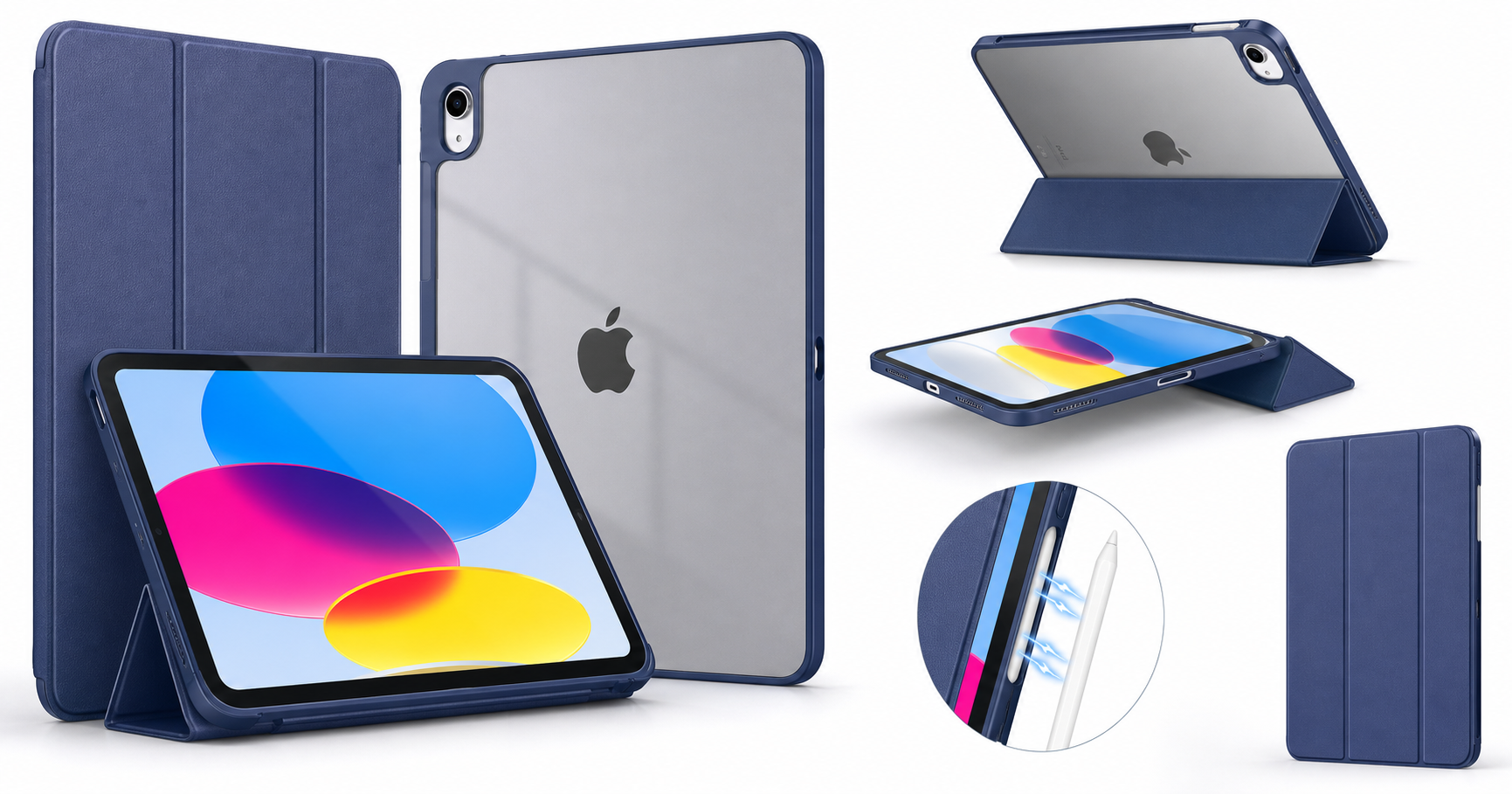
The MoKo case for iPad (A16) 11th Generation 11‑inch 2025 and iPad 10th Generation 10.9‑inch 2022 is a slim, folio-style protective cover aimed at users who want lightweight everyday protection without adding much bulk. It pairs a hard translucent polycarbonate back shell with a soft smart cover front, supports Touch ID, and includes automatic wake/sleep functionality when you open or close the cover. A cutout along the edge is designed to keep Apple Pencil (1st generation via adapter or USB‑C Pencil) charging accessible.
On paper, it targets the same audience as Apple’s own Smart Folio but at a more accessible price point of $9.95, while adding a rigid back for extra protection and a translucent finish to showcase the iPad’s design.
Typical Use Cases
1. Everyday tablet protection at home or in the office
If you primarily use your iPad for web browsing, email, social media, or reading around the house, the MoKo case is positioned as a simple, always-on layer of protection. The slim profile means it can stay on the device without feeling cumbersome, even if you swap between handheld use and leaving the iPad on a desk.
2. Note-taking and light productivity
Students and office workers who take notes, mark up PDFs, or respond to emails benefit from the tri-fold cover, which doubles as a stand. The case offers at least two primary angles: a steeper viewing angle for consuming content and video calls, and a lower angle aimed at typing on the on-screen keyboard or writing with a stylus.
3. Media consumption and casual gaming
For watching movies, YouTube, or playing casual games, the front cover’s stand positions allow for hands-free use on a table or tray. The hard back shell keeps the iPad more stable when you adjust the viewing angle, and the slim bezels of the 10th and 11th gen iPad are left unobstructed.
4. Travel and commuting
The folio design protects both the front glass and the rear aluminum shell in a bag or backpack, reducing the chances of scratches from keys or other objects. Since the case remains relatively thin and light, it suits users who carry their iPad daily but do not need heavy-duty drop protection.
5. Stylus‑centric workflows
With precise cutouts that accommodate Apple Pencil charging, the case is suitable for users who regularly draw, annotate, or navigate using a stylus. The rigid back helps provide a more stable surface when sketching on a desk compared to completely soft folios.
Performance in Each Scenario
Everyday protection
The hard PC translucent back shell does a good job preventing scratches, minor dings, and everyday scuffs. Corners are covered, and the raised edge around the camera module helps avoid direct contact with surfaces. For typical household or office use—placing the iPad on tables, moving it between rooms, or slipping it into a soft bag—the case delivers adequate peace of mind.
However, the case is not marketed as rugged or military-grade, and the edges use a relatively slim profile. It can absorb smaller impacts, but serious drops from height or onto hard surfaces may exceed its design intent.
Note-taking and light productivity
For handwriting notes or sketching, the lower stand angle is one of the more important aspects. The tri-fold design offers a relatively stable base; it resists collapsing under moderate writing pressure. The rigid back shell helps keep the tablet from flexing.
For typing on the on-screen keyboard, the angled position supports the wrists and improves visibility of the display. It works adequately on a desk or table; stability drops slightly on softer surfaces like beds or couches, where the folding segments can shift.
Media consumption and casual gaming
In the upright viewing position, the stand is generally stable for streaming and video calls. The front cover’s segment configuration and hinge strength allow it to hold the iPad at a comfortable angle for most users.
For gaming, most people will hold the iPad in their hands. The case’s slim profile keeps the device comfortable to grip for longer sessions. The matte or semi-matte texture on the back (depending on finish) reduces slipperiness compared with the bare aluminum, though it is not as grippy as rubberized or silicone cases.
Travel and commuting
Inside a backpack, messenger bag, or tote, the MoKo case provides comprehensive scratch and bump protection. The auto wake/sleep feature is helpful here: the screen turns off as soon as you close the cover, and the magnets help keep it shut to avoid accidental wake-ups.
The slim construction is an advantage for travelers who want to keep both thickness and weight down. The case does not include extras like hand straps, shoulder straps, or waterproofing, so it fits best into urban or office commutes rather than rough outdoor use.
Stylus‑centric workflows
The cutout design supports Apple Pencil charging on compatible models and retains access to the Touch ID sensor in the top button. This is important for users who frequently authenticate with Touch ID while the iPad is in landscape or portrait orientation.
While there is support for pencil charging, the case does not typically include an enclosed pencil holder. Users who want a secure, enclosed loop for the stylus during travel may find this limiting and might need an additional accessory.
Strengths Across Scenarios
-
Slim, lightweight construction
The case adds only a modest amount of bulk and weight, preserving the portability of both the 11‑inch (A16) and 10.9‑inch (10th gen) iPads. It is particularly suitable for users who dislike heavy or bulky rugged cases. -
Hard translucent back shell
The rigid polycarbonate back offers better scratch and minor impact resistance than a purely soft folio cover. The translucent finish lets the iPad’s original color show through while still hiding minor fingerprints and smudges. -
Smart cover with auto wake/sleep
Magnetic closure, automatic wake/sleep, and quick access to the display make the case practical for frequent on‑off usage throughout the day. It helps conserve battery and adds convenience when opening the iPad for short interactions. -
Touch ID and Apple Pencil compatibility
The precise cutouts preserve access to the Touch ID power button and leave the side area around the Apple Pencil charging zone open. This is crucial for note‑takers and artists relying on continuous stylus availability. -
Two primary stand modes
The tri-fold front cover supports viewing and typing angles that cover a wide range of everyday tasks—from watching videos to typing emails or note-taking. Transitioning between modes is quick and intuitive. -
Purpose-built for iPad (A16) 11th Gen and iPad 10th Gen
Designed specifically for the 2025 iPad (A16) 11‑inch and 2022 iPad 10th‑gen 10.9‑inch, the cutouts and fit are closely matched to the devices’ dimensions and ports. This reduces the risk of misaligned openings or buttons that sometimes occur with more generic cases.
Limitations Across Scenarios
-
Not a rugged or heavy-duty case
Users who need drop protection for children, field work, or very mobile lifestyles may find the MoKo case insufficient. It lacks thick bumpers, shock‑absorbing layers, or reinforced corners commonly found in rugged models. -
No integrated keyboard
The case focuses on protection and basic stand functionality; it does not include a keyboard or trackpad. For more laptop-like workflows, you would need a separate Bluetooth keyboard or a dedicated keyboard case. -
Limited stylus security
While the case supports Apple Pencil charging, it generally does not fully enclose the pencil. This leaves the stylus more exposed in bags and may not satisfy users who prioritize secure storage. -
Fewer viewing angles than multi-position stands
The tri-fold design offers the most common two orientations, but it does not match the wide range of angles available on high-end multi-position stands. Users with very specific ergonomic preferences might find the fixed angles restrictive. -
Aesthetic and material trade-offs
The translucent hard back is practical but may feel less premium compared with leather or fabric-covered alternatives. Over time, clear or translucent polycarbonate can show micro-scratches more readily than textured materials, although these are mostly cosmetic.
Verdict
The MoKo Slim Stand Hard PC Translucent Back Shell Smart Cover for iPad (A16) 11th Generation 11‑inch 2025 and iPad 10th Generation 10.9‑inch 2022 is a well-balanced option for users who want everyday protection, smart cover convenience, and Apple Pencil/Touch ID compatibility without committing to the cost or bulk of more specialized cases.
Its strengths lie in its slim profile, reliable auto wake/sleep functionality, and practical stand modes that suit reading, browsing, note‑taking, and media consumption. The translucent hard back adds meaningful scratch resistance and lets the iPad’s own color remain visible.
On the other hand, it is not the best fit for users who need rugged, kid-proof protection or integrated keyboard functionality for heavy productivity work. For most students, office workers, and casual users who primarily use their iPad for general tasks and media, the MoKo case provides a sensible and cost‑effective balance of protection and usability at around $9.95.
If you own an iPad (A16) 11th Gen or iPad 10th Gen and you are looking for a lightweight, smart-cover style case that protects both the front and back while staying compatible with Touch ID and Apple Pencil charging, this MoKo case is a solid option to consider.