
MoKo Slim Stand Case for iPad (A16) 11th Gen 11" & iPad 10th Gen 10.9" – A Practical Everyday Cover with Translucent Back
Product Summary
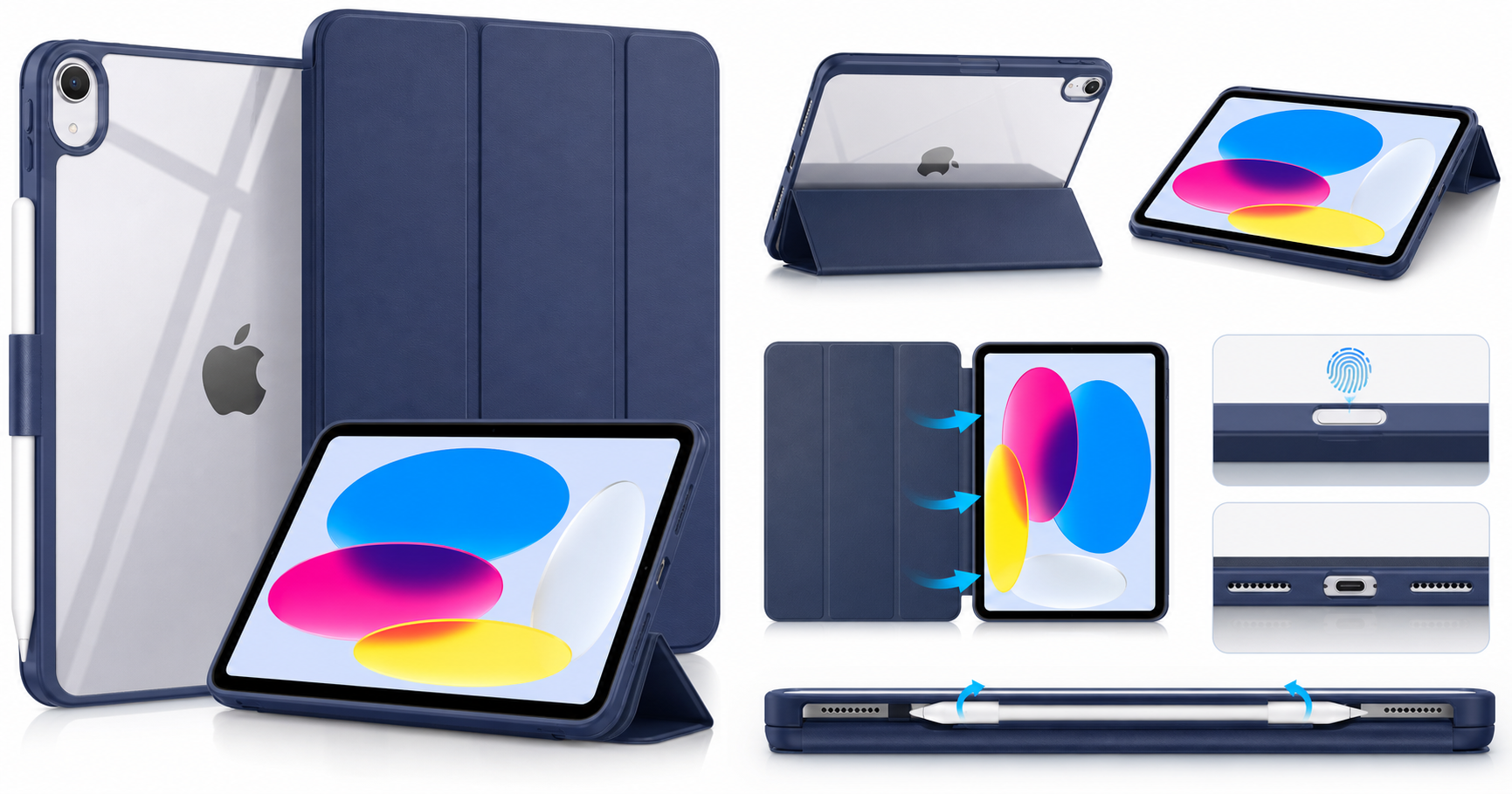
The MoKo for iPad (A16) 11th Generation Case 11 Inch 2025 / iPad 10th Generation Case 10.9 Inch 2022 is a slim, folio‑style protective cover aimed at everyday use. It pairs a tri‑fold smart cover with a hard translucent back shell to protect the display and chassis while keeping the iPad’s design visible. The front cover supports auto wake/sleep, and the precise cut‑outs maintain access to Touch ID and Apple Pencil (1st/USB‑C) charging.
Designed specifically for the 2025 iPad (A16) 11‑inch and the 2022 iPad 10.9‑inch, the case closely follows Apple’s dimensions and port layout, helping ensure a snug fit without interfering with speakers, USB‑C port, camera, or top‑button Touch ID.
If you’re looking for a lightweight, inexpensive cover around $9.95 that adds basic protection and a functional stand without making your iPad bulky, this MoKo case is positioned as a practical choice.
Target Users
This case is best suited for:
- Students and casual users who need basic scratch and bump protection and a reliable stand for note‑taking, reading, or streaming.
- Home and office users who primarily use the iPad on desks, tables, or couches and want a slim, unobtrusive cover.
- Owners of the iPad (A16) 11th Gen 11‑inch (2025) or iPad 10th Gen 10.9‑inch (2022) who want a model‑specific fit with support for Touch ID and Apple Pencil charging.
- Users who prefer a minimalist look: the translucent back lets the iPad’s color show through, while the Navy Blue cover keeps things understated and professional.
It’s less ideal for:
- People who frequently drop or travel with the iPad in rough conditions, and therefore need heavy‑duty, rugged protection with thick bumpers.
- Users who want integrated keyboard functionality—this is a simple folio/stand, not a keyboard case.
Main Benefits
1. Slim, Lightweight Protection
The case focuses on low bulk and everyday practicality rather than maximum ruggedness. The hard PC (polycarbonate) translucent back shell protects against scratches and minor bumps, while the front cover shields the display when closed.
- Easy to slip into a backpack or messenger bag, even alongside a laptop.
- The smooth exterior makes it comfortable to hold for reading or browsing.
2. Smart Cover with Auto Wake/Sleep
The tri‑fold front cover is magnetized and works as a smart cover:
- Open the cover to wake the iPad automatically.
- Close it to put the iPad to sleep, helping save battery and protect the screen.
This is especially useful if you pick up and put down your iPad many times throughout the day.
3. Versatile Stand Function
The front cover folds into a stand with multiple angles:
- A steeper angle for watching videos, video calls, or browsing.
- A lower, more inclined angle for typing, note‑taking, or drawing.
These viewing and typing positions are fairly standard for tri‑fold covers but remain one of the most convenient features for everyday use.
4. Precise Cut‑outs and Touch ID Support
The case is tailored to the iPad (A16) 11‑inch 2025 and iPad 10th Gen 10.9‑inch 2022, with cut‑outs for:
- Top button with Touch ID
- USB‑C port
- Camera and microphone
- Speakers
That means you can use Touch ID naturally without having to stretch or remove the case.
5. Apple Pencil Charging Compatibility
For users of the Apple Pencil (1st/USB‑C) (with Apple’s USB‑C to Pencil adapter where required), the case is designed to keep the Pencil area accessible so you can charge and store it along the edge. This is particularly important for note‑takers and artists who rely on the Pencil throughout the day.
Key Considerations
Before buying, keep these points in mind:
-
Protection Level
This is a slim case, not a rugged one. It offers good coverage against scratches and light impacts but may not be sufficient if you routinely drop your device on hard floors or give it to young children. -
Material Feel
The hard PC translucent back is smooth and protective, but it doesn’t provide the same grippy, shock‑absorbing feel as thick TPU or rubber bumpers. If you want a softer, more impact‑resistant edge, you may want to consider a hybrid or rugged design. -
No Built‑in Screen Protector
The front cover protects the screen when closed, but there is no integrated film or glass protector. Many users will want to add a separate tempered glass or matte screen protector for better scratch resistance. -
Folio‑Style Only
There is no keyboard, no hand strap, and no rugged kickstand—this is a straightforward folio/stand combo. If your workflow leans heavily on typing, pairing this case with an external Bluetooth keyboard might be necessary. -
Color and Aesthetics
The Navy Blue front and translucent back create a professional, understated look. If you prefer brighter or more playful colors, MoKo often offers the same design in multiple colorways, but availability can vary depending on the retailer.
Pros
- Slim and lightweight design that adds minimal bulk.
- Tri‑fold front cover doubles as a stand for viewing and typing angles.
- Auto wake/sleep support for quick access and power savings.
- Hard translucent back shell keeps the iPad’s color visible while adding protection.
- Precise cut‑outs for USB‑C, speakers, camera, and microphones.
- Touch ID compatible top‑button opening.
- Apple Pencil (1st/USB‑C) charging support along the edge.
- Typically budget‑friendly, often available around $9.95.
Cons
- Not a rugged or heavy‑duty case; limited drop protection compared to thick bumper or multi‑layer options.
- No built‑in screen protector—a separate protector is recommended for better scratch resistance.
- The smooth PC back may feel a bit slippery if you prefer rubberized grip.
- Lacks extra features such as a keyboard, hand strap, or stylus loop on the back.
Alternatives
If you’re not entirely sure this MoKo case matches your needs, consider these alternative directions (not specific products, just types):
-
Rugged Protective Case
If you’re buying for a child or frequently use your iPad in shops, warehouses, or outdoors, a rugged case with reinforced corners and a thick bumper will provide much better drop protection. These cases are bulkier but can significantly reduce the risk of damage from falls. -
Keyboard Folio or Keyboard Case
For users who do a lot of typing (emails, documents, reports), a keyboard case with integrated keys and a trackpad can transform the iPad into a more laptop‑like device. These are heavier and more expensive but can streamline productivity. -
Ultra‑Minimal Shell or Skin
If you dislike front covers altogether, a simple back shell or protective skin plus a separate screen protector might suit you better. You’d trade the stand and auto wake/sleep for an even thinner, lighter setup. -
Premium Leather or Fabric Folio
Some users prefer the look and feel of leather or fabric covers, which can feel more premium in the hand and age differently over time. These may cost more but can be a stylish alternative if aesthetics are a priority.
Conclusion
The MoKo Slim Stand Hard PC Translucent Back Shell Smart Cover for the iPad (A16) 11th Generation 11‑inch (2025) and iPad 10th Generation 10.9‑inch (2022) is a practical, everyday case focused on slim protection and usability. Its tri‑fold smart cover, auto wake/sleep, Apple Pencil charging compatibility, and translucent back check most of the boxes that typical students, home users, and office workers care about.
It’s not the most protective or feature‑rich option on the market, but if you want an affordable, lightweight, and functional folio around $9.95 that doesn’t hide your iPad’s design, this MoKo case is an easy product to recommend.