
Apple iPad 11‑inch (A16, 128GB, Wi‑Fi) Review: A Well‑Balanced Everyday Tablet
Introduction
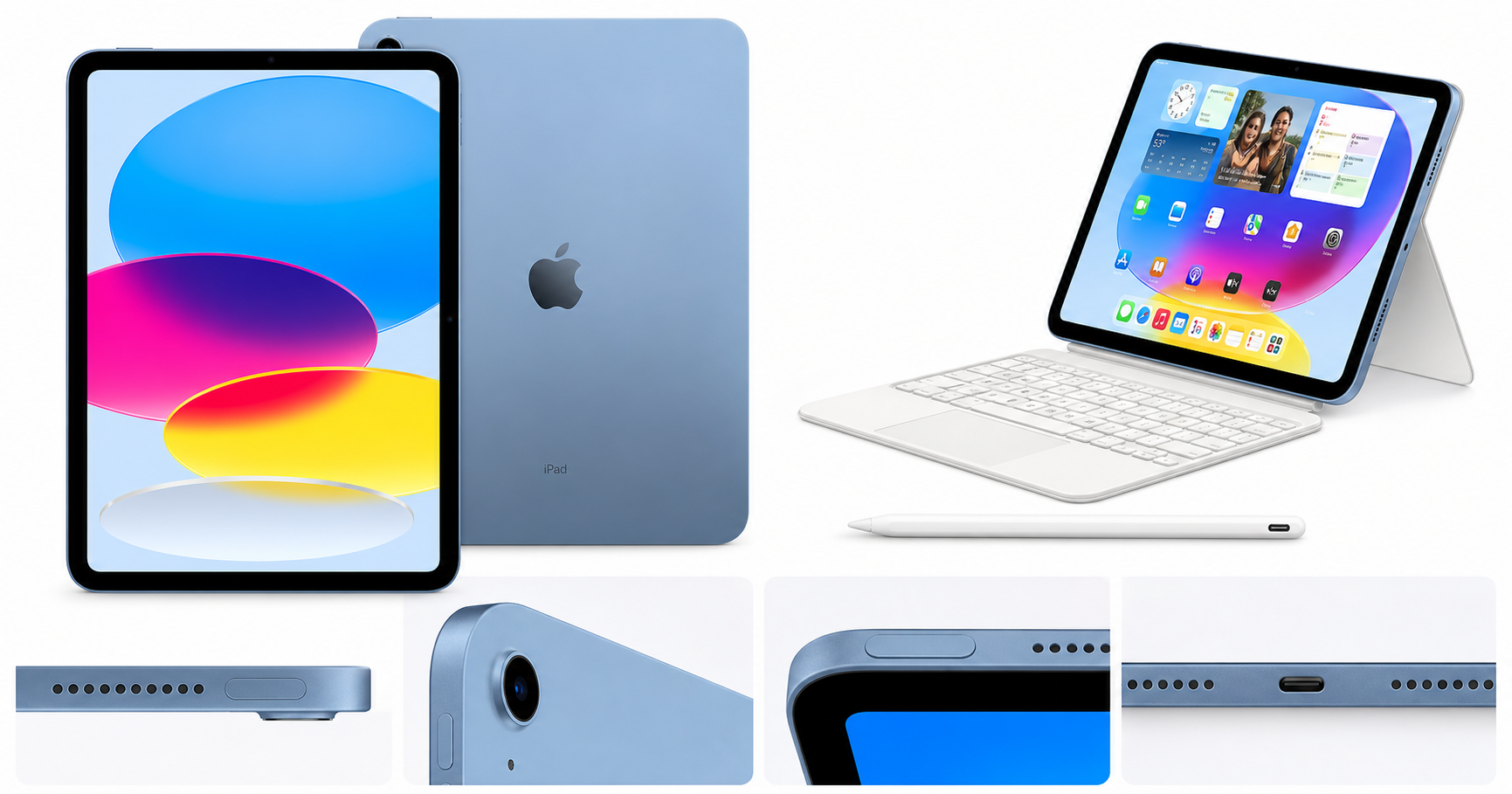
The Apple iPad 11‑inch (A16 chip, 128GB, Wi‑Fi) in Blue is Apple’s latest mainstream 11‑inch tablet, positioned between the smaller entry‑level iPad and the more expensive iPad Pro line. It offers a Liquid Retina display, A16 chip, 128GB of storage, Wi‑Fi 6, 12MP front and 12MP rear cameras, Touch ID, and all‑day battery life in a familiar, lightweight design.
For buyers who need a capable iPad for school, light creative work, entertainment, and general productivity, this model aims to deliver a strong balance of performance and value. On Amazon (product code B0DZ75TN5F), it frequently sits around the $427.00 mark, making it an appealing option for many first‑time iPad owners and upgraders from much older models.
Setup / Getting Started
Getting started with this iPad is straightforward, especially if you’re already in the Apple ecosystem.
-
Unboxing and first impressions
The 11‑inch form factor feels comfortably portable while still offering enough screen real estate for split‑screen multitasking. The Blue color is subdued and modern rather than overly bright. -
Initial power‑on and configuration
- Hold the top button to power on.
- Choose your language and region, connect to Wi‑Fi, and sign in with an Apple ID.
- If you’re upgrading from another iPad or iPhone, Quick Start lets you transfer apps and settings wirelessly, reducing setup time.
- Touch ID is configured by placing your finger repeatedly on the top button, after which you can unlock the tablet, authorize App Store purchases, and use Apple Pay.
-
Essential apps and updates
Out of the box, iPadOS includes Safari, Mail, Messages, Notes, Files, Photos, Keynote, Pages, Numbers, and more. A quick trip to Settings lets you:- Install the latest iPadOS update for security and feature improvements.
- Enable iCloud backup and sync Photos, Notes, and Contacts.
- Turn on Focus modes (e.g., School or Work) to manage notifications.
-
Optional accessories
This model supports Apple Pencil (USB‑C) and the Magic Keyboard Folio (both sold separately). Pairing is simple: connect via the USB‑C port for the Pencil or attach the keyboard magnetically. For users planning a lot of typing or note‑taking, budgeting for at least one of these accessories is recommended.
Daily Usage
In daily use, the 11‑inch size strikes a solid balance: large enough to be productive, small and light enough to be carried around all day.
Reading, browsing, and media
- The 11‑inch Liquid Retina display is bright and crisp, with accurate colors suitable for streaming, casual photo editing, and reading.
- True Tone adjusts the white balance based on ambient light, which helps reduce eye strain when reading at night or under mixed lighting.
- Stereo speakers provide clear audio for videos and video calls, though they won’t replace a good pair of headphones or external speakers for audio‑focused work.
Note‑taking and productivity
- With Apple Pencil support, this iPad can function as a digital notebook and sketchpad. Handwriting in Notes and marking up PDFs feels responsive and natural for most users, especially students and professionals dealing with documents.
- Split View and Slide Over in iPadOS make it feasible to, for example, keep a textbook PDF open on one side while taking notes on the other, or to have an email draft in view while referencing a web page.
- Paired with the Magic Keyboard Folio or another Bluetooth keyboard, the iPad works well for writing essays, reports, or emails.
Portability and battery life
- The iPad’s slim profile and roughly 11‑inch footprint make it easy to slip into a backpack or small messenger bag.
- Apple advertises all‑day battery life, which in practical mixed use (web browsing, video streaming, note‑taking, light gaming) often translates to a full school or work day without needing to recharge, assuming moderate brightness and Wi‑Fi use.
Cameras and calling
- The 12MP front camera supports Center Stage for video calls, keeping you framed as you move. This is useful for online classes or remote meetings.
- The 12MP rear camera is adequate for scanning documents, capturing whiteboards, and casual photos and 4K video. Most users won’t replace their phone camera with it, but it’s more than sufficient for productivity tasks.
Performance & Reliability
The move to the A16 chip gives this iPad a sizeable performance uplift over older non‑Pro models.
- App performance: Everyday apps—web browsers, email, office suites, and streaming apps—launch quickly and feel responsive. Multitasking with two or three apps (using Slide Over) is generally smooth.
- Creative workloads: Light to moderate photo editing, vector illustration, and note‑taking with complex PDFs run well. More demanding video editing projects are possible but will be somewhat constrained by the base 128GB storage if you handle a lot of large files.
- Gaming: Popular 3D games and Apple Arcade titles run smoothly, with the A16 handling high graphics settings for many titles. Thermal management is good, and while the device can warm up under sustained gaming, it typically doesn’t throttle heavily in everyday use.
- Wi‑Fi 6: Network performance feels modern, with fast downloads and streaming on compatible routers. While it doesn’t support Wi‑Fi 6E or 7, Wi‑Fi 6 should be adequate for most home and school environments.
In terms of software reliability, iPadOS has matured significantly. Most mainstream apps are well optimized, and Apple’s update cadence means security and feature updates are delivered regularly across the product’s lifespan.
What Works Well
-
Strong performance for mainstream users
The A16 chip easily handles typical productivity and entertainment tasks, giving this iPad solid longevity for several years of software updates. -
Balanced 11‑inch display
The Liquid Retina panel is sharp and color‑accurate, with True Tone support and enough brightness for indoor and moderate outdoor use. The size works well for reading, note‑taking, and split‑screen multitasking. -
All‑day battery life
For students, commuters, and office workers, being able to rely on a full day of use without constant charging is a practical advantage. -
Good front camera for video calls
The 12MP front camera with Center Stage is a strong point for remote work, distance learning, and casual video chatting. -
Accessory ecosystem
Compatibility with Apple Pencil (USB‑C), the Magic Keyboard Folio, and a large third‑party accessory market means users can tailor the iPad to specific roles—study device, sketchbook, writing machine, or media tablet. -
Touch ID convenience
Touch ID in the top button is fast and unobtrusive, and some users prefer it over Face ID for privacy and reliability in various lighting conditions.
What Could Be Improved
-
Base storage capped at 128GB
While 128GB is better than the 64GB base on older models, power users who keep many large games, offline videos, or creative projects may find it limiting. iCloud and external storage can help, but those add ongoing or accessory costs. -
Accessory and total system cost
Although the tablet itself around $427.00 can be good value, adding an Apple Pencil and Magic Keyboard Folio quickly pushes the total outlay toward laptop territory. Users focused on typing might want to consider more affordable third‑party keyboard cases. -
No Face ID and no high‑end display tech
This model sticks with Touch ID and lacks the ProMotion high‑refresh‑rate display found on iPad Pro models. For most users this is acceptable, but those used to 120Hz displays may notice less fluid scrolling and stylus response. -
Single USB‑C port and no headphone jack
With only one USB‑C port and no 3.5mm headphone jack, users who want to charge while using wired audio must rely on adapters or a USB‑C hub. -
Not ideal for heavy professional workloads
For professional 4K video editing, large‑scale 3D work, or very complex music production, the combination of 128GB storage and mid‑tier specs may feel constrained compared to an iPad Pro or a full laptop.
Overall Impression
The Apple iPad 11‑inch (A16, 128GB, Wi‑Fi) in Blue is a thoughtfully balanced tablet that covers the needs of a broad audience: students, casual creators, home users, and professionals who want a highly portable companion device. It delivers:
- Strong everyday performance from the A16 chip
- A bright, accurate 11‑inch Liquid Retina display
- All‑day battery life and modern Wi‑Fi 6 connectivity
- Quality cameras and reliable Touch ID
Its main trade‑offs are the cost of accessories, the lack of Pro‑level features like high‑refresh‑rate displays and Face ID, and the potential limitations of 128GB storage for heavy content creators. For many buyers, though, especially those upgrading from an older entry‑level iPad or using it primarily for school, media, and light productivity, this model offers a compelling mix of capability and longevity.
If you are looking for a versatile, mid‑sized iPad that feels fast today and should stay relevant for several years, this 11‑inch A16‑powered configuration at around $427.00 is a strong candidate to consider.