
Apple 2026 MacBook Air 13-inch with M5: Ultra‑Portable AI‑Ready Laptop Reviewed
Product Context
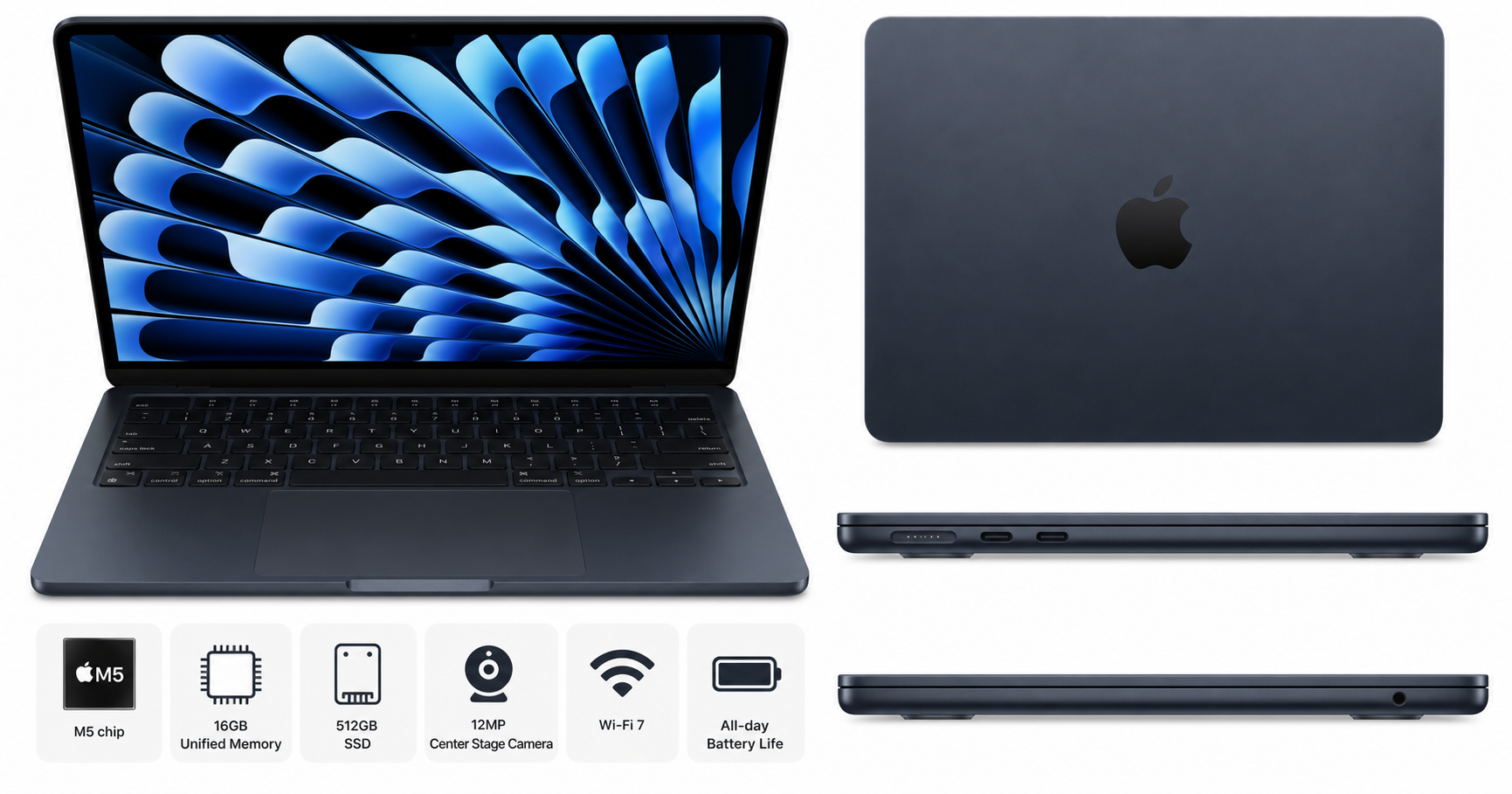
The Apple 2026 MacBook Air 13-inch Laptop with M5 chip targets users who want a highly portable machine that’s also ready for modern AI‑enhanced workflows. With a 13.6-inch Liquid Retina display, 16GB of unified memory, 512GB SSD, and a fanless design, this model sits between casual consumer notebooks and heavier Pro-class systems.
Apple positions this generation as “built for AI,” leaning on the M5 chip’s updated Neural Engine and media engines to accelerate on‑device machine learning tasks, generative tools, and video workflows, all while maintaining the familiar slim MacBook Air profile. The Midnight finish continues to appeal to users who prefer a darker, more understated aesthetic.
From a value standpoint, the configuration covered here (16GB / 512GB) typically sits in the mid-to-upper tier of the Air lineup and is frequently listed around $949.00 on its product page at Apple’s retail partners.
Feature Breakdown
M5 Chip and AI Acceleration
The headline feature is the Apple M5 chip, which builds on Apple’s in‑house ARM architecture:
- CPU: Multiple high‑performance and high‑efficiency cores designed for single‑threaded responsiveness in everyday tasks and multi‑threaded workloads like code compilation, data processing, and light content creation.
- GPU: An integrated GPU tuned for hardware‑accelerated rendering in creative apps, casual gaming, and UI smoothness, with better performance per watt than prior‑generation Air models.
- Neural Engine: Dedicated AI cores enable faster on‑device tasks such as image upscaling, background removal, speech recognition, and local generative AI features in compatible apps.
This combination makes the MacBook Air M5 especially attractive for users who regularly work with AI‑assisted tools but don’t need the sustained, heavy‑duty throughput of a MacBook Pro.
13.6-inch Liquid Retina Display
The 13.6-inch Liquid Retina display continues the modern Air design language:
- High pixel density for sharp text and UI elements.
- Wide color gamut support suitable for photo editing and content consumption.
- High brightness levels and good contrast for indoor and typical office environments.
- Slim bezels that keep the chassis compact while expanding usable screen space compared with older 13.3-inch models.
For everyday productivity, creative hobby work, and media streaming, this panel offers more than enough quality, though professional colorists or HDR‑centric workflows may still prefer higher‑end Pro displays.
Memory and Storage (16GB / 512GB)
This configuration includes 16GB of unified memory and a 512GB SSD:
- 16GB unified memory gives the M5 chip ample headroom for multiple apps, browser tabs, and light-to-moderate creative workloads. AI‑accelerated features, which can be memory‑intensive, also benefit.
- 512GB SSD offers a practical balance between capacity and cost. It’s suitable for large app libraries, documents, and a moderate selection of media and project files.
Users dealing with very large datasets, extensive 4K video libraries, or multiple virtual machines may still want to pair the system with fast external storage or consider higher capacities.
12MP Center Stage Camera and Audio
The 12MP front camera with Center Stage support is a significant step above older 720p and 1080p laptop webcams. It improves clarity and framing in video calls and supports advanced background effects enabled by the M5’s image processing.
Combined with Apple’s microphone array and tuned speakers, the MacBook Air becomes a strong option for remote work, online classes, and light content creation like live streaming or podcast guest appearances.
Connectivity and Wireless: Wi‑Fi 7
Support for Wi‑Fi 7 future‑proofs the MacBook Air’s wireless connectivity:
- Potentially higher throughput and lower latency on compatible routers.
- More robust performance in crowded wireless environments such as apartments, campuses, and offices.
For many users, this translates to smoother high‑resolution streaming, faster cloud backups, and more responsive collaboration tools, provided the rest of the network infrastructure can keep up.
Design, Ports, and Finish
The MacBook Air still emphasizes a slim, lightweight profile that’s easy to carry in a backpack or briefcase. The Midnight finish offers a modern, premium look; as with other dark anodized finishes, it may show fingerprints more readily than lighter colors and may require more frequent wiping.
Port selection focuses on a practical minimum for a thin‑and‑light laptop, typically including:
- A MagSafe power connector.
- USB‑C / Thunderbolt ports for charging, displays, and peripherals.
- A 3.5mm headphone jack.
Users with multiple legacy USB‑A devices or extensive peripheral setups will likely rely on a USB‑C hub or docking solution.
Performance Insights
Everyday and Productivity Workloads
In typical office and productivity scenarios—web browsing, office suites, note‑taking, email, and communication apps—the M5 MacBook Air provides a responsive, near‑instant experience. The combination of fast storage, unified memory, and efficient CPU cores helps keep the system feeling quick even under moderate multitasking.
Tasks such as running multiple browser windows, editing cloud documents, attending video calls, and using AI‑assisted note‑taking or transcription tools can all run concurrently with minimal slowdown.
Creative and AI‑Augmented Work
For light creative use, the M5 and its Neural Engine are a solid match:
- Photo editing and design: Apps that support GPU and AI acceleration can perform background removal, noise reduction, and style transfer more quickly and locally on the device.
- Light video editing: Short to medium‑length 1080p and selective 4K projects are generally well within the Air’s capabilities, especially for social‑media‑oriented workflows.
- AI‑assisted tools: Local large‑language‑model helpers, image upscalers, and smart productivity assistants benefit from the M5’s on‑chip acceleration without requiring constant cloud connectivity.
For large, continuous exports, complex effects, or heavy 3D rendering, a MacBook Pro or desktop remains more appropriate due to sustained thermal headroom and additional GPU resources.
Thermals and Fanless Operation
The fanless chassis keeps the MacBook Air nearly silent in operation. Under typical workloads, the system remains cool to the touch. Under extended, heavy loads (such as long video exports or continuous code compilation), the chassis may warm and the chip may throttle to maintain safe temperatures.
This behavior is expected in thin, passively cooled designs and is the primary performance difference compared with actively cooled Pro models.
Battery Life Expectations
While exact runtime depends on workload and display brightness, the M‑series chips are known for strong efficiency. For most users, a full day of mixed productivity—browsing, office apps, streaming, and occasional creative tasks—should be achievable on a single charge.
Running sustained AI workloads, high‑brightness display settings, or continuous video editing will reduce battery life, as expected, but the overall efficiency profile remains a strength for this MacBook Air generation.
Usability
Keyboard, Trackpad, and Input
The Magic Keyboard on recent MacBook Air models offers a comfortable, stable typing experience suitable for long writing sessions, coding, and note‑taking. The large Force Touch trackpad remains one of the most precise and responsive trackpads available, aiding both casual navigation and detailed creative work.
Touch ID integrated into the keyboard streamlines logins, password autofill, and secure purchases without the need to type lengthy passwords each time.
Portability and Everyday Carry
The 13-inch form factor with a slim profile and relatively low weight is well suited to:
- Students carrying a laptop between classes.
- Professionals commuting or traveling frequently.
- Home users moving between rooms or working in cafes.
The durability of the aluminum chassis, combined with the compact size, makes it an easy system to slip into most backpacks or messenger bags.
macOS and Software Ecosystem
Running the latest macOS version, the MacBook Air M5 benefits from tight integration across hardware and software:
- Optimized performance for Apple Silicon‑native apps.
- Seamless continuity features with iPhone and iPad.
- A broad library of creative, productivity, and developer tools compiled for ARM.
Users already invested in the Apple ecosystem will find the transition or upgrade straightforward, while new users may appreciate the relatively low maintenance and curated app environment.
Trade-offs
Despite its strengths, the 2026 MacBook Air M5 configuration has a few notable trade‑offs:
-
Thermal Limits vs. Pros
The fanless design favors silence and portability over maximum, sustained performance. Users with heavy, continuous CPU/GPU workloads may experience throttling and are better served by ventilated Pro‑class machines. -
Port Selection and Dongle Dependence
Limited built‑in ports mean that power users with multiple external drives, monitors, and accessories will likely need a hub or dock. This is common among ultraportable laptops but worth accounting for in your setup budget. -
Storage Ceiling for Power Users
While 512GB is comfortable for many, creators working with large media libraries or large local datasets may quickly approach this limit and should plan for external or networked storage. -
Finish Maintenance (Midnight)
The Midnight finish looks premium but can show fingerprints and smudges more readily than lighter finishes. This doesn’t affect functionality, but some users may prefer a different color if they want a cleaner appearance with minimal wiping. -
Upfront Cost vs. Entry-Level Options
The 16GB / 512GB configuration costs more than base‑spec laptops with less memory and storage. While this system’s performance and longevity may justify the cost, budget‑constrained buyers should be aware that stepping up to this tier—often around $949.00—is an investment in a more capable, longer‑lived machine.
Conclusion
The Apple 2026 MacBook Air 13-inch with M5 chip is a compelling choice for users who prioritize a combination of portability, quiet operation, and modern AI‑ready performance.
It excels in:
- Everyday productivity and multitasking.
- Remote work and study, thanks to the 12MP Center Stage camera and strong audio.
- Light creative workloads and AI‑assisted tasks that benefit from the M5’s Neural Engine.
- All‑day mobility with strong battery life and a lightweight design.
It is less ideal for:
- Users needing sustained high‑end performance for large 3D, video, or data‑science workloads.
- Those who require extensive built‑in connectivity without relying on adapters.
For students, mobile professionals, and general users who want a thin, modern MacBook that’s prepared for the expanding role of on‑device AI, this 16GB / 512GB MacBook Air M5 configuration in Midnight offers a well‑balanced package. If its typical street price of around $949.00 aligns with your budget, it’s a strong candidate as a primary laptop for the next several years.
For more details or to check current availability, you can visit the product page directly: https://www.amazon.com/dp/B0GR1JTFP8.