
2026 Upgraded Wireless CarPlay Adapter Review: Compact 2‑in‑1 Dongle for CarPlay and Android Auto
Product Context
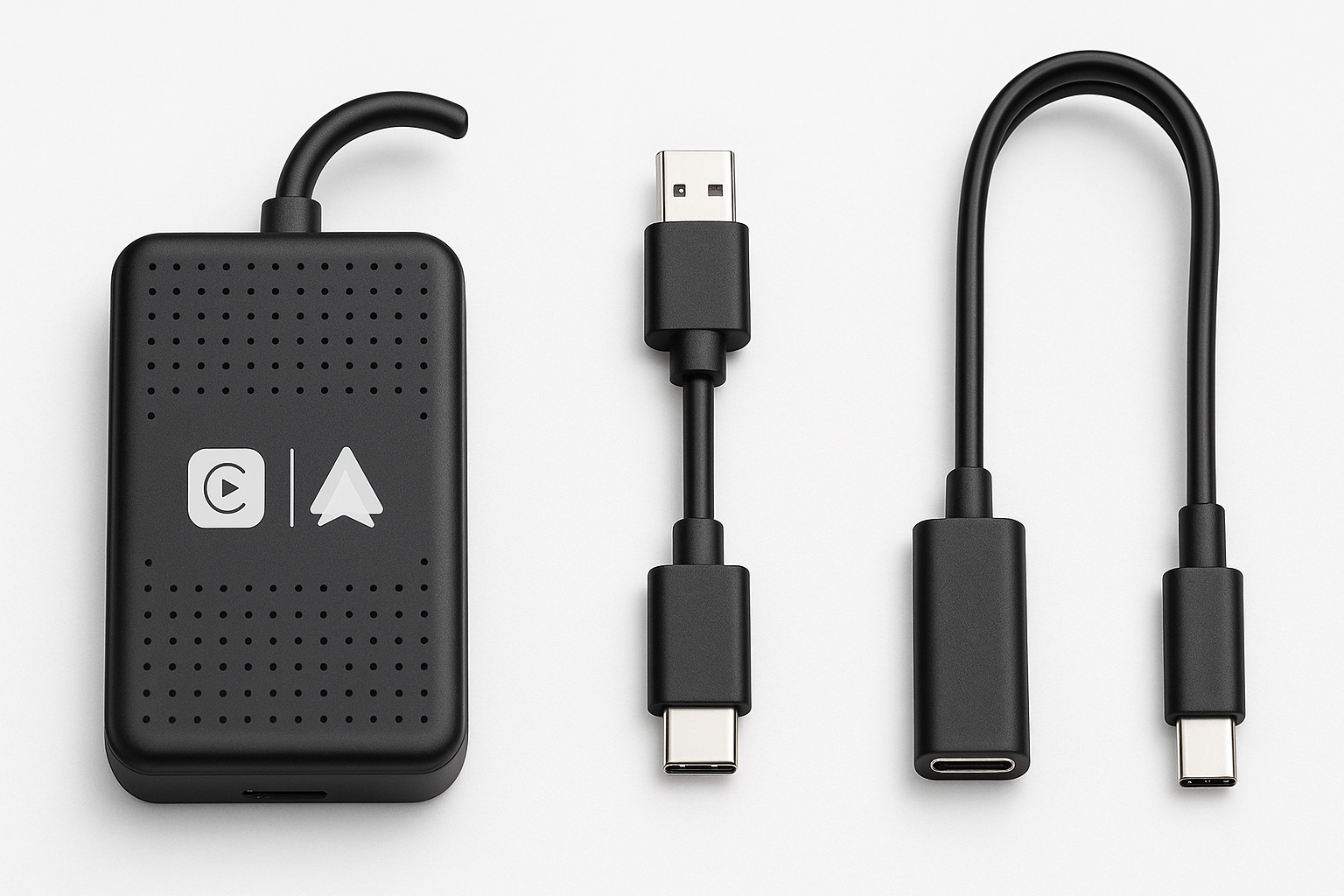
The 2026 Upgraded Wireless CarPlay Adapter for iPhone & Android (Amazon ASIN: B0GF13DB56) is designed for drivers who already have a factory or aftermarket head unit with wired Apple CarPlay and/or Android Auto and want to eliminate the USB cable. Instead of replacing the entire stereo, this adapter plugs into the existing CarPlay/Android Auto USB port and bridges the connection wirelessly between the car and your phone.
The main promises are:
- Convert wired CarPlay and Android Auto to wireless in one compact dongle (2‑in‑1 functionality).
- Plug‑and‑play setup with no permanent installation or wiring changes.
- Stable connection and low latency, aiming to keep navigation, calls, and media responsive.
- Compatibility with iPhone models running iOS 10+ and a wide range of Android phones for Android Auto.
If you’re happy with your current infotainment system but annoyed by constantly plugging your phone in, this adapter targets that specific pain point.
Note: Any pricing you see for this adapter should be treated as approximate. For current pricing, check the product page (for example: $41.99).
Feature Breakdown
1. Wired‑to‑Wireless Conversion (CarPlay & Android Auto)
The headline feature is 2‑in‑1 support:
- Apple CarPlay: For vehicles that already support wired CarPlay, the adapter makes that connection wireless once paired with an iPhone.
- Android Auto: Similarly, if the head unit supports wired Android Auto, the adapter can create a wireless Android Auto session from compatible Android phones.
This dual‑mode behavior means mixed‑ecosystem households (iPhone and Android users sharing a car) can both benefit without swapping hardware.
2. Compact “Mini” Form Factor
Compared to many bulkier dongles, this adapter emphasizes a small, unobtrusive design that aims to:
- Sit flush or nearly flush with the USB port, reducing cable clutter.
- Be easy to leave permanently plugged in without blocking other controls.
Some listings also mention a Type‑C extension cable option, which can be useful if your USB port is recessed or awkwardly located.
3. Wireless Connectivity Stack
While the exact chipset isn’t advertised in detail, adapters in this class typically use:
- Bluetooth for the initial handshake and fast reconnection.
- Wi‑Fi (2.4 GHz / 5 GHz) for data transfer (CarPlay/Android Auto interface, maps, media, and UI updates).
This is the standard architecture for modern wireless CarPlay/Android Auto dongles and is critical for keeping latency low while maintaining a stable link.
4. Plug‑and‑Play Setup
The adapter is built around a simple setup process:
- Plug the adapter into your car’s CarPlay/Android Auto USB port.
- Wait for the system to detect it (usually it appears as a CarPlay or Android Auto device).
- On your phone, pair it via Bluetooth and confirm any prompts.
- The adapter then establishes a Wi‑Fi connection in the background and launches the CarPlay/Android Auto interface.
After the first setup, the goal is for the adapter to auto‑connect whenever you start the car, so you just get in, wait a few seconds, and see CarPlay/Android Auto appear without touching your phone.
5. Broad Car and Phone Compatibility
Typical compatibility claims for this category (and this product family) include:
- Cars: Vehicles from roughly 2016 and newer that have factory or aftermarket wired Apple CarPlay and/or Android Auto.
- iPhone: iPhone 6 or later, running iOS 10 or above.
- Android: Phones that support Android Auto, usually Android 10+ with Google services.
As with any generic adapter, actual compatibility can vary by model year and infotainment firmware, so checking user feedback for your specific car and phone combo is advisable.
Performance Insights
Connection Stability
Owners of similar 2026‑generation adapters generally report solid day‑to‑day stability when used with mainstream vehicles. The adapter is designed to:
- Maintain a persistent Wi‑Fi link for maps, music, and calls.
- Reconnect automatically after short stops (fuel, groceries) without needing to re‑pair.
In real‑world conditions, you can still occasionally encounter:
- A missed auto‑connect that requires unplugging and re‑plugging the adapter.
- One‑off disconnects tied to specific phones or head‑unit firmware quirks.
These behaviors are not unique to this model but are typical of the wireless CarPlay/Android Auto ecosystem.
Latency and Responsiveness
The product explicitly advertises “no latency” or “no lag”. In practice, wireless CarPlay/Android Auto always introduces some delay compared to a direct wired connection, but on updated 2026‑era adapters it tends to be minimal:
- Map panning and zoom: Generally smooth, with only slight delay when quickly moving the map.
- Media controls: Play/pause/skip commands respond quickly, usually within a fraction of a second.
- Voice commands (Siri / Google Assistant): Initiation is near‑instant once the connection is established.
You may still notice that:
- Audio track changes can feel a hair slower than wired.
- Very old head units or heavily customized Android head units may show more lag.
Call and Audio Quality
Wireless adapters must bridge the audio path accurately to avoid compression artifacts or echo. This adapter aims for OEM‑like audio, and for most users in compatible vehicles:
- Music playback is clean, comparable to wired in typical driving conditions.
- Calls are intelligible, using your car’s factory microphone and speakers.
As with competitors, occasional users may experience:
- Slight audio dropouts in areas with heavy RF interference.
- Rare echo or level mismatches, often fixable by rebooting the adapter or resetting Bluetooth/Wi‑Fi pairing.
Usability
Everyday Experience
Once set up, the daily routine is straightforward:
- Start the car.
- Within several seconds, CarPlay or Android Auto appears on the screen.
- Your phone can stay in your pocket or on a wireless charger.
The compact size means it’s easy to forget the adapter is there at all, which is ideal if you prefer a clean interior without dangling cables.
Setup & Troubleshooting
Most users should be able to complete initial setup in a few minutes, but there are common best practices:
- Delete old Bluetooth pairings between your phone and the car, then pair only via the adapter.
- Ensure Wi‑Fi and Bluetooth are both enabled on your phone during setup.
- If connection issues arise, try:
- Unplugging and re‑plugging the adapter.
- Resetting the adapter (often via a small button or on‑screen menu, depending on firmware).
- Forgetting and re‑pairing the Bluetooth device.
Some units may support firmware updates (via a built‑in web interface) to address bugs or compatibility problems. It’s worth checking the manual or product page periodically to see if an update is available.
Physical Integration
The mini form factor is especially beneficial if:
- Your USB port is in a shallow cubby or armrest where larger dongles get in the way.
- You want the adapter to be invisible to casual passengers, reducing the chance it gets unplugged or bumped.
If your USB port is deeply recessed or obstructed, using the included or optional short extension cable can help position the adapter more conveniently.
Trade‑offs
No wireless CarPlay/Android Auto adapter is perfect, and this model is no exception. Here are the key trade‑offs to consider before buying.
Pros
- 2‑in‑1 support for both Apple CarPlay and Android Auto in a single dongle.
- Plug‑and‑play with no permanent installation or modifications needed.
- Compact size that keeps your cabin tidy and minimizes cable clutter.
- Auto‑connect behavior after the first pairing for hands‑off convenience.
- Typically good compatibility with many 2016+ vehicles that already have wired CarPlay/Android Auto.
Cons
- Not a retrofit solution: It requires an existing wired CarPlay/Android Auto head unit; it will not add these features to cars that don’t support them.
- Wireless overhead means there can still be slight latency or occasional dropouts, even if performance is generally strong.
- Car‑ and phone‑specific quirks: Certain combinations may need extra troubleshooting or may be less reliable.
- Potentially limited documentation and long‑term firmware support compared with major, brand‑name adapters.
Price Considerations
In the wireless CarPlay/Android Auto market, this type of generic 2026‑generation adapter typically occupies a budget‑to‑midrange price tier. That makes it attractive if you want to upgrade from wired to wireless without paying premium brand pricing.
To see current pricing for this specific model, refer directly to the product listing (e.g., $41.99) because discounts and stock status can change frequently.
Conclusion
The 2026 Upgraded Wireless CarPlay Adapter for iPhone & Android offers a practical, compact way to convert an existing wired CarPlay/Android Auto setup into a wireless experience. Its 2‑in‑1 platform support, plug‑and‑play installation, and generally stable, low‑latency performance make it a strong candidate for drivers who want the convenience of cable‑free connectivity without replacing their entire head unit.
It’s best suited to:
- Drivers with 2016+ vehicles that already feature wired CarPlay and/or Android Auto.
- Households that switch between iPhone and Android and want a single adapter for both.
- Users who prioritize a clean, minimal cabin and want to avoid constantly plugging and unplugging phones.
However, if your car does not support CarPlay/Android Auto at all, or if you demand absolutely wired‑like reliability in every scenario, this adapter—and indeed any wireless solution—may not fully replace a physical cable. For most users with compatible vehicles and up‑to‑date phones, though, it delivers a meaningful quality‑of‑life upgrade at a relatively accessible cost, especially when you factor in the time saved and the reduced wear on your phone’s charging port.
For full specifications, compatibility notes, and up‑to‑date pricing, consult the product page on Amazon: $41.99.