
Roku TV Remote Control Review: An Official, No‑Nonsense Replacement for Roku TVs
Product Context
The Roku TV Remote Control (Official Manufacturer Product) is a straightforward replacement remote designed for Roku TV sets that use an infrared (IR) remote. It is intended primarily for users who have lost, damaged, or worn out the original remote that shipped with their Roku TV and want a direct, like-for-like substitute rather than a universal or third‑party alternative.
Key context points:
- Official Roku TV accessory: This remote is designed to mirror the layout and behavior of the standard, non‑voice Roku TV remote.
- Roku TV models only: It is not compatible with Roku streaming players (like Roku Express, Streaming Stick, or Ultra) and is meant only for TVs with built‑in Roku software.
- Infrared control: Because it uses IR, it requires line‑of‑sight to the TV’s IR receiver and does not need Wi‑Fi pairing.
- Budget‑oriented replacement: It targets users who want an uncomplicated, reliable replacement at around $9.99 without extra smart features.
Feature Breakdown
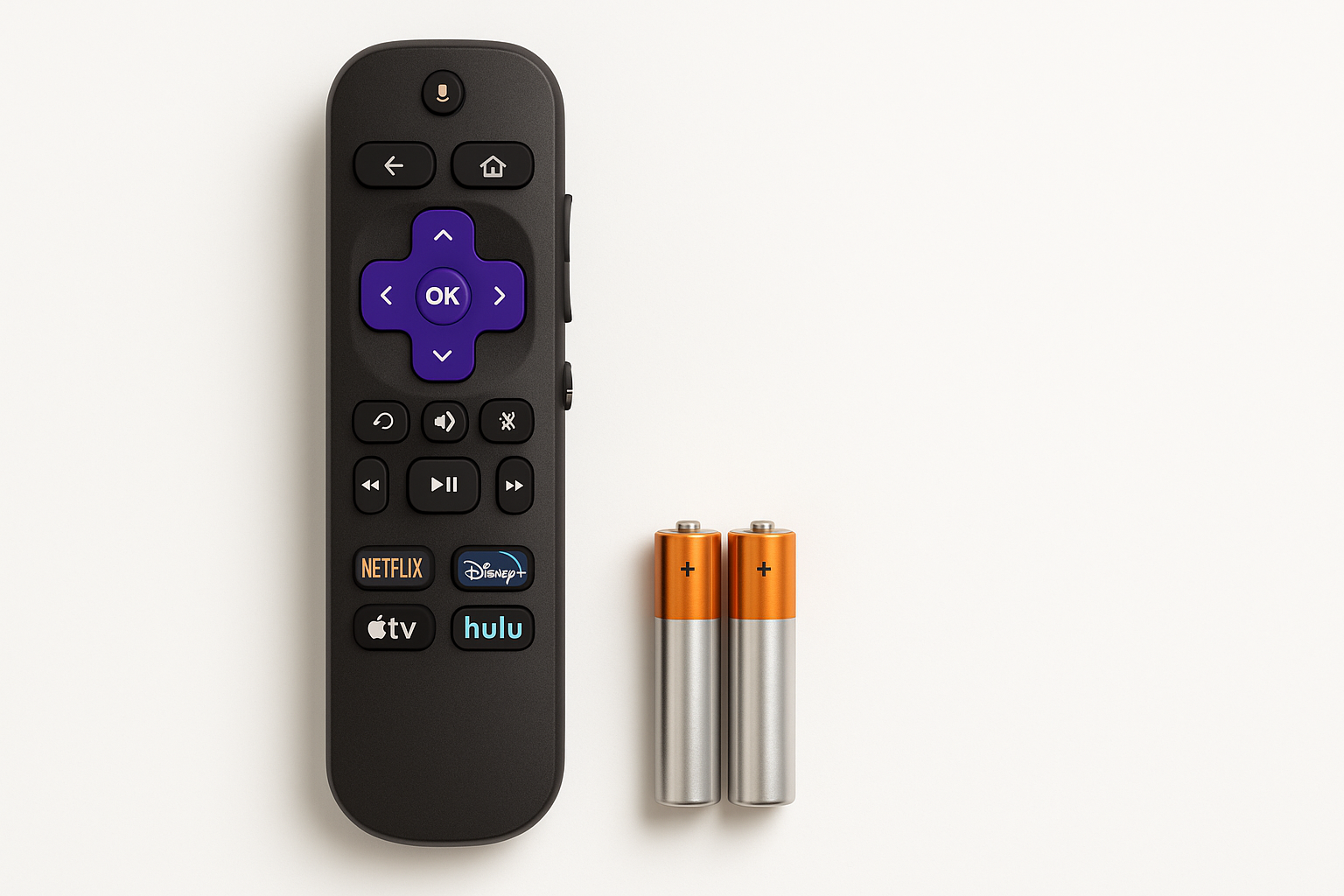
1. Design and Layout
The Roku TV Remote Control largely follows Roku’s familiar minimalist design:
- Compact plastic body with a slightly curved back for grip.
- Directional pad (D‑pad) at the center for navigation.
- Home and Back buttons in their usual Roku positions.
- Playback controls (Play/Pause, Fast Forward, Rewind) placed below the navigation area.
- TV control buttons: Power, Volume Up/Down, and Mute, allowing you to manage basic TV functions without a second remote.
The result is a remote that will be instantly familiar to anyone who has used a Roku TV before, minimizing any learning curve.
2. Pre‑Set App Shortcuts
A key element of this remote is the row of pre‑set streaming app shortcut buttons. While the exact services may vary by production run or region, they typically include popular platforms (for example, Netflix or similar services). Pressing one of these immediately launches the associated app on your Roku TV.
What to know about these shortcut buttons:
- They provide one‑touch access to frequently used streaming apps.
- They are factory‑fixed, so the icons and underlying apps cannot normally be reprogrammed.
- Because they’re physical buttons, they remain usable even after a factory reset of the TV—as long as the service is supported on Roku.
3. Compatibility and Limitations
This is where the product draws some firm boundaries:
- Designed for Roku TV models only: It is compatible with TVs that have Roku OS built in (e.g., many TCL, Hisense, Sharp, and other Roku TV brands) as long as they use the standard Roku TV IR codes.
- Not for Roku streaming players: It does not work with Roku streaming sticks or boxes, which often rely on Wi‑Fi Direct remotes.
- IR‑only control: No Bluetooth, Wi‑Fi, or voice functionality is included. You must point it at the TV for reliable response.
Pros of IR‑only design:
- No wireless pairing needed; insert batteries and it typically works immediately with supported Roku TVs.
- Less susceptible to wireless interference.
Cons:
- Must maintain line‑of‑sight; obstructions can block signals.
- No advanced control over hidden devices or through cabinets.
4. Power and Batteries
The remote is powered by standard batteries (commonly two AAA batteries, though actual contents may vary by seller package). Battery usage is modest, thanks to the IR design and absence of backlighting or microphones.
User expectations:
- Simple battery replacement via a sliding back cover.
- No charging port or rechargeable battery—this is a traditional battery‑powered remote.
Performance Insights
In day‑to‑day use, the Roku TV Remote Control is optimized for predictability rather than novelty.
Responsiveness and Range
- IR performance: When pointed toward the TV’s IR receiver, button presses register quickly with minimal lag.
- Typical operating distance: Works reliably across a typical living room distance, assuming clear line‑of‑sight.
- Angle tolerance: The IR emitter usually offers enough spread to handle modest off‑axis angles, but performance drops if you point it far away from the TV or block it with furniture.
Reliability
Because this remote mirrors Roku’s straightforward IR design, reliability is mostly governed by:
- Battery health: Weak batteries are the most common source of missed button presses.
- IR cleanliness: Dust or fingerprints on the IR LED or the TV’s IR receiver can occasionally affect performance, but are easy to clean.
There are no wireless pairing or connectivity layers to break, which makes this a relatively low‑maintenance device compared with Wi‑Fi remotes.
Usability
Setup Experience
One of the main selling points of this product is its simple setup:
- Insert the required batteries.
- Aim the remote at your Roku TV.
- Confirm that the TV responds to commands such as Power, Home, and Volume.
On most Roku TVs that already used a similar IR remote, no additional programming is required. If your TV brand or model uses non‑standard IR codes, compatibility may vary, but this is uncommon among mainstream Roku TVs.
Everyday Use
The familiar Roku layout keeps the learning curve very shallow:
- Navigation is intuitive with the D‑pad and Home/Back buttons.
- Volume and mute are consolidated on the side (or a clearly marked area), avoiding accidental presses.
- Pre‑set app shortcuts reduce the number of on‑screen steps needed to reach your go‑to streaming services.
This makes the remote particularly friendly for households where multiple people use the TV, including guests or less tech‑savvy family members.
Ergonomics
- Lightweight build: Easy to hold for long viewing sessions.
- Tactile button feel: Distinct, clicky buttons help you operate the remote by feel in dim lighting.
- No backlight: Buttons are not illuminated, which is typical in this price range but worth noting if you frequently watch in a dark room.
Trade‑offs
The Roku TV Remote Control deliberately emphasizes simplicity, which leads to a few notable trade‑offs.
Advantages
- Official Roku design: High compatibility and predictable behavior with Roku TV models.
- No setup complexity: Plug‑and‑play style operation with IR—no pairing menus or network settings.
- Dedicated TV controls: Power, volume, and mute help eliminate the need for a second TV brand remote in many setups.
- Pre‑set app shortcuts: Quick access to popular services with a single button press.
- Accessible price point: For around $9.99, it fills the gap between ultra‑cheap generics and feature‑rich voice remotes.
Limitations
- Roku TV only: It won’t control Roku streaming players or non‑Roku smart TVs.
- No voice search or private listening: If you rely on features like voice commands or headphone listening through the remote, you’ll need a different Roku remote model or the Roku mobile app.
- Fixed shortcut apps: The printed app shortcut buttons can’t be reassigned, which may be less useful if you don’t subscribe to those specific services.
- IR line‑of‑sight requirement: Obstructions or cabinets can block the signal, unlike Wi‑Fi or Bluetooth remotes.
Conclusion
The Roku TV Remote Control (Official Manufacturer Product) is a purpose‑built, no‑frills replacement for Roku TV owners who simply want their television to feel “normal” again after a lost or broken remote. It closely matches the layout and behavior of the original Roku TV remote, offers easy setup, and integrates pre‑set streaming app shortcut buttons for quick access to popular services.
If you own a Roku TV and have no need for voice commands, headphone jacks, or advanced smart‑remote features, this model is a practical and cost‑effective option at approximately $9.99. However, if your setup includes Roku streaming players, or you want more advanced capabilities, you should look at Roku’s higher‑end voice remotes or compatible universal remotes instead.
For buyers who value simplicity, familiarity, and official Roku compatibility, this remote is a solid, low‑risk choice.