
Roku TV Remote Control Review: Official Replacement for Roku TV Owners
Product Summary
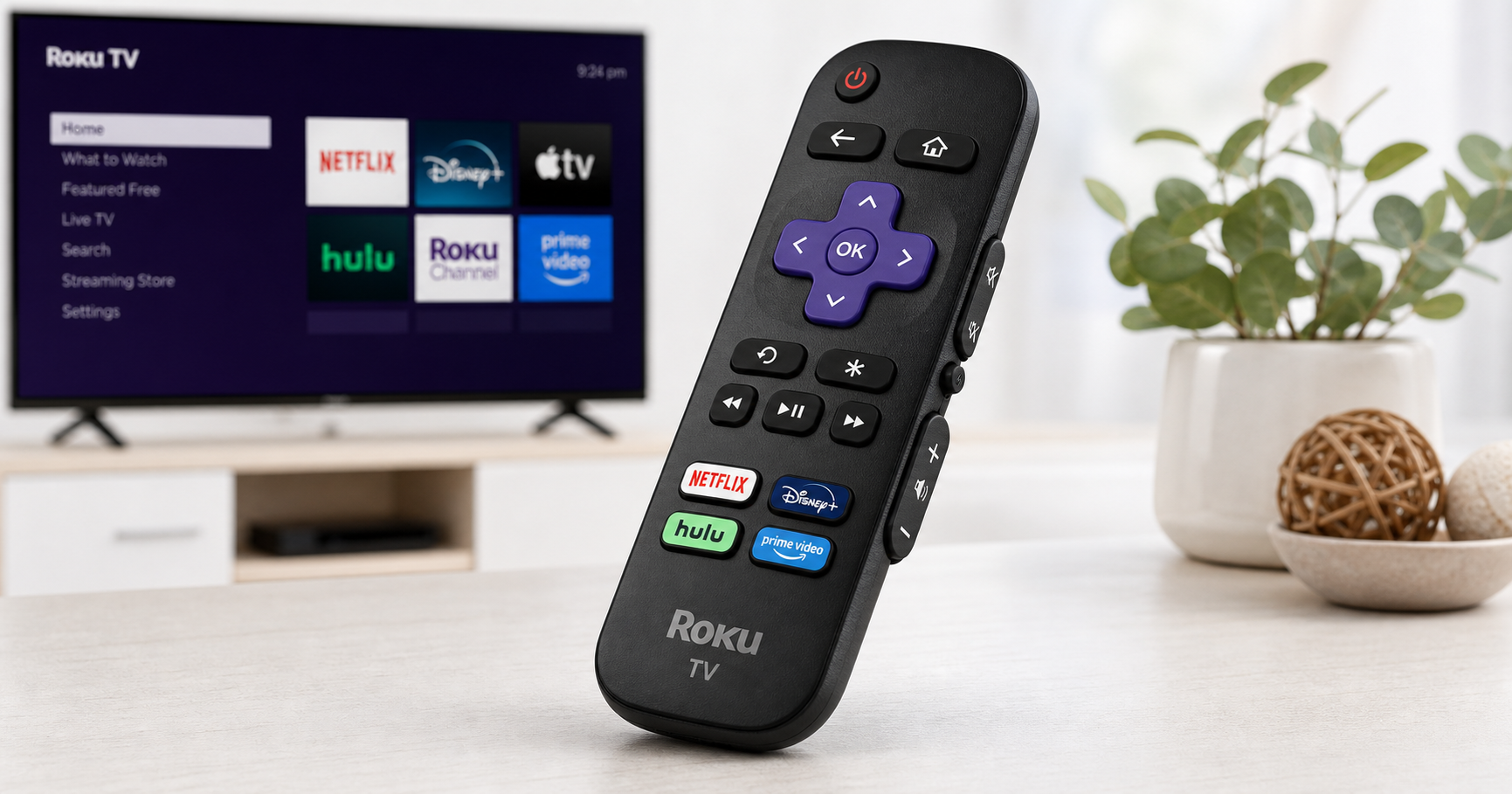
The Roku TV Remote Control (Official Manufacturer Product) is a straightforward infrared (IR) replacement remote designed only for Roku TV models, not for Roku streaming players, sticks, or soundbars. It closely mirrors the basic remotes that ship with many Roku TVs, offering:
- Direct power, volume, and mute controls for your Roku TV
- Directional pad and playback controls for navigating the Roku interface
- Pre-set app shortcut buttons for quick access to popular streaming services
- Simple, near plug‑and‑play setup—typically just insert batteries and aim at the TV
For Roku TV owners who have lost, damaged, or worn out their original remote, this official unit is intended to be a low‑friction, familiar replacement.
You can usually find this remote around $9.99, which positions it as a budget-friendly, no‑frills option within Roku’s broader accessory lineup.
Target Users
This remote is best suited for:
-
Roku TV owners who want an exact‑style replacement
If your TV already has Roku built in (TCL, Hisense, ONN, Sharp, etc. with “Roku TV” branding), this remote is meant to work as a drop‑in replacement, keeping the experience close to the original. -
People who prefer physical buttons over phone apps
While the Roku mobile app can function as a remote, many users still prefer a dedicated handheld remote for channel surfing, quick volume changes, and family use. -
Households needing a simple, non‑technical solution
Elderly users, houseguests, or anyone who doesn’t want to deal with pairing procedures or Wi‑Fi Direct connections will appreciate the IR point‑and‑click simplicity. -
Backup remote buyers
If you rely heavily on your Roku TV, having a spare remote like this one can prevent frustration when the main remote goes missing or the buttons eventually wear out.
Notably, this product is not intended for Roku streaming players like the Roku Express, Premiere, Ultra, or any Roku Streaming Stick; those typically require different remotes and may use Wi‑Fi Direct rather than pure IR.
Main Benefits
1. True “Roku TV Only” Compatibility
This remote is designed specifically for Roku TV models, so you avoid much of the guesswork that comes with generic universal remotes. As long as your TV is a Roku TV, the remote should work once you insert batteries and point it at the screen.
2. Simple, One‑Step Setup
Because it’s an IR remote pre‑configured for Roku TV codes, setup is effectively:
- Insert batteries.
- Ensure line‑of‑sight to the TV’s IR receiver.
- Start using the remote.
There’s no Bluetooth or Wi‑Fi pairing, no complex on‑screen menus, and no companion app required. This is particularly helpful if your original remote has failed completely and you can’t navigate settings to pair a new one.
3. Familiar Layout and Controls
The button layout closely mirrors typical Roku TV remotes:
- Power button
- Volume up/down and mute (usually along the side or bottom edge)
- Home, Back, OK/Select, directional arrows
- Playback controls (play/pause, fast forward, rewind)
- Four pre‑set app shortcuts at the bottom
If you’ve used any Roku TV before, you can pick up this remote and use it immediately without a learning curve.
4. Pre‑Set App Shortcuts
The pre‑set shortcut buttons provide one‑touch access to popular streaming apps (like Netflix, Disney+, Hulu, etc., depending on the batch and retailer). While you can’t reprogram these buttons, they do speed up routine viewing—especially for less tech‑savvy users who just want “their show” as quickly as possible.
5. Official Manufacturer Build and Support
Because this is an official Roku product, you benefit from:
- Consistent compatibility with Roku TV models
- More predictable quality control than many third‑party clones
- Clearer documentation and support from Roku and major retailers
For users who have tried cheap off‑brand remotes that feel flimsy or partially compatible, this can be an important upgrade in reliability.
Key Considerations
Before purchasing, keep these factors in mind:
1. Roku TV Only (No Roku Players or Sticks)
The biggest limitation is right in the name: this remote is only for Roku TV models. It will not work properly with:
- Roku Streaming Sticks
- Roku Ultra, Express, Premiere, or older Roku boxes
- Non‑Roku smart TVs or cable boxes
If you’re replacing a remote for a standalone Roku device plugged into a non‑Roku TV, you’ll need a different remote (such as a Roku Voice Remote or Voice Remote Pro) rather than this Roku TV‑specific unit.
2. Infrared Line‑of‑Sight Requirements
This remote communicates via infrared, so you must:
- Have a clear path between the remote and the TV’s IR sensor
- Point the remote roughly toward the TV when pressing buttons
If you’re used to Wi‑Fi Direct or Bluetooth remotes that can work from another room or behind furniture, you’ll need to adjust expectations. IR remotes are still very common and reliable, but they are sensitive to blocked sensors and extreme angles.
3. No Voice Control or Advanced Features
Unlike the Roku Voice Remote or Voice Remote Pro, this unit:
- Does not support voice search or voice commands
- Does not offer private listening through a headphone jack
- Does not have programmable shortcut buttons beyond the fixed app keys
- Uses standard batteries instead of a rechargeable internal battery
If you want hands‑free operation, advanced shortcuts, or a more premium experience, you may prefer Roku’s higher‑end remotes instead of this basic replacement.
4. App Shortcut Buttons Are Fixed
The pre‑set streaming app buttons cannot be changed. Over time, streaming habits and service lineups evolve, so you might end up with one or more shortcut buttons you rarely use. Functionally this isn’t a problem, but it does limit customization.
5. Battery Use and Durability
The remote uses standard AAA batteries. Under normal home use, batteries typically last a good while, but IR remotes can drain faster if they’re used heavily or if poor‑quality batteries are installed. The construction is generally solid for the price, but as with any plastic remote, drops and spills can shorten its life.
Pros
- Official Roku accessory designed specifically for Roku TV models
- Very simple setup—usually works immediately after installing batteries
- Familiar, intuitive layout that matches many original Roku TV remotes
- Integrated TV controls (power, volume, mute) for single‑remote operation
- Pre‑set app shortcut buttons for one‑press access to major streaming services
- Budget‑friendly price point (typically around $9.99) for an official replacement
- Widely available through major retailers and online marketplaces
Cons
- Compatible only with Roku TV models, not standalone Roku players or Streaming Sticks
- Infrared only: requires line‑of‑sight and won’t work from behind walls or cabinets
- No voice search or advanced smart features
- Pre‑set app buttons are non‑customizable, which may leave you with unused shortcuts
- Powered by disposable AAA batteries rather than a rechargeable pack
- Some users may find the build quality more basic compared with premium Roku remotes
Alternatives
If you’re considering this Roku TV Remote Control, it’s worth weighing it against a few alternative categories:
1. Roku Voice Remote / Voice Remote Pro
- Best for: Users who want voice control, private listening, or backlit keys (Voice Remote Pro).
- Pros:
- Works with many Roku devices and Roku TVs (with proper pairing)
- Voice search and commands simplify navigation and content discovery
- Higher‑end models offer rechargeable batteries and more premium feel
- Cons:
- Typically more expensive than the simple Roku TV remote
- Requires pairing and may be overkill for users who just need basic controls
2. Third‑Party Roku‑Compatible IR Remotes
- Best for: Budget shoppers or those wanting extra shortcut buttons or TV‑brand‑specific layouts.
- Pros:
- Often very inexpensive
- Some offer more shortcut buttons than the official remote
- Cons:
- Quality and compatibility can be inconsistent
- Documentation and support may be weaker
- Button feel and durability often lag behind official hardware
3. Roku Mobile App (as a Stopgap or Supplement)
- Best for: Users comfortable using their phone as a remote, or those waiting for a physical replacement.
- Pros:
- Free to use on compatible smartphones
- Offers keyboard input, private listening, and advanced controls
- Great backup when the physical remote is misplaced
- Cons:
- Requires Wi‑Fi and a paired device
- Not always ideal for guests, kids, or quick casual use
- Drains phone battery and keeps you tied to your device while watching
Conclusion
The Roku TV Remote Control (Official Manufacturer Product) is a focused, practical solution for Roku TV owners who need a straightforward replacement remote. It doesn’t try to be a universal controller or a smart, voice‑driven gadget. Instead, it delivers exactly what many households want:
- Reliable basics (power, volume, navigation)
- Familiar layout and behavior
- One‑touch shortcuts for popular streaming services
- Simple, low‑effort setup
If you primarily watch content through your Roku TV and just want a dependable, familiar remote without advanced features, this official unit is a sensible and cost‑effective choice, especially around $9.99. However, if you’re interested in voice search, private listening, or broader device compatibility (including standalone Roku players), you may want to look at Roku’s Voice Remote or Voice Remote Pro instead.