
Review: (Pack of 2) Replacement Remote Control Only for Roku TV
Introduction
The (Pack of 2) Replacement Remote Control Only for Roku TV is a straightforward, no‑frills infrared (IR) remote set aimed at owners of Roku‑powered televisions who need an easy drop‑in replacement. It is compatible with a wide range of Roku TV models from major brands, including TCL, Hisense, Onn, Sharp, Element, Westinghouse, and Philips. As the name makes clear, it is not designed for Roku streaming sticks, Roku boxes, or other standalone Roku players.
Positioned as a budget‑friendly alternative to brand‑name replacements (typically around $8.97 for a pack of two), this product focuses on plug‑and‑play operation, basic TV control, and quick access to popular streaming apps via dedicated shortcut buttons.
Setup / Getting Started
Because these are IR remotes, setup is intentionally minimal:
-
Confirm you have a Roku TV, not a Roku stick or box
These remotes are meant to work with televisions that have Roku built in (often labeled "Roku TV" on the bezel or in the on‑screen menus). They will not control Roku Streaming Sticks, Roku Express, Roku Ultra, or other external Roku players. -
Insert two AAA batteries in each remote
Batteries are typically not included, so you will need your own set of AAA cells. Open the battery compartment, match the polarity markings, and close the cover securely. -
Point the remote at the TV’s IR sensor
The IR receiver on most Roku TVs is located along the bottom bezel, usually in the center or off to one corner. Because the remote uses line‑of‑sight infrared, it must be pointed roughly at this area with no solid obstacles in the way. -
No pairing or programming required
Unlike Wi‑Fi or Bluetooth voice remotes, this replacement does not require pairing. Once the batteries are installed, the TV should respond immediately to standard commands (Power, Home, OK, navigation arrows, volume, mute, and app shortcuts).
If the TV does not respond on first try, common quick checks include verifying that:
- You truly have a Roku TV (not just a TV with a Roku stick plugged in).
- The TV is powered on and not in an unusual standby state.
- The batteries are new or fully charged.
- You are within a typical indoor range (up to around 20–25 feet) and pointing toward the IR sensor.
Daily Usage
In day‑to‑day use, this replacement remote behaves very similarly to the original basic Roku TV remotes that ship with many budget and mid‑range sets.
Layout and Buttons
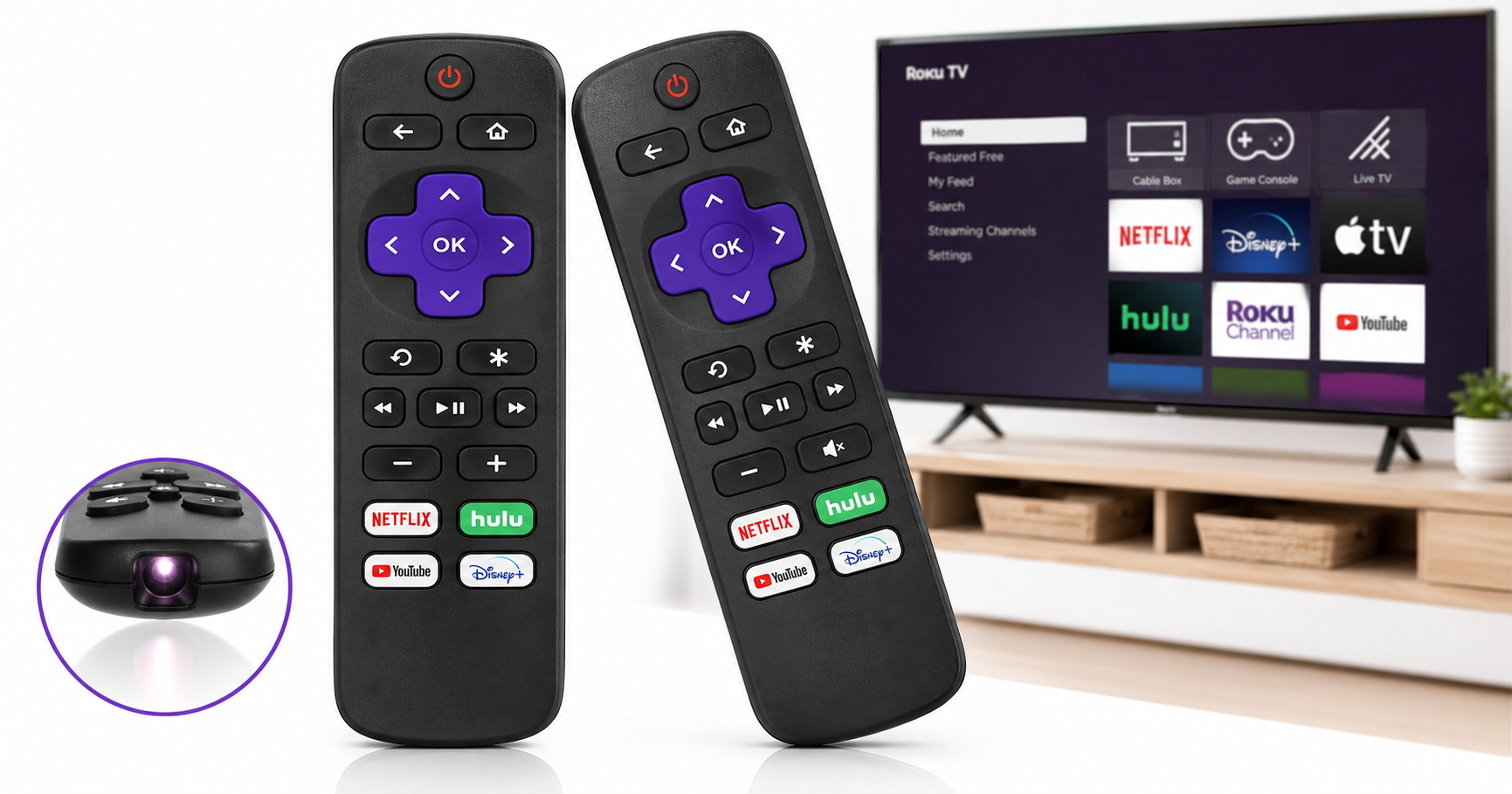
The layout typically includes:
- Navigation cluster: Up, down, left, right, and an OK/Select button at the center.
- Home and Back: For jumping back to the Roku home screen or stepping back one level in menus.
- Playback controls: Play/Pause, and often rewind/fast‑forward controls for video.
- Volume and mute controls: On compatible TVs, these adjust TV audio directly.
- Four streaming shortcuts: Dedicated buttons for popular apps such as Netflix, Hulu, YouTube, and Disney+ (the exact services may vary by batch or region).
The shortcut buttons are especially useful if your household tends to use the same services most of the time. With one press, you can launch a supported app without drilling through menus.
Handling and Ergonomics
Physically, the remotes are light and compact—easy to hold in one hand and small enough to sit unobtrusively on side tables or in a drawer. The plastic shell feels similar to other entry‑level TV remotes. There are no premium touches like rubberized grips or backlit keys, but the core buttons are generally well‑spaced and easy to identify by feel after some use.
Because this is a pack of two, many users choose to:
- Keep one remote in the living room and the second in a bedroom or office, or
- Keep the second unit as a backup in case the main remote gets lost or damaged.
Performance & Reliability
Responsiveness
As long as you maintain line‑of‑sight and stay within typical living‑room distances, button presses register quickly. The IR signal is immediate, with no wake‑from‑sleep delays that sometimes affect Wi‑Fi or Bluetooth remotes. This makes the remote feel snappy for routine navigation and volume control.
Range and Line of Sight
IR remotes always have a few predictable limitations:
- Direct path required: Thick furniture, cabinet doors, or people standing directly in front of the TV can block the beam.
- Reflective assistance: In some rooms, IR can bounce off walls or ceilings, giving you a little flexibility in where you point, but you should not rely on this.
Within those constraints, this replacement performs similarly to original OEM Roku TV remotes.
Durability
The construction is basic, but the lightweight design tends to survive everyday drops from couch height without issue. The buttons are typical dome switches; they generally hold up to frequent use, though—as with any budget remote—heavy wear on certain keys (Home, OK, volume) over years could eventually lead to reduced click feel or responsiveness.
There is no water resistance rating, so spills should be avoided. If liquid gets inside, battery removal and thorough drying are recommended.
Battery Life
Because these are IR‑only remotes with no wireless radios or backlighting, battery life is usually very good. With typical household use, a pair of AAA batteries often lasts several months before needing replacement. There is no on‑screen battery gauge; you’ll mainly notice low battery when button presses become erratic or unresponsive.
What Works Well
-
Plug‑and‑play for Roku TVs
No pairing, codes, or complicated setup. Insert batteries and use it—ideal for less tech‑savvy users or as a quick emergency replacement. -
Broad brand compatibility within the Roku TV ecosystem
Designed to work with Roku‑branded televisions from TCL, Hisense, Onn, Sharp, Element, Westinghouse, and Philips, covering a large chunk of Roku TV owners. -
Two remotes in one package
The pack‑of‑two format is practical and cost‑effective. It reduces the need to buy a second remote later and gives you an immediate spare if one is lost. -
Familiar Roku layout
Anyone used to stock Roku TV remotes will feel at home quickly. The Home, Back, and directional controls are where you expect them to be. -
App shortcut buttons
Having direct launch keys for major streaming services can shave a few steps off your nightly viewing routine. -
Good value for basic functionality
For around $8.97 at the provided product link, you get two working, ready‑to‑use remotes—often less than the cost of a single premium OEM voice remote.
What Could Be Improved
-
No support for Roku sticks or boxes
This remote is only for Roku TVs. Owners of Roku Streaming Sticks, Roku Express, Roku Ultra, and similar players will need a different replacement. -
No voice control or advanced features
There is no microphone, no voice search, and no headphone jack. If you rely heavily on voice queries, private listening, or lost‑remote beepers, you will miss those features found on higher‑end Roku remotes. -
No backlighting
All keys are non‑illuminated, which can make it harder to see button labels in a dark room. Users who frequently watch with the lights out may prefer a backlit option. -
Basic plastic build
The remote feels utilitarian rather than premium. While this is reasonable at the price point, some users might prefer a more substantial or textured finish for better grip. -
Fixed shortcut buttons
The streaming shortcut keys are hard‑wired. If you don’t use one or more of the pre‑printed services, those buttons become wasted real estate. -
No batteries included
Having to supply your own AAA batteries is normal for budget accessories but might be inconvenient if you’re expecting a ready‑to‑use package.
Overall Impression
The (Pack of 2) Replacement Remote Control Only for Roku TV is a practical, budget‑oriented solution for anyone whose original Roku TV remote is lost, broken, or unreliable. It trades away higher‑end extras—like voice control, built‑in headphone support, and backlighting—in favor of simplicity, broad Roku TV compatibility, and the convenience of getting two remotes in one package.
If you own a compatible Roku TV from TCL, Hisense, Onn, Sharp, Element, Westinghouse, or Philips and mainly need basic navigation, app launching, and volume control, this set delivers solid everyday performance for approximately $8.97 without requiring any technical setup. However, if you use a Roku streaming stick or rely on advanced features, you’ll want to look at official Roku voice remotes or higher‑end third‑party options instead.
For most households with a Roku TV that just need a dependable, no‑nonsense clicker—and maybe a spare kept in the drawer—this pack is an easy and cost‑effective recommendation.