
UGREEN FineTrack Air Tracker Tags (4‑Pack) Review: An Apple Find My Alternative for Everyday Items
Introduction
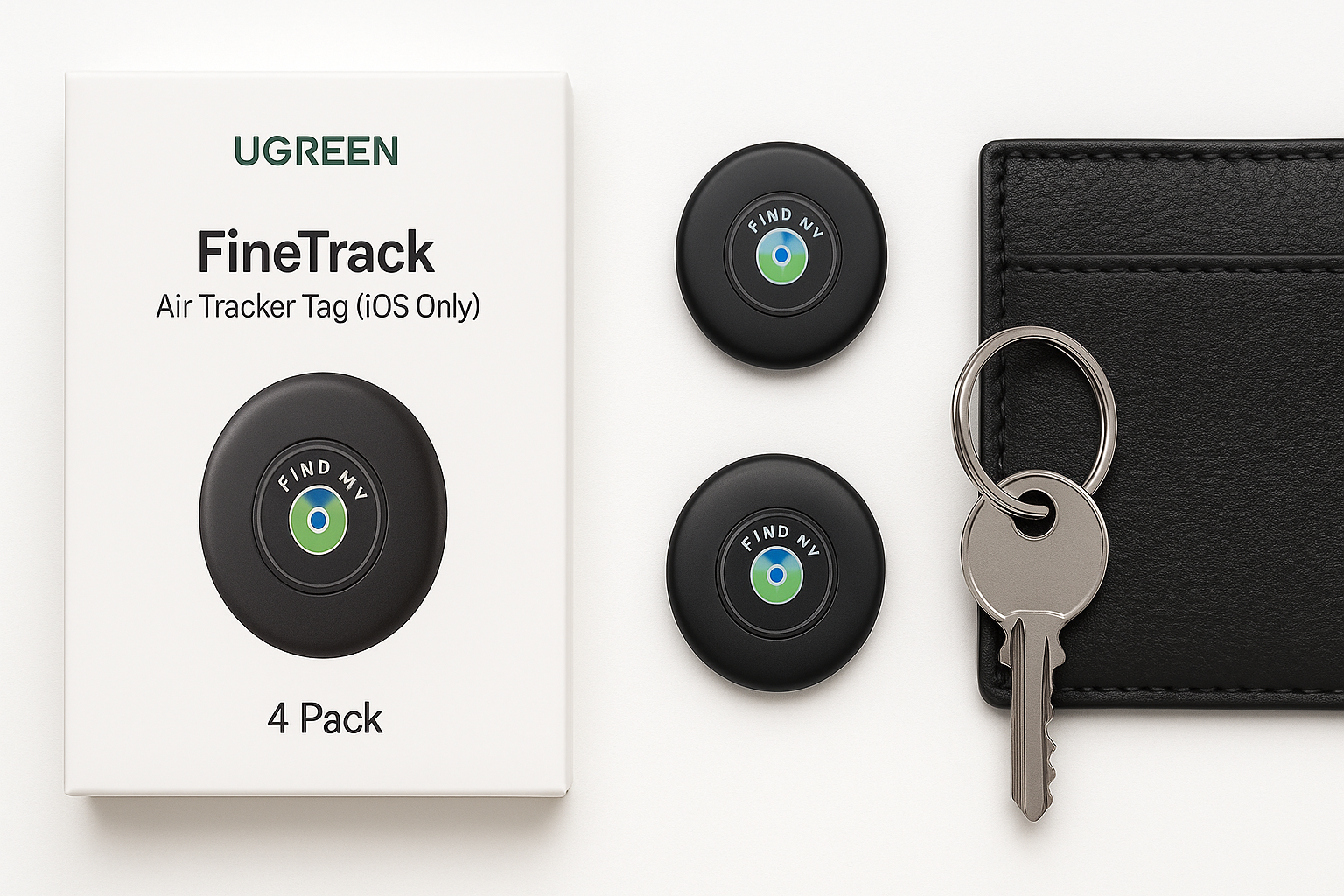
The UGREEN FineTrack Air Tracker Tags (iOS Only) 4 Pack are compact Bluetooth trackers that integrate directly with Apple’s built‑in Find My network. Apple Find My certification means they pair through the standard Find My interface on iPhone or iPad, without any extra apps, and benefit from Apple’s large device network for crowdsourced location updates.
UGREEN sells this 4‑pack at around $21.99, positioning it as a budget‑friendly AirTag alternative for users who want multiple tags for keys, bags, and other valuables, but still want native Find My support and a replaceable battery with up to two years of life.
Key specs and features include:
- Apple Find My certified (iOS only)
- One‑tap pairing with iPhone or iPad via Find My
- Global location updates via the Apple Find My network (no subscription)
- Replaceable CR2032 battery rated for up to 2 years
- Lost Mode with contact info sharing
- Out‑of‑range alerts through the Find My app
- UL4200A certification for child‑safe battery compartment【turn0search0】
Typical Use Cases
1. Everyday key tracking
Most buyers will likely use at least one FineTrack tag on their primary keyring. After pairing, the tag appears in the Items tab in the Find My app, where you can quickly ring it or see its last known location on a map.
Typical scenarios:
- Keys misplaced at home (sofa cushions, coat pockets, etc.)
- Keys left at the office or a café
- Shared car keys where multiple household members use the same tag
2. Luggage and travel bags
With four tags in the box, dedicating one or more to checked luggage or backpacks is practical. The Find My network leverages nearby Apple devices in airports, hotels, rideshares, and public transport to periodically update the bag’s location, which can be particularly useful during flights or long‑distance travel.
Typical scenarios:
- Monitoring if a suitcase made it onto the plane
- Confirming whether luggage is still at the departure airport or has arrived
- Locating a backpack left at a friend’s house or in a rideshare
3. Wallets, ID pouches, and small accessories
The tags are relatively slim disc‑style trackers. They can be slipped into a wallet pocket (depending on thickness), attached to a wallet card holder, or dropped into a small pouch containing passports and IDs.
Typical scenarios:
- Locating a misplaced wallet at home
- Tracking a small travel pouch during trips
- Keeping tabs on a camera bag or gear case
4. Shared family items
With iOS 17 or later, FineTrack tags support location sharing with family members through Find My. That allows multiple iPhone users in a family group to see and locate a shared item, such as car keys, a stroller, or a shared backpack.
Typical scenarios:
- Parents sharing access to a tag on a child’s school bag
- Multiple adults tracking a shared car or house keys
- Family tracking a shared piece of travel luggage【turn0search0】
5. General valuables and ad‑hoc uses
Because it’s a 4‑pack, it’s easy to dedicate tags to:
- Bike or scooter
- Tech bag or laptop sleeve
- Musical instrument case
- Tools or work gear you frequently loan out
Performance in Each Scenario
Key tracking at home and around town
Setup and pairing are straightforward: bring the FineTrack near your iPhone, press the button if required, and follow the on‑screen prompt in the Find My app. Once added, the tag shows up like a standard Find My item. The Find My app lets you name the tag and assign an icon (e.g., keys, backpack).
In short‑range situations, the play sound function works well for locating misplaced keys within a room or small apartment. Sound output is typical of small trackers: loud enough for a quiet home, but potentially harder to hear in noisy environments or if buried under cushions. Unlike Apple’s own AirTag, FineTrack does not support Ultra‑Wideband precision finding, so you rely on sound plus the map view rather than directional arrows and distance readouts.
For out‑of‑home use (e.g., keys forgotten at work), Find My shows the last known location based on when your tag was last detected by your phone or any nearby Apple device. This works reliably in dense urban or suburban areas but, just like AirTags, updates will be less frequent in locations with few Apple devices.
Luggage and travel
For checked luggage and travel bags, FineTrack’s performance is directly tied to the density of Apple devices around your luggage—iPhones from other travelers, staff devices, and so on. In major airports and city centers where Apple device penetration is high, FineTrack can provide reasonably frequent updates on your bag’s whereabouts.
You can:
- See if a suitcase has left your departure airport
- Check if it has arrived at your destination
- View approximate location in transit, particularly at transfer hubs
However, you may see gaps in updates:
- During flights (no nearby devices with connectivity)
- In baggage handling zones with limited public iPhone presence
- In rural or low‑population areas
This is a limitation of the Find My network model rather than the tag itself; Apple’s own AirTag works similarly.
Wallets and small accessories
In wallets, passports pouches, or small bags, FineTrack performs similarly to key‑ring use but with two considerations:
- Sound muffling: Sound can be more muffled inside a wallet or thick pouch. You may need to be closer to hear the alert tone.
- Form factor: While compact, the tag is still a small disc. In a slim minimalist wallet, it may create a noticeable bulge. Users highly sensitive to wallet thickness may prefer a dedicated slim card‑style tracker instead.
When not nearby, the Find My app still updates the wallet’s last known location based on nearby Apple devices, which is useful if you leave it at a restaurant or friend’s house.
Shared family items
With compatible iOS versions, item sharing works much like sharing locations of people or devices in Find My. Each authorized family member can:
- See the item’s location in their Find My app
- Trigger a sound on the tag (if within range)
In practice, this is convenient for shared keys, strollers, or children’s school bags. However, remember that:
- All sharers must be on iOS/iPadOS with access to Find My
- Android users cannot participate in location sharing for these tags
General valuables and niche applications
In broader use—on bikes, camera bags, or electronics cases—the FineTrack behaves as expected for a Find My‑based tracker:
- Reliable for remembering where you last left the item
- Helpful as an aid to recovery if the item is misplaced or lightly moved
- Not a guaranteed anti‑theft solution, since it still relies on third‑party Apple devices to report location
Users experimenting with more creative installations (such as hiding a tracker inside a device or case) will benefit from the 2‑year battery life, as infrequent access to the tracker makes a long service interval important.
Strengths Across Scenarios
1. Tight Apple Find My integration
Because FineTrack is Apple Find My certified, it:
- Pairs directly in the native Find My app
- Appears alongside Apple devices and other Find My items
- Benefits from end‑to‑end encryption and anonymized location relay through Apple’s network
- Requires no third‑party subscription or additional app【turn0search0】
For Apple users, this yields a highly integrated, low‑friction experience.
2. No subscription fees
All tracking functionality—global updating via Find My, Lost Mode, and sound alerts—works without recurring fees. The only ongoing cost is replacing the CR2032 battery roughly every two years.
3. Long, replaceable battery life
UGREEN advertises up to 2‑year battery life from a standard CR2032 cell, which is longer than many competing trackers with 1‑year estimates. The battery is user‑replaceable, and the Find My app can display battery status so you can swap cells before they run out.
Since the battery compartment is UL4200A‑certified, the design also aims to make accidental child access more difficult, a safety consideration compared with looser battery covers.
4. Multi‑pack value and flexibility
The 4‑pack format, at about $21.99 for all four tags, makes it more economical per tag than buying individual Apple AirTags at standard pricing. This encourages broader coverage—keys, multiple bags, and smaller accessories—rather than rationing a single tag among important items.
5. Lost Mode and contact sharing
When an item is truly lost, Lost Mode lets you:
- Mark the item as lost in Find My
- Attach a phone number or message for the finder
If another Apple user comes near the tag, their device can display this contact information, helping facilitate recovery without revealing your identity or precise home address by default.
6. Privacy protections via Apple’s ecosystem
Because all communication runs through the Apple Find My system, FineTrack inherits:
- Encrypted, rotating Bluetooth identifiers
- Anonymized location relay via nearby Apple devices
- No direct location storage on the tag itself
This means neither UGREEN nor random third parties can see your precise movements, and even Apple cannot easily link a particular person’s device to your tag’s identity without a legal process.
Limitations Across Scenarios
1. iOS‑only support (no Android compatibility)
FineTrack tags are not compatible with Android devices. The product is designed exclusively for Apple’s Find My network, which:
- Requires an iPhone, iPad, or Mac to set up and manage
- Does not allow real‑time location tracking from Android
Android users can sometimes receive generic "unrecognized tracker" alerts using third‑party safety apps, but they cannot use FineTrack as a normal tracker on Android.
2. No Ultra‑Wideband precision finding
Unlike newer Apple AirTags paired with UWB‑equipped iPhones, FineTrack does not support Ultra‑Wideband precision finding. That means:
- You won’t get on‑screen arrows and distance measurements
- Fine‑grained, room‑level guidance is limited to sound and approximate Bluetooth proximity
For most lost‑in‑house scenarios, ringing the tracker is still effective, but users accustomed to UWB precision may find this a step down.
3. Reliance on nearby Apple devices for updates
As with any Find My‑based tracker, location updates depend on other Apple devices passing near the tag and relaying its encrypted location. Practical implications:
- In sparsely populated or low‑Apple‑device areas, updates can be infrequent
- For moving targets (pets, bikes, or vehicles), continuous live tracking is not guaranteed
- In some edge cases (e.g., very remote locations), the last known location may be significantly outdated
These constraints apply equally to Apple AirTags and most third‑party Find My trackers—FineTrack does not overcome them.
4. Sound output and physical form factor
While the sound is adequate for many indoor scenarios, it may be harder to hear:
- In loud outdoor environments
- When buried deep in luggage or heavily padded cases
Additionally, the round disc shape may not perfectly suit super‑slim wallets, where a card‑style tracker would be more comfortable.
5. Not a full anti‑theft solution
FineTrack is best viewed as an aid to recovery and memory, not as a professional anti‑theft device. Determined thieves can:
- Find and discard the tracker (especially if it rings)
- Shield it from signals
Therefore, it’s useful for misplacement and casual loss, but should not be treated as a guaranteed theft‑prevention solution.
Verdict
The UGREEN FineTrack Air Tracker Tags (iOS Only) 4 Pack offers a well‑rounded set of features for Apple users seeking a cost‑effective, Apple‑certified alternative to AirTags. Native Find My integration, up to two years of replaceable‑battery life, and a child‑safe battery compartment make it a practical choice for tracking keys, bags, wallets, and luggage.
For iPhone and iPad owners invested in the Apple ecosystem, the FineTrack 4‑pack at approximately $21.99 strikes a compelling balance between price, convenience, and functionality, especially if you need multiple tags around the home. Its main compromises are the lack of Android support and Ultra‑Wideband precision finding, as well as the inherent limitations of any Find My‑based tracker in low‑device‑density environments.
If you:
- Use iOS devices exclusively
- Want multiple trackers without paying premium per‑tag pricing
- Can live without UWB precision finding
then UGREEN’s FineTrack Air Tracker Tags are a strong, value‑oriented option for everyday item tracking within Apple’s Find My ecosystem.