
Samsung Galaxy SmartTag2 Review: A Purpose‑Built Tracker for Samsung Users
Introduction
The Samsung Galaxy SmartTag2 is Samsung’s second‑generation Bluetooth tracker, aimed at users who live inside the Galaxy ecosystem and want a simple way to keep tabs on keys, wallets, luggage, pets, and other valuables. Compared with the original SmartTag, this 2023 model brings a redesigned, more durable chassis, significantly extended battery life, and smarter software features through SmartThings Find.
Sold here as a 1‑pack in black (product link: https://www.amazon.com/dp/B0CCBXRYRC), the SmartTag2 positions itself as a direct alternative to popular trackers like Apple’s AirTag—but optimized for Galaxy phones and tablets. Its value proposition is straightforward: if you already use a modern Samsung device, this is one of the most seamless ways to add tracking to your everyday items for around $26.98.
Key Points
- Samsung‑only ecosystem: Works with Samsung phones and tablets running Android 11 or later, through the SmartThings / SmartThings Find apps.
- Redesigned hardware: Ring‑shaped design with a larger metal‑reinforced loop for attaching to keys, bags, or collars.
- Durability: IP67 rating for dust and water resistance, meaning it can withstand splashes, rain, and brief submersion.
- Strong battery life: Single CR2032 coin cell rated for up to around 500 days in Normal mode and up to 700 days in Power Saving mode (manufacturer claim).
- Improved finding experience:
- Bluetooth Low Energy (BLE) for proximity finding.
- Optional Compass View with directional arrows on supported UWB‑equipped Galaxy phones.
- Loud built‑in speaker for audible alerts when nearby.
- SmartThings Find network: Uses nearby Galaxy devices with SmartThings Find enabled to help locate your tag when it’s out of Bluetooth range.
- Lost Mode with NFC: Anyone who scans the tag with an NFC‑enabled phone can see your pre‑set contact information in a browser.
Experience
Design and Build
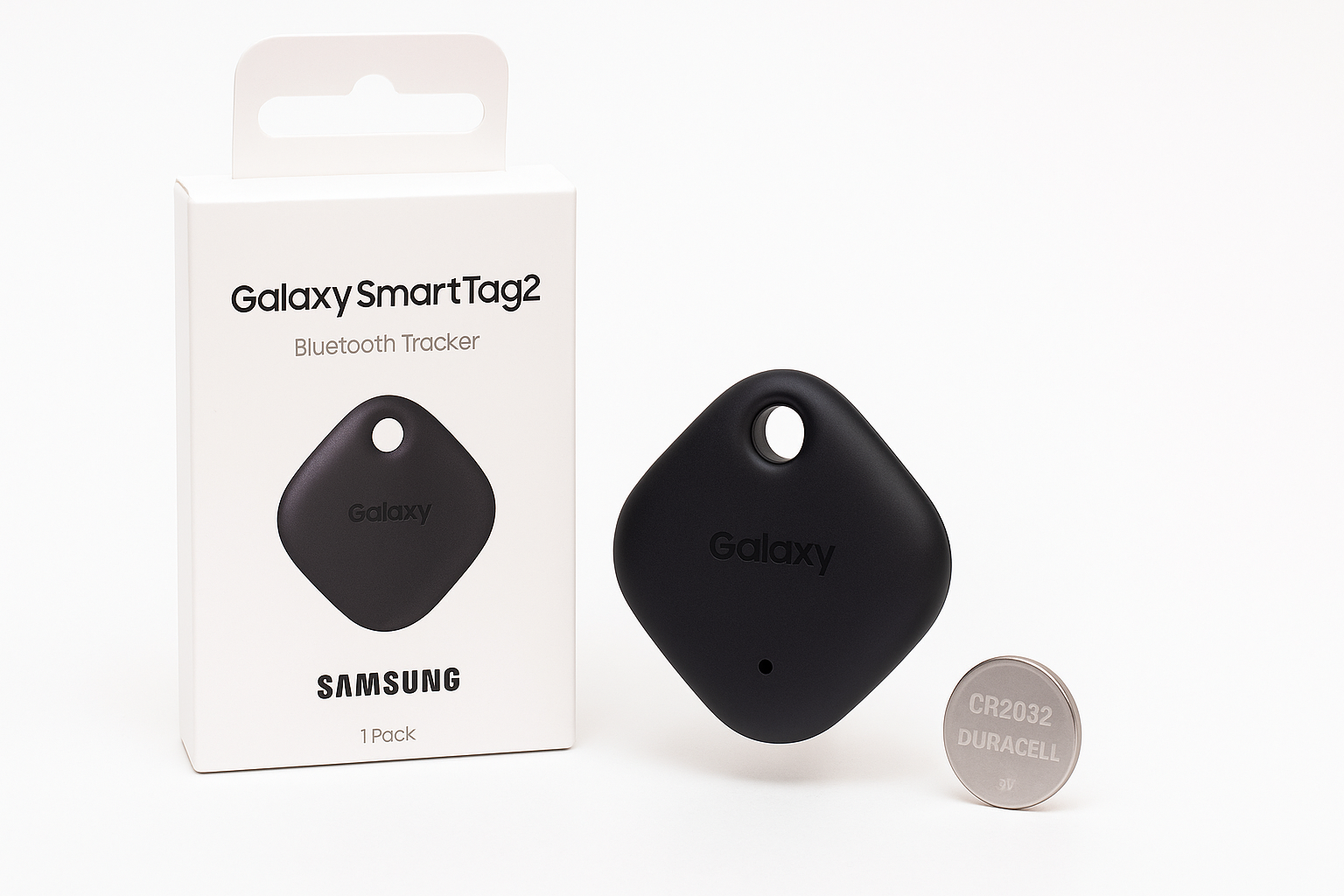
The Galaxy SmartTag2 moves away from the earlier pill‑shaped design to a compact, ring‑style body with a large cut‑out at the top. The loop is internally reinforced with metal, so attaching it to keyrings, carabiners, or pet collars feels secure and less prone to breakage than plastic‑only loops.
The IP67 rating is a practical upgrade. In everyday use, that means the tag can survive rain, splashes, or being dropped in a puddle, and it’s better suited to outdoor gear and pet collars than many basic Bluetooth fobs. It’s still not designed for prolonged swimming or salt water, but for real‑world mishaps it’s well protected.
The black finish on this particular 1‑pack version is understated and doesn’t draw much attention, which is often desirable for a tracker attached to valuables.
Setup and Compatibility
Setup is intentionally streamlined for Samsung users:
- Bring the SmartTag2 near a compatible Galaxy phone or tablet (Android 11 or later).
- A pairing prompt appears, or you open SmartThings and add a new device.
- The tag automatically links to your Samsung account and registers with SmartThings Find.
Once paired, the SmartThings app creates a shortcut to SmartThings Find on your device, giving you quick access to the map view and tag list. Switching to a new Galaxy phone is also smoother than before—the SmartTag2 can re‑sync to your new device through your Samsung account without a full re‑setup.
The flip side is that this product is effectively Samsung‑only. While a non‑Samsung phone with NFC can read the tag’s Lost Mode information in a browser, full tracking and management features depend on a Galaxy device. If you use a non‑Samsung Android phone or iPhone as your primary device, you won’t get the intended experience.
Everyday Tracking
In daily use, the SmartTag2 performs well for typical Bluetooth tracker scenarios:
- Finding nearby items: From the SmartThings Find app, you can make the tag play a sound and see its approximate location on a map. Indoors, the sound is loud enough to track down keys under a couch cushion or a bag in another room.
- Compass View (on UWB phones): With a UWB‑equipped Galaxy phone (such as recent Galaxy S and Z Fold models), you can use Compass View to show directional arrows and distance estimates to your tag. This is especially helpful in cluttered spaces or when the map gets you “close but not quite there.”
- Out‑of‑range finding: When your tag is out of Bluetooth range, SmartThings Find relies on the crowd‑sourced Samsung device network. If another Galaxy user with SmartThings Find enabled passes near your tag, its approximate location can update in your app. In regions with high Galaxy adoption, this improves the odds of recovering lost items.
The SmartTag2 also supports automation via the button on the tag. You can configure single or double‑press actions in the SmartThings app, such as turning on smart lights, toggling scenes, or triggering routines. This dual role—tracker plus remote button—adds some extra value if you already use SmartThings for home automation.
Battery Life and Maintenance
Samsung’s rated battery life of up to around 500 days in Normal mode and up to 700 days in Power Saving mode comes from using Bluetooth Low Energy, conservative location update intervals, and a low‑power chipset. In practice, real‑world life will vary depending on how often you ring the tag, how frequently the app checks in, and environmental factors.
The use of a standard CR2032 coin cell is user‑friendly: when the battery is low, you can swap it yourself rather than replacing the entire tracker. The SmartThings app provides a battery level indicator so you have ample warning before it dies.
Software Experience
The SmartThings Find interface is relatively clean and focused, featuring:
- A full‑screen map with your tagged items.
- Easy switching between devices and tags.
- Options to enable notifications—such as alerts when a tag is left behind or comes back in range.
The newer Lost Mode adds a more public‑facing safety net: you pre‑configure a message and contact details in the app. If someone finds an item with the SmartTag2 attached, they can tap it with any NFC‑capable smartphone and be taken to a web page showing how to reach you. This works regardless of whether the finder uses a Samsung device, which is a smart way of softening the ecosystem lock‑in.
One important consideration is that the crowd‑sourced network is only as strong as the number of Samsung users running SmartThings Find in your area. In densely populated regions with high Galaxy adoption, this can work well. In areas where Galaxy and SmartThings usage is rare, the tracker behaves more like a classic Bluetooth fob—excellent at close‑range finding, less effective when truly lost far away.
Pros
- Deep integration with Samsung Galaxy devices for streamlined setup and daily use.
- Strong battery life with claims of well over a year per CR2032 in typical conditions.
- Compact, redesigned ring form factor with metal‑reinforced loop for more secure attachment.
- IP67 dust and water resistance, suitable for outdoor gear and pet collars.
- UWB‑powered Compass View on supported Galaxy phones for more precise locating.
- SmartThings Find network support to help locate items beyond Bluetooth range.
- Lost Mode with NFC, allowing any NFC‑enabled phone to see your contact details via a browser.
- Configurable button can trigger SmartThings routines, doubling as a simple smart home remote.
- Uses a standard, user‑replaceable coin cell battery.
Cons
- Locked to the Samsung ecosystem for full functionality; not suitable if you primarily use non‑Samsung phones.
- Crowd‑sourced location network is dependent on local Samsung/SmartThings usage, which may be sparse in some regions.
- No built‑in GPS; all location is derived from Bluetooth connections to nearby devices.
- Requires some initial SmartThings setup and permissions, which can be a bit involved if you’re new to Samsung’s ecosystem.
- Single‑pack version may feel limited if you need to track multiple items (though multi‑packs exist separately).
Verdict
The Samsung Galaxy SmartTag2, Bluetooth Tracker, Smart Tag GPS Locator Tracking Device, Item Finder for Keys, Wallet, Luggage, Pets (1 Pack, Black) is a thoughtfully updated tracker that makes the most sense if you already own a compatible Samsung Galaxy phone or tablet. It offers a noticeable step up over the original SmartTag in battery life, durability, and software refinements, while the new ring design is both more robust and easier to attach.
Its biggest strength—tight Samsung integration—is also its primary limitation. For users tied to the Galaxy ecosystem, the SmartTag2 is a highly practical way to add tracking to valuables at a reasonable cost of around $26.98. For those on other Android devices or iOS, a cross‑platform tracker will be a better fit.
If you want a low‑maintenance, water‑resistant, and long‑lasting tracker for everyday items and you’re comfortable living in Samsung’s SmartThings world, the Galaxy SmartTag2 is one of the most coherent and convenient options currently available.