
Life360 Tile (1‑Pack, Black) Review: A Simple Bluetooth Tracker With Tight Life360 Integration
What This Product Is
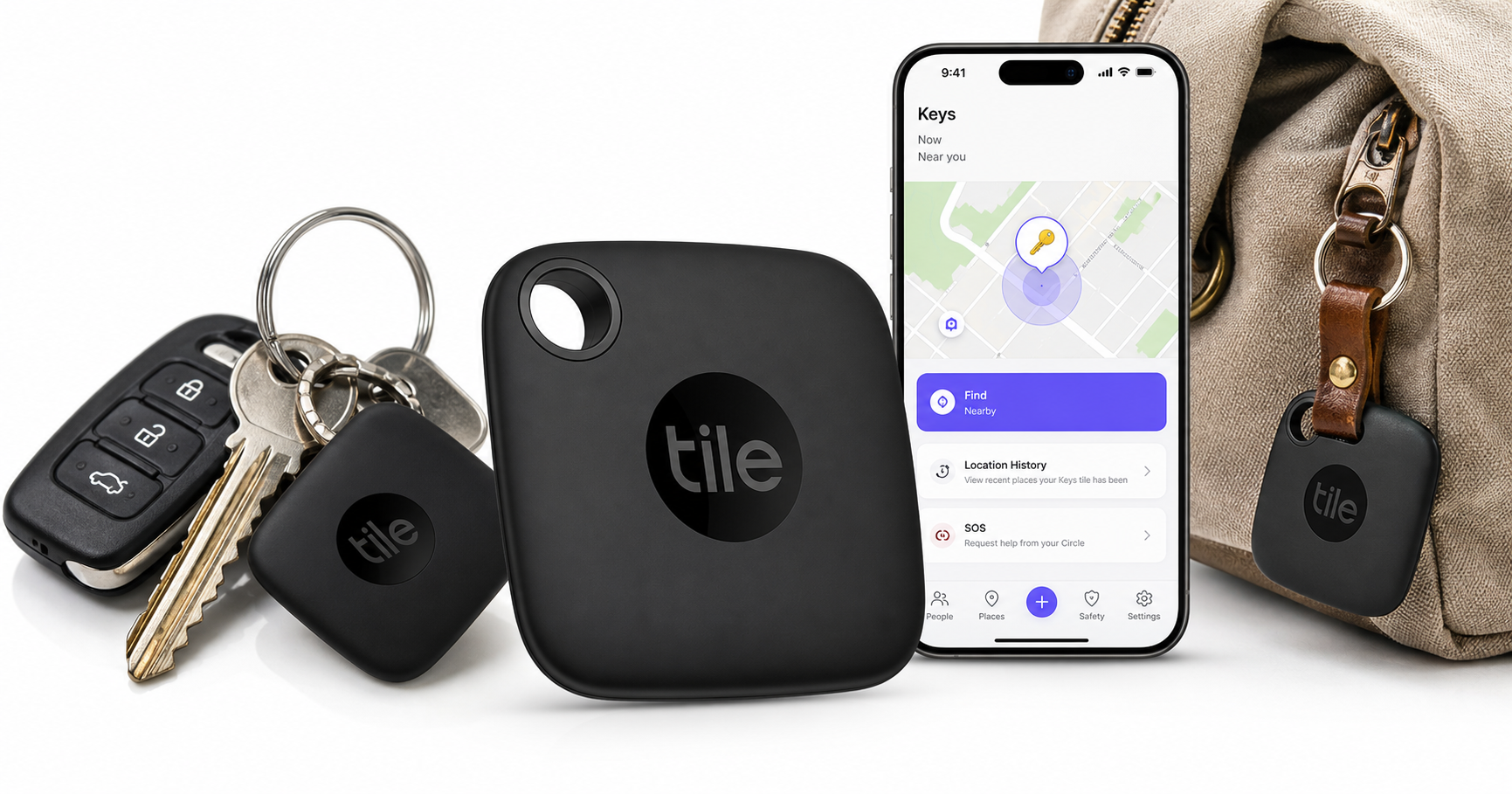
The Life360 Tile – Bluetooth Tracker, Keys Finder and Item Locator (1‑Pack, Black) is a small Bluetooth tracking tag designed to help you locate commonly misplaced items such as keys, bags, backpacks, and other everyday carry essentials.
Physically, it’s a lightweight, square tracker with a built‑in keyring hole so you can attach it directly to a keychain or strap it to a bag. It connects to your phone over Bluetooth and works with both iOS and Android via the Tile or Life360 apps. Within Bluetooth range, you can make the Tile ring to help you find it by sound; outside of range, you can see its last known location on a map and rely on the broader Tile/Life360 network to refresh its location when another participating phone passes nearby.
Although exact pricing fluctuates, this single‑pack configuration is typically positioned as an entry‑level way to try the Life360 Tile ecosystem, often coming in around $24.99 for the 1‑Pack (Black).
Why It Matters
Losing keys, a work badge, or a backpack can be more than just annoying—it can disrupt your day, cost money to replace, and sometimes raise safety concerns if house or car keys are involved. Bluetooth trackers like the Life360 Tile exist to reduce that friction.
Several aspects make this particular tracker notable:
- Cross‑platform support: Because it works with both iOS and Android, it can serve mixed‑device households, unlike some platform‑locked trackers.
- Life360 ecosystem integration: Life360 has become a popular family safety and location‑sharing app. Being able to see people, pets, and now items in the same map view can simplify how families manage everyday logistics.
- SOS functionality on newer Tiles: On compatible 2024‑lineup devices, pressing the Tile button multiple times can trigger an SOS alert to your Life360 Circle, sharing your location in a discreet way. (intl.life360.com)
For many users, that combination of item‑finding and family‑safety features is the main reason to choose a Life360 Tile over a basic, stand‑alone Bluetooth tracker.
Key Advantages
1. Simple, Familiar Item‑Finding Experience
The Life360 Tile behaves like a modern Bluetooth tracker should:
- Ring your things: From the app, you can make the Tile play a tone to guide you to your keys or bag when it’s nearby.
- Find your phone: Pressing the Tile button can make your phone ring, even if it’s on silent (app and permissions required).
- Map view for last known location: If you’re out of Bluetooth range, you can check the app to see the last place your Tile was connected.
The interface is intentionally minimal, which helps non‑technical users get started quickly.
2. Integration With Life360
If you already use Life360 for family location sharing, the Tile adds another layer:
- Unified map: Items can appear alongside people and pets in the Life360 app, reducing the need to juggle multiple tracking apps. (intl.life360.com)
- Network effect: Life360 and Tile users collectively help update each other’s Tile locations when trackers are spotted via Bluetooth. This can improve the odds of seeing a refreshed location when an item is lost away from home. (intl.life360.com)
For families who already rely on Life360, adding Tiles for high‑value or frequently misplaced items can be a natural extension.
3. Cross‑Platform Compatibility
Because the Life360 Tile works with both iOS and Android, mixed‑device families don’t need separate ecosystems for item tracking:
- iPhone users access trackers from the Tile or Life360 iOS app.
- Android users can do the same from the Android versions.
If grandparents, babysitters, or roommates use a mix of platforms, everyone can still help find shared items, as long as they’re part of the same Tile or Life360 setup.
4. SOS Button on Newer Models (When Paired With Life360)
On the latest Life360 Tile models, pressing the Tile button three times can send a discreet SOS alert to your Life360 Circle. This includes:
- A notification to Circle members.
- Your shared location at the time of the SOS.
While not a replacement for dedicated emergency devices, it’s a useful extra in situations where pulling out your phone might feel uncomfortable or unsafe. (intl.life360.com)
5. Small, Lightweight, and Easy to Attach
The Black 1‑Pack variant is designed for keys and small items:
- Integrated keyhole makes it easy to put on a keyring or carabiner.
- Low profile means it won’t add much bulk to your pocket or bag.
For most people, it’s unobtrusive enough to attach and forget—until you need it.
Key Limitations
1. Bluetooth Range and Update Frequency
Like all Bluetooth trackers, the Life360 Tile has range and update limitations:
- Effective range is typically a few hundred feet in open space; walls and other obstacles reduce this.
- Location updates depend on being within range of your phone or another Tile/Life360 user. If your lost item isn’t near participating devices, location won’t update in real time. (life360.com)
If you need continuous, wide‑area tracking (for vehicles, shipments, or remote equipment), a dedicated GPS tracker with cellular connectivity will be more appropriate than a Bluetooth Tile.
2. Reliance on the Tile/Life360 Network
The usefulness of community‑based updates is tied to how many people around you use Tile or Life360 and have Bluetooth and the app running:
- In dense urban areas with many users, your chances of seeing updated locations are better.
- In rural or low‑traffic regions, your Tile could go unseen for long periods.
This is a general trade‑off with all Bluetooth trackers, not unique to Life360 Tile, but it’s important to understand if you expect near‑real‑time tracking.
3. Privacy and Data‑Sharing Concerns
Life360 has previously drawn criticism over how it handled location data, raising concerns for privacy‑conscious users. While policies evolve, some users remain cautious about giving Life360 detailed location history for people and items. (androidauthority.com)
If you’re sensitive about data collection and third‑party sharing, you’ll want to review the current Life360 and Tile privacy policies carefully before committing.
4. Not Part of Apple’s or Google’s Native Find Networks
Unlike Apple’s AirTag (which integrates with Apple’s Find My network) or upcoming native trackers tied to Google’s Find My Device, the Life360 Tile relies on its own ecosystem:
- You must use the Tile or Life360 apps; you won’t see these trackers inside Apple’s or Google’s built‑in device‑finding interfaces.
- The network of devices that can spot your Tile is limited to users with those apps installed.
If you live deep in Apple’s ecosystem and want the widest possible crowd‑finding network, you may find an AirTag more effective.
5. Single‑Item Starter Pack May Feel Limiting
This 1‑Pack (Black) is a good starter, but many users quickly realize they want multiple trackers—for keys, bags, luggage, and possibly a wallet or camera bag. Because this is a one‑unit package, you may outgrow it and need to purchase additional Tiles.
Who It’s For
The Life360 Tile 1‑Pack (Black) is best suited for:
- Life360 families and circles: If you already use Life360 daily and want to extend that map to include keys, bags, or other valuables, this Tile fits right in.
- Households with mixed devices: Families or shared homes where some use iOS and others use Android can all participate in finding items.
- People who frequently misplace keys or bags at home or work: For desk‑to‑sofa‑to‑car scenarios, the ring‑to‑find and last‑location features are very effective.
- Users who value a discreet SOS option: Those who like the idea of an unobtrusive, wearable or carry‑able button that can alert family members in a pinch (on supported models) may see added value.
- Gift buyers: As a small, practical tech gift, a single Tile is easy to give without requiring the recipient to buy into a whole system upfront.
Who Should Skip It
You may want to look for alternatives if:
- You need continuous, long‑distance tracking: For vehicles, bikes left in public spaces, or high‑value gear on the move, a GPS/cellular tracker or native device‑finding ecosystem (Apple/Google) may be more appropriate.
- You’re deeply invested in Apple’s Find My ecosystem: If all your devices are Apple and you want maximum benefit from the existing Find My network, an AirTag may perform better in terms of crowd‑sourced location updates.
- You’re highly privacy‑sensitive: If prior reports about Life360’s data practices give you pause, you may prefer a tracker from a company with a different privacy posture, or you may decide to avoid cloud‑based location tracking altogether.
- You dislike installing extra apps: Because full functionality depends on the Tile or Life360 apps, this is not ideal if you want to avoid additional app installations or background services.
Final Recommendation
The Life360 Tile Bluetooth Tracker (1‑Pack, Black) is a straightforward, capable item finder that shines in households already using Life360 or those needing a cross‑platform tracker for everyday items. Its Bluetooth‑based design is best for short‑range and around‑town scenarios, not for continuous or long‑distance asset tracking.
If you’re a Life360 user or a family that mixes iOS and Android devices, starting with this 1‑Pack at around $24.99 can be a sensible way to add item tracking to your existing setup. However, if you prioritize maximum crowd‑finding reach within Apple’s or Google’s native networks, or if you have strong privacy reservations about Life360, you may want to compare this Tile against alternative trackers before deciding.
For most people who simply want an affordable, easy‑to‑use way to stop losing keys and bags—and who are comfortable with the Life360 ecosystem—the Life360 Tile 1‑Pack (Black) is a practical and effective choice.