
Metapen A8 iPad Pencil Review: A Fast-Charging Apple Pencil Alternative for 2018–2026 iPads
Overview
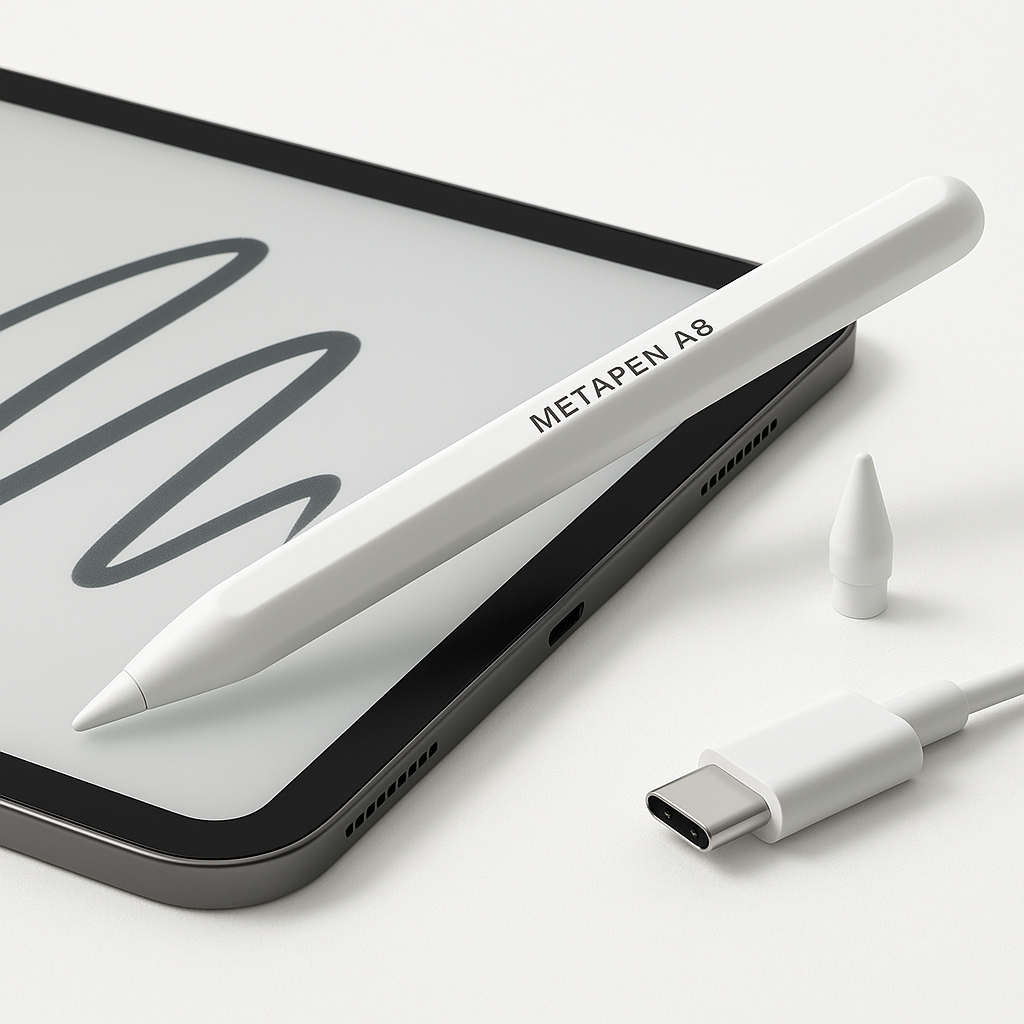
The Metapen A8 iPad Pencil is a budget‑friendly, active stylus built specifically for modern Apple iPads (2018–2026). It’s aimed at students, professionals, and hobbyist artists who want a near Apple Pencil experience—tilt input, palm rejection, and strong precision—without paying for Apple’s first‑party styluses.
Key points at a glance:
- Compatibility: iPad 6th–10th gen, iPad Pro 11" (1st–4th gen and M4), iPad Pro 12.9" (3rd–6th gen), iPad Pro 13" M4, iPad Air 3/4/5/M2/M3, iPad Mini 5/6 (not for pre‑2018 iPads, iPhone, Android, or Windows). (manuals.plus)
- Charging & battery: USB‑C, about 30 minutes for a full charge and up to ~10 hours of use; approximately 1 minute for ~50 minutes of operation and 4 minutes for about 2 hours. (newegg.com)
- Input features: Tilt sensitivity for shading, palm rejection on compatible iPads, and 0.1 mm / ~0.004 in claimed pixel‑level precision (no pressure sensitivity). (newegg.com)
- Ergonomics: Lightweight pen‑style body with a flat side and magnetic attachment on recent iPad Pro, Air, and Mini models (attachment only—no wireless charging). (prezzo.it)
- Price positioning: Typically sits well below Apple Pencil pricing, often around $14.99, making it attractive as a cost‑conscious upgrade.
Overall, the Metapen A8 is designed as a cross‑generation, fast‑charging stylus that closely mimics the feel of a traditional pencil while keeping the setup as simple as possible (no Bluetooth pairing required).
Standout Features
1. Broad iPad Compatibility (2018–2026)
One of the Metapen A8’s biggest strengths is its wide support across recent iPads. The manufacturer lists compatibility with:
- Standard iPad: 10th, 9th, 8th, 7th, and 6th gen
- iPad Pro:
- 11" – 1st, 2nd, 3rd, 4th gen and M4
- 12.9" – 3rd, 4th, 5th, and 6th gen
- 13" – M4
- iPad Air: 3rd, 4th, 5th gen, plus M2 and M3 generations
- iPad Mini: 5th and 6th gen (manuals.plus)
If your iPad was released from 2018 onward, there’s a good chance the A8 will work, but it’s still critical to verify the exact model number in your iPad’s settings before purchasing.
2. Rapid USB‑C Charging
Charging convenience is a core selling point of the A8. The pen uses USB‑C—matching modern iPads—so you can often reuse the same cable.
Metapen claims: (newegg.com)
- Full charge in around 30 minutes
- Up to 10 hours of continuous use on a full charge
- Roughly 1 minute of charging for 50 minutes of use
- About 4 minutes for 2 hours of use
In everyday terms, that means a short top‑up before class, a meeting, or a drawing session is usually enough to get you through.
3. Tilt Sensitivity and Pixel‑Level Precision
The Metapen A8 is designed for fine handwriting and sketching:
- Tilt sensitivity: When you angle the pen, strokes can change in width or opacity (depending on the app), allowing more natural shading.
- High claimed precision: Marketing materials cite 0.1 mm / ~0.004 in accuracy with high responsiveness and no noticeable delay. (newegg.com)
- No pressure sensitivity: Unlike Apple Pencil, pressing harder does not change line thickness—apps will treat all strokes as a single pressure level.
The combination of tilt plus fine accuracy makes it particularly appealing for note‑taking, markup, and light illustration, though advanced artists who rely heavily on pressure curves may find it limiting.
4. Palm Rejection
The A8 supports palm rejection on compatible iPads running supported iPadOS versions. You can rest your hand on the screen while writing or drawing, and the iPad should recognize only the pen input.
Setup tips from Metapen’s documentation include: (manuals.plus)
- Ensuring your iPad is updated to at least iOS/iPadOS 12.2 or later
- Disabling any previous Apple Pencil pairing before use
- Turning off “Only draw with Apple Pencil” in iPad settings if enabled
5. Magnetic Attachment (On Supported Models)
With integrated magnets, the Metapen A8 can attach to the side of certain iPads, including: (prezzo.it)
- iPad Pro 11" (1st–3rd gen and later compatible versions)
- iPad Pro 12.9" (3rd–5th gen and later compatible versions)
- iPad Air 4/5
- iPad Mini 6
This makes it less likely to roll off desks and easier to keep track of. However, unlike Apple Pencil 2, the magnetic mount does not provide wireless charging—you still charge via USB‑C.
Supporting Features
Beyond the headline capabilities, the Metapen A8 includes several practical touches that round out the experience.
Simple On/Off Control
Instead of Bluetooth pairing or a physical switch, the A8 uses double‑tap on the pen’s top to turn it on or off. (manuals.plus)
That keeps the setup straightforward:
- Ensure your compatible iPad is updated.
- Make sure any Apple Pencil is unpaired.
- Double‑tap the A8’s top to power it, then start writing in a supported app.
No Bluetooth Pairing Required
The A8 functions as a direct active stylus and does not require a Bluetooth connection to work. You don’t get advanced Apple Pencil‑specific features (like system‑level hover previews or tool switching), but you also avoid pairing glitches and battery drain from a persistent Bluetooth connection.
Replaceable Tips
Metapen and third‑party sellers offer replacement tips compatible with the A8, so the pen’s lifespan isn’t limited to the original nib. This is especially important for users who do a lot of digital drawing or aggressive handwriting. (prezzo.it)
Warranty and Support
Documentation references a 12‑month warranty and 24‑hour email support for troubleshooting. While the quality of support will vary by region and retailer, having a defined warranty period is reassuring when choosing a third‑party stylus. (manuals.plus)
Usability
Setup Experience
For supported iPads, getting started is generally quick:
- Check compatibility: Verify your iPad model (Settings → General → About) and confirm it’s on the 2018–2026 list.
- Update software: Ensure iPadOS is up to date. Older versions may have palm‑rejection quirks.
- Unpair Apple Pencil (if applicable): If your iPad has previously been paired with an Apple Pencil, remove that pairing before using the Metapen A8. (manuals.plus)
- Turn on the stylus: Double‑tap the top of the pen.
- Open a compatible app: Such as Notes, GoodNotes, Notability, or Procreate.
Because there’s no Bluetooth pairing, the process is less intimidating for non‑technical users, though you give up some OS‑level integration.
In‑Hand Feel and Ergonomics
The Metapen A8 is broadly similar in size and shape to many active styluses, with a slim barrel and flat side for magnet attachment. Weight is light enough for long writing sessions, and the matte finish (where present) aids grip.
For note‑takers and students who spend hours annotating PDFs or writing lecture notes, the A8 strikes a good balance between comfort, control, and portability.
Everyday Workflow
In daily use, the A8 is suitable for:
- Note‑taking: Digital notebooks, to‑dos, and classroom notes
- Document markup: Highlighting, signing PDFs, and commenting on drafts
- Light illustration: Sketching, concept art, diagrams, and UI wireframes
- Navigation: Tapping icons and UI elements with more precision than a finger
Quick top‑off charging and long idle times between charges mean it’s easy to grab the pen and start writing without much preparation.
Performance
Input Accuracy and Latency
Thanks to its active tip and iPad’s display tech, the A8 can feel very close to a native pen experience in many apps:
- Fine strokes: Claimed pixel‑level precision (0.1 mm) enables small handwriting and detailed marks.
- Low latency: With recent iPads and optimized apps, on‑screen ink typically follows the pen tip closely enough for handwriting and sketching. (newegg.com)
However, being a third‑party stylus, performance can vary between apps and OS versions. Some users report skipped strokes or intermittent detection in specific scenarios, especially after major iPadOS updates or on less common apps. (reddit.com)
Practical takeaways:
- For standard uses (Notes, markup, mainstream drawing apps), performance is generally smooth.
- If you rely on niche creative tools or are on a very new OS version, expect to test and potentially tweak settings.
Palm Rejection Reliability
Palm rejection is largely handled by the iPad’s OS. When configured correctly, most users can rest their hand on the display without generating stray marks.
That said, documentation and user discussions highlight important caveats: (manuals.plus)
- Replaced or third‑party screens can interfere with stylus recognition.
- Certain iPad settings (like "Only draw with Apple Pencil") can block input from third‑party pens.
- Major iPadOS updates occasionally introduce input lag or recognition issues until software is patched.
Battery Life in Practice
Real‑world battery life depends on workload and idle behavior, but the combination of fast top‑ups and ~10‑hour quoted runtime means most people won’t run it dry in a single workday. (newegg.com)
For students:
- A quick charge during breakfast or between classes often covers a full day of note‑taking.
For professionals and artists:
- Leaving a USB‑C cable at your desk makes it simple to plug in for a few minutes if the LED indicates a low battery.
App Compatibility
Because the A8 acts as an active capacitive stylus without deep OS integration, it works with almost any ink‑capable app that accepts standard touch/stylus input. This includes:
- Apple Notes
- GoodNotes / Notability
- Procreate and other drawing suites
- PDF editors and annotation tools
Some specialized apps (for example, those that only fully support Apple Pencil APIs) may not expose all features or may require configuration, and occasional reports mention issues with specific tools such as Clip Studio on certain setups. (reddit.com)
Pros and Cons
Pros
- Broad compatibility with a large range of iPad models from 2018 through 2026, including latest Pro and Air lines.
- Fast USB‑C charging with convenient short top‑offs and up to ~10 hours of use per full charge.
- Tilt sensitivity and palm rejection for a more natural writing and sketching feel.
- High claimed precision suitable for small handwriting, markups, and detailed diagrams.
- Magnetic attachment to supported iPads for improved portability and reduced risk of loss.
- Simple setup with no Bluetooth pairing and intuitive double‑tap on/off.
- Lower cost than Apple Pencil models, with pricing commonly around $14.99, improving value for budget‑conscious buyers.
- Replaceable tips and stated 12‑month warranty, enhancing long‑term usability.
Cons
- No pressure sensitivity, which can be a deal‑breaker for advanced illustrators who depend on nuanced line weight control.
- Occasional compatibility and stability issues reported around certain apps or after major iPadOS updates (e.g., intermittent input, lag, or connection hiccups in specific setups).
- Magnetic attachment does not charge the pen—you still need to plug in via USB‑C.
- Not compatible with pre‑2018 iPads, iPhones, Android, or Windows devices, limiting cross‑platform flexibility.
- Fewer OS‑integrated features compared with Apple Pencil (no hover preview on supporting models, limited system shortcuts).
Summary
The Metapen A8 iPad Pencil is a compelling Apple Pencil alternative for users whose priorities are broad compatibility, rapid charging, and solid everyday writing performance—without paying a premium.
For students and general productivity users, the combination of palm rejection, tilt sensitivity, USB‑C fast charging, and compatibility with many 2018–2026 iPads makes the A8 a strong value choice. Its lower price point (often around $14.99) enhances its appeal as a first stylus or a backup pen.
For creative professionals, the lack of pressure sensitivity and occasional third‑party‑stylus quirks may be limiting. If you depend on the full Apple Pencil feature set, first‑party hardware still provides the most consistent results.
If you own a compatible iPad and primarily need a pen for note‑taking, annotation, and light sketching, the Metapen A8 offers a well‑balanced mix of features, performance, and affordability that makes it worth serious consideration.