
Apple iPad Pro 13‑inch (M5, 256GB) Review: Ultra Retina XDR Powerhouse for Creators and Pros
Product Summary
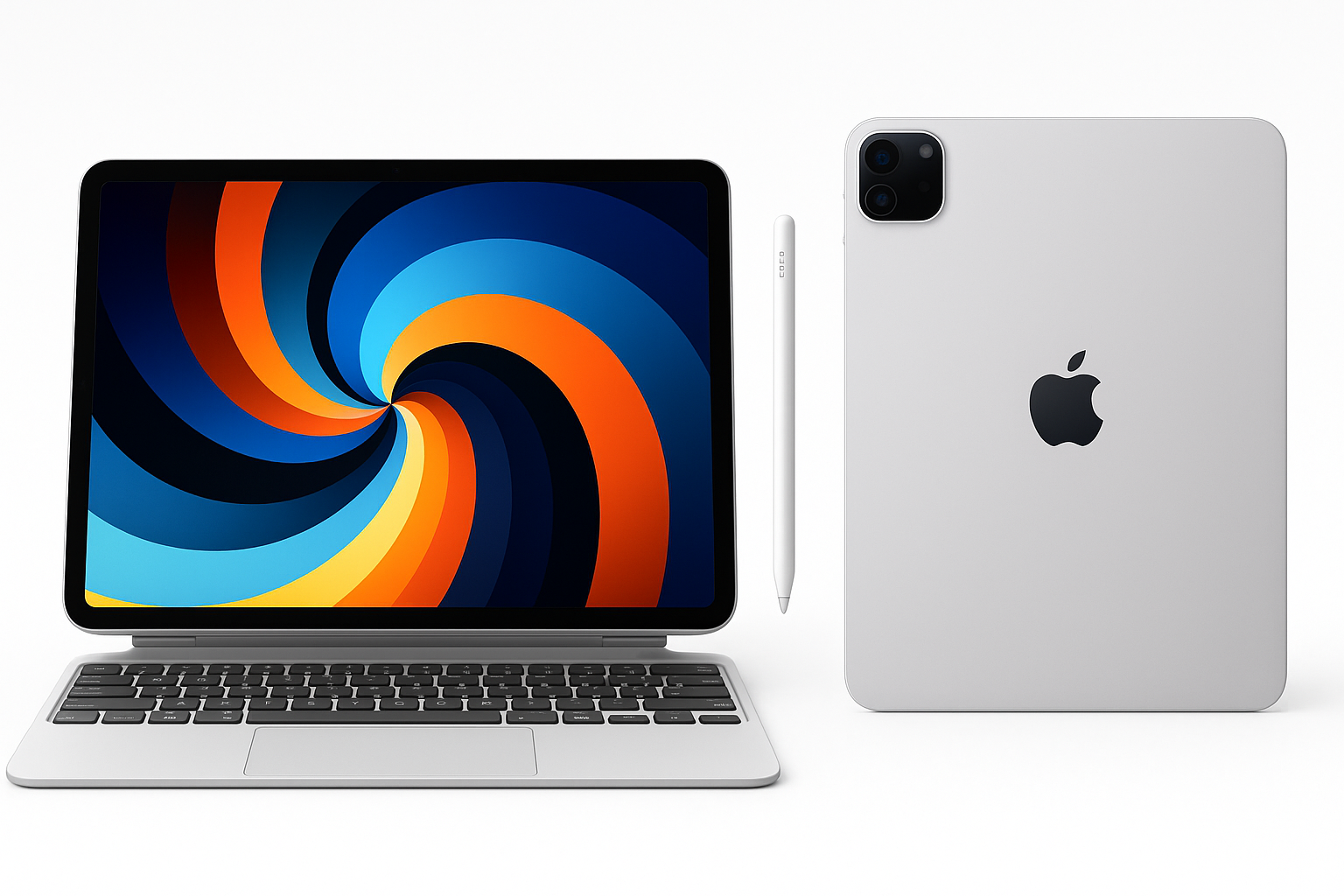
The Apple iPad Pro 13‑inch (M5) with 256GB of storage and Wi‑Fi is Apple’s large‑screen flagship tablet, designed to blur the line between tablet and laptop. It features a 13‑inch Ultra Retina XDR display based on tandem OLED technology, capable of extreme brightness and precise contrast with ProMotion up to 120Hz and wide P3 color. Powered by the M5 chip, it delivers desktop‑class performance and is built to run Apple Intelligence features on‑device.
This configuration pairs the 13‑inch panel with 256GB of storage, a landscape‑oriented 12MP front camera optimized for video calls in horizontal use, a 12MP rear camera with LiDAR Scanner for depth‑sensing and AR, and Wi‑Fi 7 connectivity with the Apple N1 wireless chip for low‑latency, high‑throughput networking. Face ID handles secure authentication, and Apple rates the tablet for all‑day battery life under typical mixed use.
If you purchase this specific 13‑inch, 256GB Wi‑Fi model from Amazon, expect a premium flagship tablet positioned at around $1199.00, reflecting both the high‑end display and workstation‑level performance.
Target Users
This iPad Pro 13‑inch (M5) is best suited for:
-
Creative professionals
- Photo and video editors who benefit from the tandem OLED Ultra Retina XDR panel’s HDR capability, deep blacks, and accurate color.
- Illustrators and designers using Apple Pencil Pro for drawing, painting, or layout work on a large digital canvas.
- Musicians, audio producers, and content creators who rely on low‑latency performance and powerful apps.
-
Productivity‑focused users and students
- Users who want to pair the iPad Pro with a Magic Keyboard (or similar) and use it as a near‑laptop replacement for writing, research, and multitasking.
- Graduate‑level students or professionals who annotate PDFs, take handwritten notes, run reference apps, and split‑screen multitask extensively.
-
Developers, technical users, and power users
- Those who run heavy productivity workflows, large spreadsheets, data dashboards, or remote desktop sessions and need fast performance plus a high‑quality display.
- Users who intend to make use of Apple Intelligence and on‑device AI features as they continue to roll out in iPadOS.
-
AR, 3D, and CAD users
- Professionals and enthusiasts who use LiDAR‑enabled AR apps, 3D scanning, architectural visualization, or room‑mapping tools.
-
Media consumers who value image quality above all
- Viewers who prioritize OLED‑level contrast, HDR movies, and smooth 120Hz scrolling for reading, gaming, and streaming.
More casual users whose primary needs are email, light browsing, and streaming may find an iPad Air or standard iPad to be more cost‑effective than this Pro‑level configuration.
Main Benefits
1. Ultra Retina XDR Tandem OLED Display
The standout feature is the 13‑inch Ultra Retina XDR display using tandem OLED technology. It supports very high full‑screen brightness for both SDR and HDR, along with up to 1600 nits peak in HDR content on compatible material. Combined with ProMotion (adaptive 10–120Hz refresh), P3 wide color, and True Tone, it delivers:
- Exceptionally high contrast with inky blacks and bright highlights.
- Smooth scrolling and animation, especially noticeable in drawing apps and games.
- Accurate color reproduction suitable for photo grading and design work.
For users who care about visual quality for both content creation and consumption, this is one of the most compelling tablet displays available.
2. M5 Performance and On‑Device Intelligence
The M5 chip brings multi‑core CPU and advanced GPU performance that rivals modern laptops. In practice this means:
- Fast app launches, near‑instant multitasking, and responsive Stage Manager workflows.
- Smooth handling of large photo libraries, 4K video editing workflows (especially ProRes), and complex layered documents.
- Headroom for Apple Intelligence features, which depend heavily on on‑device processing and neural engine throughput.
For power users coming from earlier iPad Pro generations (e.g., M1 or older), the combination of faster CPU, GPU, and neural processing offers better future‑proofing, especially as iPadOS and professional apps grow more demanding.
3. Large 13‑Inch Canvas
The 13‑inch size gives meaningfully more screen real estate than 11‑inch models while remaining thin and relatively light. Benefits include:
- More comfortable side‑by‑side multitasking with two full‑size apps plus a third in Slide Over.
- Larger drawing and note‑taking area, especially useful when using Apple Pencil Pro for detailed artwork or technical diagrams.
- A more laptop‑like experience when docked to a keyboard, reducing the feeling of working on a cramped screen.
Users who frequently use the iPad as a primary productivity device or creative workstation generally appreciate the 13‑inch form factor.
4. Landscape Front Camera and LiDAR‑Enabled Rear System
The 12MP landscape‑oriented front camera is ideal for video calls when the iPad is used horizontally on a stand or keyboard. It supports features like Center Stage to keep you in frame during movement.
The 12MP rear camera paired with a LiDAR Scanner adds depth‑sensing capability for:
- AR applications, room mapping, and object placement.
- 3D scanning, measurement, and design workflows.
- Improved low‑light focus and depth‑aware photo effects.
While many users will still prefer a phone or dedicated camera for photography, the rear system is more than sufficient for document capture, quick field photos, and AR‑centric professional tasks.
5. Wi‑Fi 7 with Apple N1 Wireless Chip
With Wi‑Fi 7 and the Apple N1 wireless chip, this iPad Pro is built for high‑bandwidth, low‑latency networking. On compatible Wi‑Fi 7 routers, you can expect:
- Faster large file transfers to network storage or cloud services.
- Lower latency for cloud streaming, remote desktops, and online collaboration.
- Better performance in congested wireless environments.
For users who frequently sync large media projects or rely on real‑time cloud workflows, the networking improvements are a meaningful quality‑of‑life upgrade.
6. All‑Day Battery Life
Despite the powerful chip and bright OLED panel, Apple targets all‑day battery life for typical workflows such as web browsing, media consumption, and note‑taking. Real‑world runtime will vary depending on brightness, HDR use, and heavy compute workloads, but for most office, school, or mixed creative days, a single charge is usually sufficient.
Key Considerations
Before choosing this iPad Pro configuration, keep these points in mind:
-
Price and value
This 13‑inch M5 model is a premium device, and the 256GB Wi‑Fi configuration commonly sits around $1199.00. Once you add accessories like Apple Pencil Pro and a keyboard case, the total investment approaches or exceeds many high‑end laptops. -
256GB storage limitations
While 256GB is adequate for many users, professional video editors, large photo library owners, or heavy offline media consumers may quickly hit storage limits. Cloud storage and external drives over USB‑C/Thunderbolt can help, but you’ll need to manage files more actively than on a 512GB or 1TB model. -
iPadOS vs. macOS or Windows
Even with Stage Manager and robust pro apps, iPadOS remains more constrained than desktop OSes when it comes to traditional windowing, file system operations, some development workflows, and certain niche professional tools. Consider whether your day‑to‑day software stack is well‑supported on iPadOS. -
Accessory costs
To unlock the full potential of the iPad Pro as a workstation, many users will add accessories such as Apple Pencil Pro and a Magic Keyboard‑style case. These significantly increase the total cost of ownership and should be part of your budget planning. -
Potential OLED burn‑in and brightness behavior
As with any OLED‑based panel, long‑term use with static UI elements can theoretically introduce burn‑in over many years, and brightness may be managed dynamically for thermal and power reasons. For most mixed‑use patterns this is a minor concern, but professionals who run static content at high brightness for extended durations should be aware.
Pros
- Class‑leading 13‑inch Ultra Retina XDR tandem OLED display with superb HDR, deep blacks, and 120Hz ProMotion for both content creation and consumption.
- Powerful M5 chip delivering laptop‑class multi‑core and GPU performance with plenty of headroom for professional apps and Apple Intelligence features.
- Generous 13‑inch canvas that significantly improves multitasking, drawing, note‑taking, and keyboard‑based workflows compared with smaller tablets.
- Landscape 12MP front camera ideal for video conferencing when docked; 12MP rear camera plus LiDAR for AR, scanning, and depth‑aware tasks.
- Wi‑Fi 7 with Apple N1 wireless for high‑speed, low‑latency networking on compatible routers.
- Face ID for fast, secure, and reliable authentication in both portrait and landscape orientations.
- All‑day battery life under typical usage scenarios, even with demanding apps.
- Thin, light chassis relative to the display size, maintaining portability despite the 13‑inch screen.
Cons
- High overall cost, especially once you include a keyboard case and Apple Pencil Pro; the effective system price often rivals premium laptops around $1199.00 or higher depending on configuration and accessories.
- 256GB storage can be limiting for 4K video projects, large local media libraries, and multi‑app pro workflows without frequent offloading to external or cloud storage.
- iPadOS constraints mean some professional workflows (software development, certain specialized desktop apps, complex multi‑window setups) may still require a Mac or PC.
- Large footprint; while thin and light, the 13‑inch size is less convenient for one‑handed tablet use or reading compared with 11‑inch models.
- Accessory ecosystem is expensive, and third‑party options, while available, may not fully match Apple’s accessories in integration or feel.
- Potential OLED‑specific concerns such as long‑term burn‑in risk for static UI and dynamic brightness behavior under sustained HDR workloads.
Alternatives
Direct alternatives to consider based on needs and budget include:
-
Apple iPad Pro 11‑inch (M5)
- Same M5 performance and Ultra Retina XDR display technology in a smaller footprint.
- Better for handheld use, travel, and users who prioritize portability over screen area.
- Multitasking and drawing space are more constrained than on the 13‑inch, but many users find the 11‑inch size more balanced.
-
Apple iPad Air (M‑series)
- More affordable with a still‑strong M‑series chip (but usually LCD rather than tandem OLED).
- Better choice for students and general users who don’t need the very best display or top‑tier performance.
- Pairs well with a keyboard and Pencil, but lacks some of the Pro’s headroom and premium features.
-
MacBook Air or MacBook Pro
- For users whose workflows are heavily desktop‑app‑oriented (development, complex spreadsheets, specialized native software), a MacBook may be more flexible.
- You’ll lose touch and Pencil input but gain a traditional desktop OS with more robust multitasking and file management.
-
High‑end Windows ultrabooks or 2‑in‑1s
- Devices such as premium 2‑in‑1 laptops can provide full desktop operating systems with touch and pen support.
- Typically heavier and less optimized for tablet‑only use than the iPad, but may better fit enterprise or legacy software requirements.
When comparing alternatives, evaluate not just hardware but also ecosystem, apps, and whether you need iPadOS‑exclusive creativity tools versus desktop‑class software.
Conclusion
The Apple iPad Pro 13‑inch (M5, 256GB, Wi‑Fi, Silver) is a top‑tier tablet that excels in display quality, performance, and versatility. Its Ultra Retina XDR tandem OLED panel, powerful M5 processor, and Wi‑Fi 7 connectivity create an excellent platform for creative professionals, students with demanding workloads, and anyone looking to push tablet‑based productivity to the limit.
However, its premium pricing around $1199.00, accessories that add substantial extra cost, and the inherent constraints of iPadOS mean it’s not the right choice for every user. If you’ll genuinely take advantage of the 13‑inch canvas, pro‑grade display, M5 performance, and Apple Intelligence capabilities, this model is one of the strongest tablets you can buy. If your needs are more casual or heavily depend on traditional desktop software, an iPad Air, smaller iPad Pro, or a MacBook/Windows laptop may offer better overall value.