
Apple 2026 MacBook Pro (M5 Pro, 14.2") Review: A Compact Powerhouse Built for AI Workloads
Product Summary
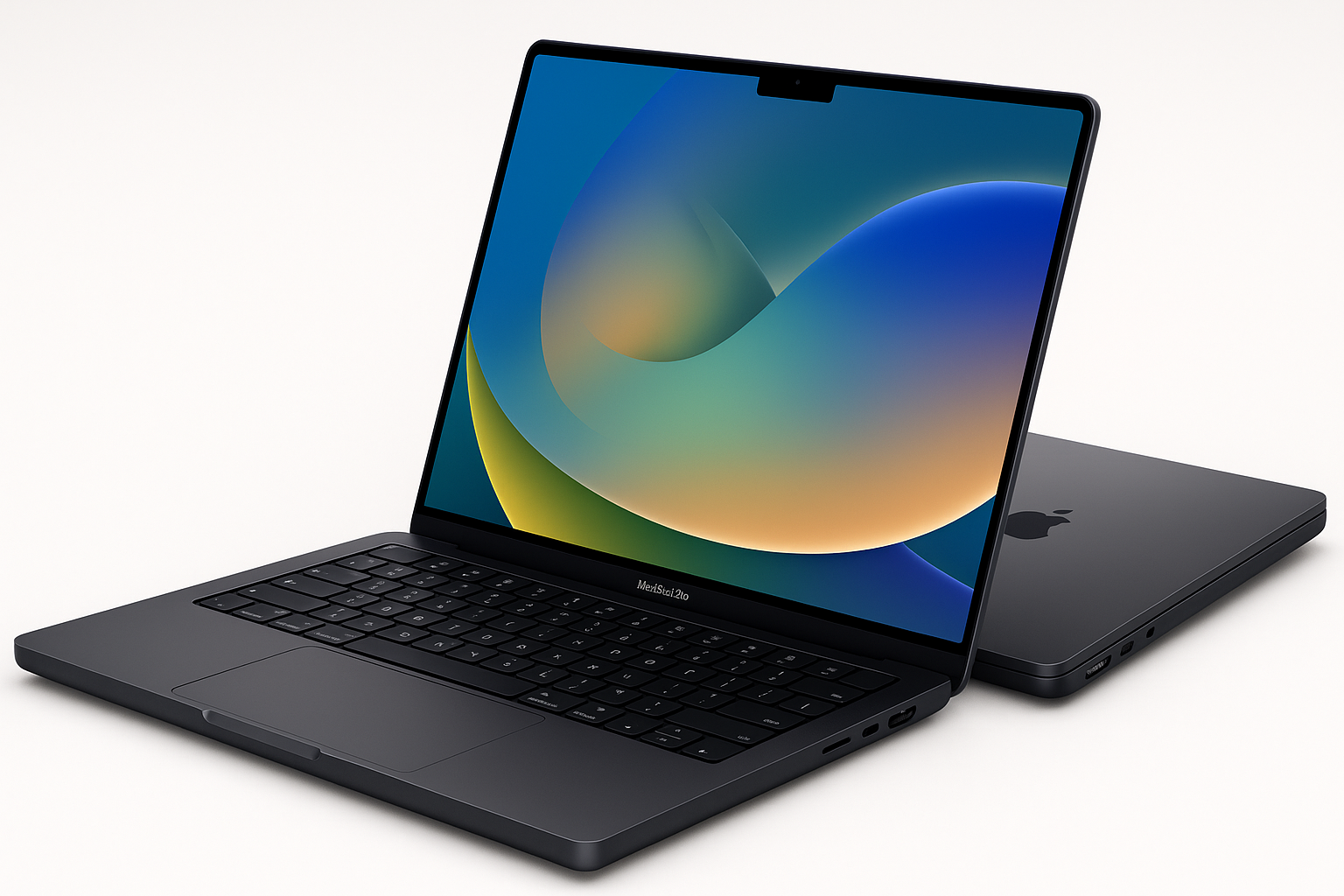
The Apple 2026 MacBook Pro Laptop (14.2-inch, M5 Pro, 24GB unified memory, 1TB SSD, Space Black) is Apple’s compact professional notebook for users who want serious performance without moving up to the larger 16-inch form factor. Equipped with the Apple M5 Pro chip featuring a 15-core CPU and 16-core GPU, it is explicitly positioned as “built for AI” workloads, including on-device large language model inference and training tasks.
The 14.2-inch Liquid Retina XDR display offers mini-LED backlighting, high sustained brightness, and deep contrast, making it suitable for HDR video work and color‑critical creative tasks. Connectivity is modern and expansive for a MacBook: three Thunderbolt 5 ports, HDMI, SDXC card slot, MagSafe 3, headphone jack, and Wi‑Fi 7 with Apple’s N1 wireless chip.
For buyers considering a premium macOS laptop that can handle demanding creative, development, and AI-centric workflows, this configuration delivers a blend of performance, portability, and advanced display technology—albeit at a premium price around $2034.05.
Target Users
This MacBook Pro configuration is aimed at:
- Creative professionals: Video editors, photographers, motion graphics artists, and audio producers who need strong GPU performance, fast storage, and a high-end HDR display.
- Software developers and engineers: Particularly those working with local development environments, containerized workflows, or AI/ML frameworks that can leverage the M-series Neural Engine and GPU.
- AI and data practitioners: Users running on‑device AI tasks, model experimentation, or local LLM inference where privacy and offline operation are important.
- Power users and prosumers: Users who want a long‑lasting, high‑performance macOS machine for a mix of productivity, content creation, and media consumption.
- Mobile professionals: Those who travel frequently and require all‑day battery life, reliable build quality, and a relatively compact 14‑inch form factor.
If your workloads are lightweight (web, email, office apps) and you don’t need the AI or GPU acceleration, a lower-tier MacBook may be sufficient. This model makes the most sense when you can actually leverage the performance on offer.
Main Benefits
1. Strong Next-Generation Performance
With an M5 Pro chip, 15-core CPU, and 16-core GPU, this MacBook Pro is built to handle:
- Multi-track 4K (and above) video editing
- Complex software builds and local development environments
- AI/ML workloads including on-device inference and training for smaller models
- Heavy multitasking with numerous browser tabs, IDEs, and creative apps open simultaneously
The 24GB unified memory provides a larger working set than baseline configurations, reducing swapping when handling big projects, virtual machines, or large datasets.
2. Built for On-Device AI
Apple positions the M5 Pro as “built for AI”, with:
- A more powerful GPU layout and a Neural Accelerator built into each core, designed to accelerate AI workloads
- Hardware-accelerated on-device inference for tasks like image generation, code completion, and text analysis in compatible apps
- Deep integration with Apple Intelligence features across macOS, which can assist with writing, image creation, and system‑wide automation while keeping data processed locally wherever possible
For users who care about privacy and offline performance, these capabilities differentiate it from cloud-only AI workflows.
3. High-End Liquid Retina XDR Display
The 14.2-inch Liquid Retina XDR panel provides:
- Up to 1600 nits peak brightness (HDR) and 1000 nits sustained brightness for HDR content
- Mini‑LED backlighting with 1,000,000:1 contrast
- Wide color (P3) and high resolution for sharp UI elements and content
Color‑sensitive work such as grading, photography, and design benefits substantially from this level of display quality compared to standard IPS laptop screens.
4. All-Day Battery Life with Consistent Performance
MacBook Pros with Apple silicon are known for sustained performance on battery. This model continues that trend, delivering similar performance whether plugged in or not, which is notably different from many high‑power Windows laptops that throttle heavily on battery.
For mobile professionals, this means you can edit video, code, or run models on the go without being tethered to power.
5. Robust Connectivity and Expansion
Despite its size, the 14-inch chassis offers:
- Three Thunderbolt 5 ports for high-bandwidth peripherals and external displays
- HDMI port for direct monitor/projector connections
- SDXC card slot for quick ingest of photos and video
- MagSafe 3 for safe, quick charging
- Headphone jack for wired audio
- Wi‑Fi 7 and Bluetooth 6 for faster, more reliable wireless connections
M5 Pro configurations can drive up to three external displays, giving substantial flexibility for desk‑based setups.
6. macOS and Apple Ecosystem Integration
macOS continues to be a major draw:
- Optimized performance for creative suites, development tools, and productivity apps
- Strong integration with iPhone and iPad (e.g., iPhone Mirroring, Universal Clipboard, Continuity Camera, AirDrop)
- Built-in security features, including encryption, sandboxing, and regular OS updates
If you already use Apple devices, the seamless cross-device workflows are a meaningful quality-of-life advantage.
Key Considerations
Before choosing this MacBook Pro configuration, keep these factors in mind:
- Price tier: This is a premium system, and the configuration with 24GB memory and 1TB SSD comes in around $2034.05. You are paying for performance, display quality, AI capability, and build quality.
- Upgradeable options: Memory and storage are not user-upgradable. Choosing 24GB/1TB up front is important—future expansion is not possible.
- Portability vs. power: While relatively compact at 14.2 inches, it is still thicker and heavier than a MacBook Air. If ultra‑portability is your top priority, this may be more than you need.
- AI workload fit: The “built for AI” positioning is valuable if you actually run workloads or tools that can use the Neural Engine and GPU accelerators. For simpler office tasks, you may not notice a big difference compared to less powerful M‑series chips.
- Ecosystem expectations: Best suited to users who are comfortable in, or committed to, the Apple ecosystem. Some niche or legacy Windows-only tools may require workarounds (virtualization, remote desktops, or alternatives).
Pros
- High performance M5 Pro chip with 15-core CPU and 16-core GPU for demanding professional workflows
- Strong on-device AI acceleration, ideal for AI-assisted creative tools, coding assistants, and local LLM inference
- Excellent 14.2-inch Liquid Retina XDR display with HDR capability and high contrast
- 24GB unified memory is a practical sweet spot for heavy multitasking and creative/technical work
- 1TB SSD offers ample, fast local storage for large projects
- Robust port selection (Thunderbolt 5, HDMI, SDXC, MagSafe 3, headphone jack)
- Wi‑Fi 7 and Bluetooth 6 for future-proof wireless connectivity
- All-day battery life with consistent performance on battery
- Premium build quality and refined Space Black finish
- Deep integration with macOS and the broader Apple ecosystem
Cons
- High upfront cost, especially once configured with 24GB RAM and 1TB SSD
- No post-purchase upgrades to memory or storage—configuration decisions are permanent
- Heavier and thicker than a MacBook Air or many ultrabooks, even if still portable
- Some AI and GPU benefits depend on software support; not all tools may fully exploit the hardware yet
- macOS may require adjustment for users migrating from Windows, particularly for specialized or legacy software
Alternatives
If you are considering this MacBook Pro, you might also evaluate:
-
Lower-tier 14-inch MacBook Pro (M5 or lower memory/storage)
If your workloads are lighter, a configuration with less memory or storage can save cost while keeping the same display and general build quality. -
MacBook Air (M-series)
For students, writers, and general productivity users, a recent MacBook Air offers excellent performance-to-weight and performance-to-price ratios. You sacrifice some ports, GPU performance, and display brightness, but you gain even better portability and a lower price. -
16-inch MacBook Pro with M5 Pro or M5 Max
If you want a larger screen, more thermal headroom, and the option for even higher performance (particularly with the M5 Max), the 16-inch models are worth a look. They are heavier and more expensive, but better suited for users who are mostly desk-based. -
High-end Windows creator or workstation laptops
Users reliant on specific Windows-only applications or specialized GPU features (e.g., CUDA) may still prefer a powerful Windows workstation. These systems can match or exceed performance in some scenarios and may offer more varied hardware choices, but often with less battery efficiency and more fan noise.
Conclusion
The Apple 2026 14-inch MacBook Pro with M5 Pro, 24GB unified memory, and 1TB SSD (Space Black) is a compelling choice for professionals and advanced users who want a compact machine capable of handling demanding creative, development, and AI workloads.
Its strengths lie in the combination of next-generation performance, AI acceleration, a best‑in‑class display, and robust connectivity, wrapped in a refined and portable chassis. The primary trade-offs are the high purchase price (around $2034.05) and the need to commit to your memory and storage configuration at the time of purchase.
If you are a creative professional, developer, or power user who will fully leverage its performance and AI capabilities—and you value macOS and Apple ecosystem integration—this configuration of the 2026 MacBook Pro is likely to serve as a fast, reliable primary machine for years to come.