
Mini Smart Projector with 180° Rotation and Built‑in Apps: Portable Big‑Screen Entertainment Anywhere
Overview
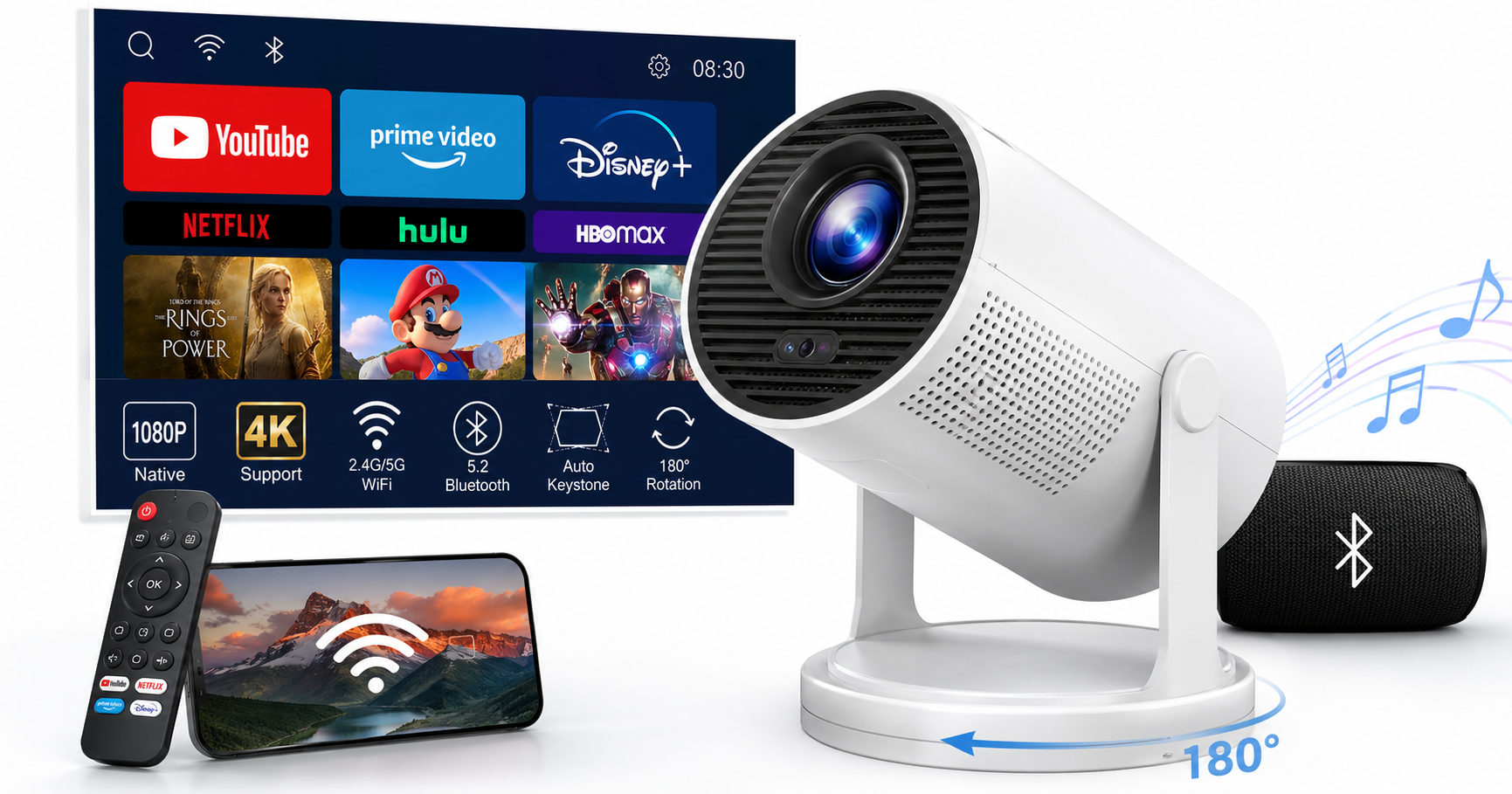
The Mini Projector, Portable Projector with Wifi and Bluetooth, Built in Apps, Support 4K 1080P, 180° Rotation, Auto Keystone is a compact smart projector aimed at casual home and bedroom use. Instead of relying on an external streaming stick, it integrates popular apps (such as YouTube, Prime Video, and Disney+ in many listings) directly into the device, while Wi‑Fi and Bluetooth connectivity simplify setup with phones, laptops, and speakers. (tiendamia.cr)
While it supports 1080P and 4K input, its core appeal is convenience rather than reference‑grade image quality: automatic keystone correction, a 180° rotating stand for flexible placement, and a highly portable body that can move between rooms or travel in a bag. Depending on the retailer and any ongoing promotion, it typically sits in an entry‑level price bracket around $59.99, making it an accessible option for first‑time projector buyers and families looking for a small, flexible movie projector.
Key Highlights
- Compact and portable mini projector designed for bedroom and on‑the‑go use.
- Built‑in apps so you can stream directly from services like YouTube, Prime Video, and Disney+ without an extra streaming stick (app availability can vary by region and firmware). (tiendamia.cr)
- Wi‑Fi (often dual‑band 2.4G/5G) and Bluetooth 5.x for wireless casting and pairing with speakers or headphones. (tiendamia.cr)
- Supports up to 1080P/4K input with a native resolution around 720p–1080p, depending on the exact variant.
- 180° rotation for projecting on walls, angled surfaces, or even the ceiling.
- Auto keystone correction to square the image automatically when the projector is tilted. (newegg.com)
- Multiple inputs including HDMI and USB, compatible with TV sticks, smartphones, laptops, and game consoles.
Core Features
1. Design and Portability
The projector uses a compact, rounded body with an integrated stand or rotating base that lets you pivot the lens up to 180°. This allows you to:
- Place it on a bedside table and project onto the wall or ceiling.
- Angle it upward from a coffee table without needing a separate tripod.
- Quickly adjust the viewing angle in tight spaces, such as dorm rooms or small apartments. (tiendamia.cr)
Its light weight and small footprint make it easy to move between rooms or pack for travel, though it still needs mains power and is not a battery‑powered pico projector.
2. Display and Image Quality
- Resolution: Listings for this style of projector commonly specify native 720p or 1080p, with support for 1080P or 4K input signals. That means 4K content will be downscaled rather than displayed in native 4K, but you still benefit from cleaner source material. (tiendamia.cr)
- Brightness: Many similar mini projectors advertise brightness in the 150–320 ANSI lumen range, adequate for dark rooms and nighttime viewing but not for bright daylight or strongly lit spaces. (newegg.com)
- Image size: Typical throw distances produce screens from roughly 40" up to around 120–130" diagonal. For best clarity and brightness, staying in the 60–100" range is ideal. (newegg.com)
- Optics: A fixed lens design keeps things simple; focusing is usually manual on this class of device, though some siblings in the same family add auto‑focus.
In practice, the projector delivers a watchable, enjoyable image for movies, TV, and casual gaming in a dark room, but it will not match dedicated home‑theater units or higher‑end smart projectors in contrast, color accuracy, or sharpness.
3. Smart System and Built‑in Apps
A key selling point of this mini projector is its built‑in smart OS with pre‑installed streaming apps. Instead of plugging in a separate TV stick, you can:
- Connect the projector to Wi‑Fi.
- Sign into apps like YouTube, Prime Video, and Disney+ directly on the device (selection can differ by market and firmware revision). (tiendamia.cr)
- Use the included remote to browse content.
App performance on budget smart projectors tends to be functional rather than snappy: menu navigation may feel slower than on a modern streaming box, and some niche apps or advanced features (Dolby Vision, advanced HDR formats) are not supported.
4. Connectivity: Wi‑Fi and Bluetooth
- Wi‑Fi: Many listings describe dual‑band 2.4G/5G Wi‑Fi or Wi‑Fi 6 for more reliable streaming, reducing buffering when watching HD content. (walmart.com)
- Screen mirroring / casting: The projector can mirror compatible smartphones and tablets, making it handy for quickly sharing photos, videos, or presentations.
- Bluetooth: Bluetooth 5.x support allows pairing with external speakers, soundbars, or wireless headphones to overcome the limited power of the built‑in speaker. (tiendamia.cr)
5. Auto Keystone and 180° Rotation
Auto keystone correction aims to automatically square the image when the projector is tilted up or down. When paired with the 180° rotating stand, it helps compensate for off‑axis placement—for example, projecting from a low table towards a high wall or ceiling. (newegg.com)
As with many budget projectors, auto keystone should be seen as a convenience aid rather than a precision tool. In some models, heavy keystone correction can slightly soften the image, so for the sharpest picture it is best to keep the projector roughly perpendicular to the screen and use only minor corrections.
6. Inputs and Compatibility
Typical connectivity includes:
- HDMI for laptops, desktops, streaming sticks (Fire TV, Roku, etc.), or game consoles.
- USB for media playback from flash drives (video, images, some music formats) or powering lightweight streaming sticks.
- Audio out (often 3.5 mm) for wired speakers or headphones.
This gives you flexibility to use the projector as either a self‑contained smart device or a simple display for your existing gear.
Usage Experience
Setup
Initial setup is straightforward:
- Place the projector on a flat surface and connect power.
- Rotate the stand to aim at your wall or screen.
- Turn it on and let auto keystone roughly square the image.
- Adjust focus and minor keystone manually if necessary.
- Connect to your Wi‑Fi network and sign into streaming apps.
Within a few minutes, you can be watching content without needing extra hardware. For better audio, pairing a Bluetooth speaker or soundbar is highly recommended.
Everyday Use
In day‑to‑day use, this projector best fits evening and nighttime viewing in a dim or dark room. Under those conditions:
- Colors appear reasonably vibrant.
- Text and UI elements are legible at moderate screen sizes.
- Streaming over Wi‑Fi is generally stable if your home network is solid.
The fan noise is typical of compact projectors: audible in quiet scenes but usually masked once content plays at normal volume. Built‑in speakers are sufficient for casual use, but movie enthusiasts will want external audio.
Ceiling and Bedroom Projection
The 180° rotation and auto keystone make this style of projector especially appealing for bedroom and ceiling projection, a use case frequently highlighted by users of similar 180° mini projectors and HY300‑class devices. (reddit.com) Lying in bed while projecting onto the ceiling or a high wall can be more comfortable than craning your neck toward a fixed TV.
Do note that prolonged off‑axis keystone adjustments may slightly soften the picture compared with a perfectly aligned setup.
Strengths
- Highly portable: Small size and light weight make it easy to move or travel with.
- Flexible placement thanks to the 180° rotating stand and auto keystone.
- Built‑in streaming apps reduce the need for a separate TV stick.
- Wi‑Fi and Bluetooth enable wireless streaming and audio without complex cabling.
- Broad compatibility with HDMI/USB/TV sticks/smartphones/laptops.
- Entry‑level pricing (around $59.99 depending on seller and promotions) positions it as an accessible first projector rather than a premium investment.
Weaknesses
- Limited brightness: Best suited for dark rooms; performance drops notably in bright environments compared with higher‑end home‑theater projectors.
- Resolution and sharpness: Even with 1080P/4K input support, fine detail and uniform sharpness across the screen will lag behind pricier 1080p/4K projectors.
- Smart OS speed and app coverage: The built‑in system may feel slower and support fewer apps than a dedicated streaming box.
- Auto keystone accuracy: Can be inconsistent; heavy correction can soften the image, and you may still need manual adjustments.
- Audio output: Built‑in speakers are basic; external speakers or headphones are strongly recommended for a cinematic experience.
Suitable Scenarios
This mini projector is best suited for:
- Bedroom movie nights: Projecting onto a wall or ceiling from a nightstand.
- Casual home entertainment: Family movie sessions, kids’ cartoons, YouTube, and streaming shows.
- Dorm rooms and small apartments: When you lack space for a large TV but still want a big screen.
- Occasional outdoor use at night: Backyard or camping movie nights, provided you have power and a dark environment.
- Travel and secondary setups: Bringing a projector to a friend’s house or using it as a secondary screen away from your main living room TV.
It is less ideal for:
- Bright living rooms with many windows.
- Users who prioritize maximum image fidelity, high contrast, or accurate color reproduction.
- Professional presentations where reliability and brightness under ambient light are critical.
Final Evaluation
The Mini Projector with WiFi, Bluetooth, built‑in apps, 4K/1080P support, 180° rotation, and auto keystone is a feature‑rich, highly portable option aimed squarely at casual viewers who value convenience over ultimate image precision. For an entry‑level outlay around $59.99, it offers a flexible, smart, and easy‑to‑use big‑screen experience that works especially well in bedrooms, dorms, and small living spaces.
Buyers expecting the brightness, color performance, and build quality of a full‑size home‑theater projector may be disappointed, and the smart OS will not rival dedicated streaming devices in polish. However, if your priority is a compact projector that you can quickly set up, rotate toward any surface, stream directly from popular apps, and easily pair with Bluetooth audio, this model is a compelling, budget‑friendly choice.