
Xbox Wireless Gaming Controller (Shock Blue) Review: A Versatile, Modern Gamepad for Console, PC, and Mobile
Overview
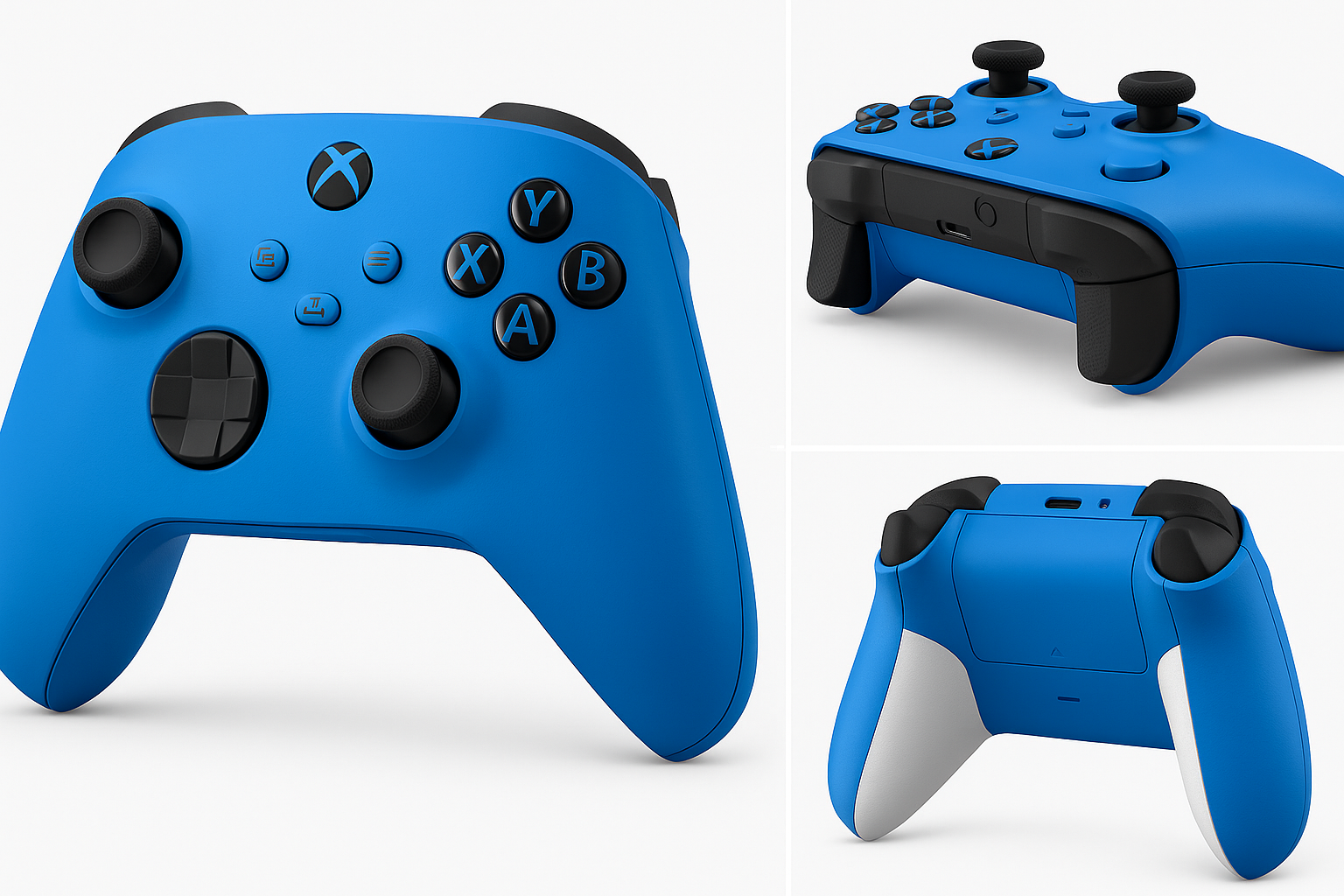
The Xbox Wireless Gaming Controller | Shock Blue is Microsoft’s current-generation gamepad, compatible with Xbox Series X|S, Xbox One, Windows PCs, Android, and iOS. It builds on the familiar Xbox layout while adding a refined shape, textured grips, a hybrid D‑pad, and expanded connectivity options via Xbox Wireless, Bluetooth, and USB‑C.
Positioned as a general‑purpose controller rather than a premium “pro” model, it targets players who want a dependable, cross‑platform pad with minimal setup hassle. On retailers like Amazon, it typically sits in the mid‑range bracket around $59.99, making it an accessible option for replacing an aging controller or adding an extra pad for multiplayer.
Key Highlights
- Modernized design with slightly smaller, more ergonomic body and signature Shock Blue finish
- Textured grip on triggers, bumpers, and back case for better control during intense play sessions
- Hybrid D‑pad that blends a classic cross with a disc design for more reliable diagonals
- Multi‑device connectivity: Xbox Wireless for consoles, Bluetooth for PC and mobile, plus wired USB‑C
- Dedicated Share button for one‑press screenshots and video capture
- 3.5 mm headset jack for wired audio and chat directly from the controller
- AA battery support with up to roughly 40 hours of use per set (under typical conditions)
Core Features
Design and Build Quality
The Shock Blue variant stands out visually with a bold blue front shell complemented by a contrasting white back and blue buttons. The shell uses a matte plastic that resists fingerprints reasonably well while providing additional grip compared to older glossy models.
Build quality is solid for a mass‑market controller: the face buttons feel consistent, triggers and bumpers have a defined actuation point, and there’s minimal flex in the chassis when twisted by hand. It doesn’t reach the heft or metal accents of premium controllers, but for everyday use it feels robust and well put together.
Ergonomics
Microsoft has slightly refined the geometry compared with earlier Xbox One controllers. The grips taper a bit more, making the pad comfortable for a wider range of hand sizes. The rear case and trigger surfaces are textured, which helps maintain control when your hands get warm during long sessions.
Weight is moderate, even with two AA batteries installed. Most users should find it comfortable for multi‑hour gaming without significant fatigue.
Controls and Layout
- Analog sticks: Standard asymmetric Xbox layout, with smooth travel and a light to medium resistance suitable for shooters and driving games.
- Face buttons (A/B/X/Y): Responsive with a crisp, slightly soft click and well‑spaced layout.
- Bumpers and triggers: Triggers are analog with a predictable curve; bumpers now feel more consistent and less hollow than some earlier revisions.
- Hybrid D‑pad: A circular, dished D‑pad that improves diagonal inputs while still supporting precise cardinal directions, making it decent for platformers and fighting games.
- Share button: Centered under the Menu and View buttons, it captures screenshots or clips with a single press (on supported platforms) and quickly becomes part of your muscle memory.
Connectivity
The controller supports three main connection modes:
- Xbox Wireless (for Xbox Series X|S and Xbox One)
- Bluetooth (for Windows PCs, Android phones/tablets, iOS devices, and many smart TVs/streaming sticks)
- USB‑C wired (for PC, consoles, and some mobile/TV devices)
Switching between devices is straightforward once paired. For example, you can use it on an Xbox Series X, then hold the pairing button to sync with a Bluetooth device like a laptop or phone. The USB‑C port allows low‑latency, wired play and removes concerns about wireless interference when needed.
Power and Battery
The controller uses two AA batteries by default. Under typical mixed usage, Microsoft rates battery life at up to around 40 hours, though this will vary based on vibration usage, headset connection, and wireless type.
You can also:
- Use rechargeable AA batteries, or
- Add an optional rechargeable battery pack (sold separately) for a built‑in charging solution via USB‑C.
Audio Support
A 3.5 mm headset jack on the bottom lets you plug in standard gaming headsets or earbuds for game audio and chat. On Xbox consoles and Windows, you can adjust audio mix and volume from the system menus, which is convenient if you frequently swap between speakers and headset.
Usage Experience
Setup
- On Xbox Series X|S / One: Pairing is nearly instant via the console’s pairing button, with on‑screen prompts guiding you through. Firmware updates are handled through the console or the Xbox Accessories app.
- On Windows PC: You can connect via Bluetooth, USB‑C cable, or the optional Xbox Wireless Adapter. Bluetooth is sufficient for most users, though competitive players may prefer wired or the dedicated adapter for slightly lower latency.
- On Android and iOS: Pair like any other Bluetooth device from the phone or tablet’s settings. Many mobile games and cloud gaming services recognize the layout immediately.
Gaming Performance
In practice, the Shock Blue Xbox Wireless Controller feels responsive and consistent across genres:
- Shooters and action games benefit from the improved grip and familiar stick layout.
- Racers take advantage of the smooth triggers and fine analog control.
- Platformers and retro titles are helped by the hybrid D‑pad, which is more forgiving on diagonals than the older cross‑shaped designs.
Input latency is low enough over Xbox Wireless or Bluetooth for nearly all non‑esports use cases. Wired USB‑C offers an extra margin of responsiveness and removes dependence on battery level and wireless signal quality.
Comfort Over Time
Over extended sessions, the lighter weight and textured back help reduce hand fatigue and slipping. Users with smaller hands may find the slightly more compact shell easier to manage than previous‑generation Xbox controllers, though very large hands may still prefer thicker grip profiles.
Strengths
- Wide compatibility with Xbox Series X|S, Xbox One, Windows PCs, Android, iOS, and many smart devices
- Reliable, familiar layout that works well across most game genres
- Improved ergonomics and grip, including textured triggers, bumpers, and back case
- Hybrid D‑pad that’s noticeably better than older Xbox D‑pads for precision and diagonals
- Flexible connectivity options (Xbox Wireless, Bluetooth, and wired USB‑C)
- Share button simplifies capturing gameplay highlights
- Decent battery life from AA cells with multiple charging options
- Distinctive Shock Blue colorway that stands out from standard black/white controllers
Weaknesses
- AA battery design may not appeal to users who prefer built‑in rechargeable packs by default
- No advanced pro features like rear paddles, trigger stops, or adjustable tension (you’d need an Elite‑class controller for that)
- Plastic construction lacks the premium feel of metal‑accented or rubber‑sided controllers
- Bluetooth performance can vary slightly depending on the quality of the host device’s adapter and drivers
- Stick drift risk is similar to other mainstream controllers over long‑term heavy usage, as it uses traditional analog stick modules
Suitable Scenarios
This Shock Blue Xbox Wireless controller is particularly well‑suited for:
- Xbox Series X|S owners needing a second (or replacement) controller for local multiplayer or co‑op
- PC gamers who want a widely supported, plug‑and‑play controller for Steam, Game Pass, and other launchers
- Mobile and cloud gaming users playing through services on Android or iOS, or on streaming devices and smart TVs
- Households with mixed devices, where a single controller may be used on console, laptop, and phone
- Casual and mid‑core players who value comfort and reliability without paying extra for pro‑level features
If you are heavily into competitive play, or require back paddles and trigger locks, an Elite‑style controller may be more appropriate. But for most players, this model strikes a balanced combination of capability, comfort, and price.
Final Evaluation
The Xbox Wireless Gaming Controller | Shock Blue | Console, PC, & Android is a strong evolution of Microsoft’s standard gamepad. It offers a familiar, polished design with meaningful improvements in grip, D‑pad performance, and connectivity. Its multi‑platform support and straightforward setup make it an easy recommendation for anyone who splits their time between Xbox, PC, and mobile gaming.
While the reliance on AA batteries and the absence of premium features may deter some enthusiasts, those trade‑offs help keep the controller in a more approachable price range around $59.99. For players seeking a dependable, modern, and visually distinctive controller that works across many devices, the Shock Blue Xbox Wireless Controller is an excellent all‑round choice.