
Xbox Wireless Gaming Controller (2025) – Shock Blue Review: A Familiar Favorite for Modern Multi‑Device Gaming
Introduction
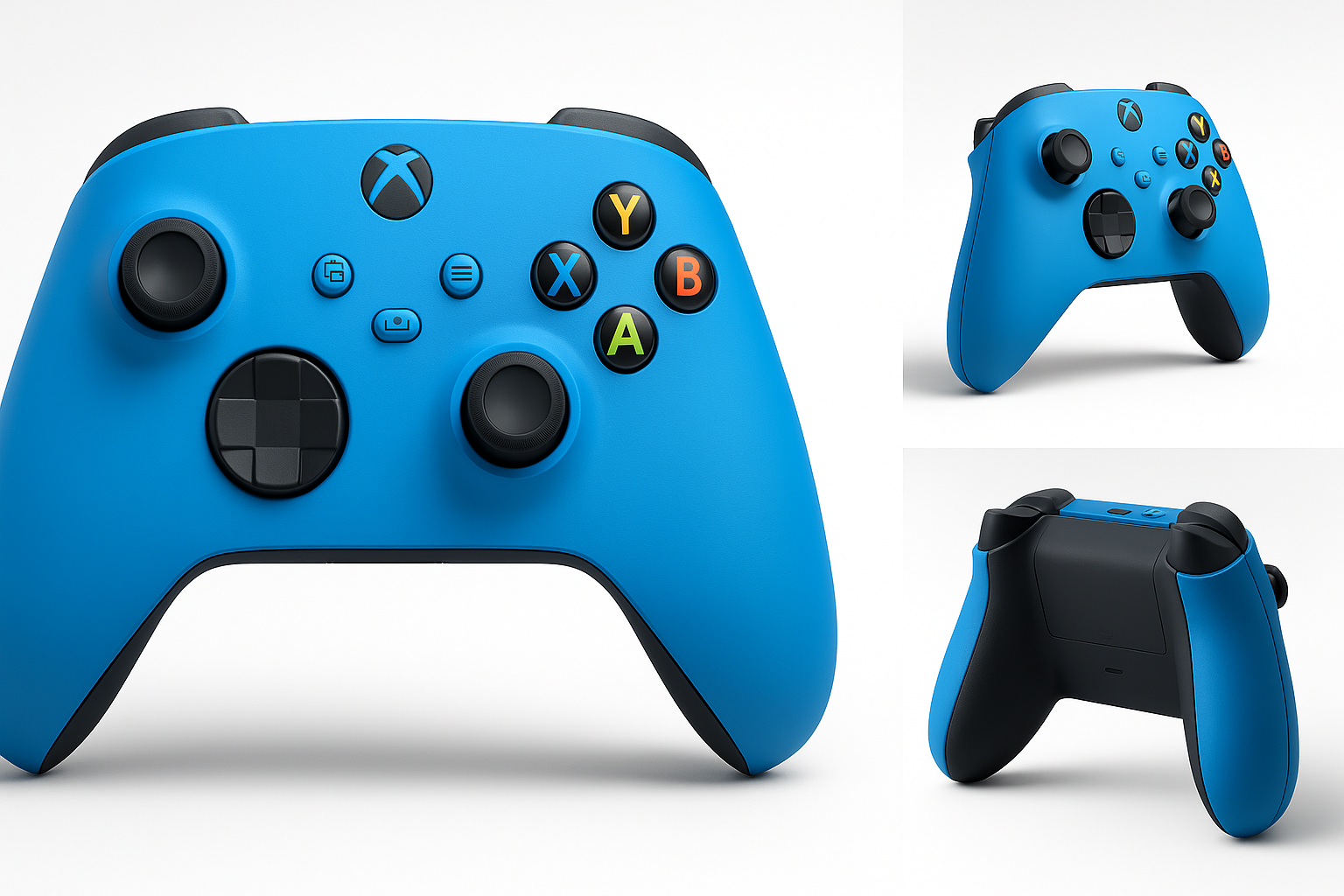
The Xbox Wireless Gaming Controller (2025) – Shock Blue is Microsoft’s latest iteration of its now‑standard gamepad design, positioned as a versatile controller for Xbox consoles, Windows PCs, mobile devices, smart TVs, and some VR headsets. While the core hardware is very similar to the existing Xbox Core Wireless Controller line, this 2025 Shock Blue variant emphasizes cross‑platform play and broad Bluetooth compatibility, making it attractive for players who split time between console, PC, and streaming devices.
In this review, we’ll cover what the controller is like to set up, how it performs in everyday use across different platforms, and where it excels or falls short compared with other modern gamepads.
Note: Pricing on Amazon for this model typically sits in the mid‑range for modern wireless controllers, often fluctuating around $59.99, which positions it competitively against other first‑party console pads.
Setup / Getting Started
In the box
Typical retail packaging for the Xbox Wireless Gaming Controller (2025) – Shock Blue generally includes:
- The Shock Blue wireless controller itself
- A pair of AA batteries to get started
- Basic documentation / quick‑start guide
A USB‑C cable is not always included and may need to be purchased separately if you prefer a wired connection or plan to update firmware via PC.
Initial pairing
On Xbox Series X|S and Xbox One
Connecting the controller to an Xbox console is straightforward:
- Turn on the console.
- Press and hold the Xbox button on the controller to power it on.
- Press the pairing button on the console.
- Press and hold the small pairing button on the top of the controller until the Xbox logo flashes rapidly.
- Within a few seconds, the console and controller should sync and the light will become solid.
Once paired, the controller will automatically reconnect to the console when powered on, as long as it hasn’t been switched to another device.
On Windows PCs
You can connect via Bluetooth, via a USB‑C cable, or with an optional Xbox Wireless Adapter for Windows:
- Bluetooth:
- Turn on Bluetooth in Windows and put the controller into pairing mode with the top button.
- Select the controller from the list of available devices.
- USB‑C:
- Plug in a USB‑C cable between the controller and PC; Windows will install drivers automatically in most cases.
- Xbox Wireless Adapter (optional):
- Plug in the adapter, press its button, then press the controller’s pairing button.
Using the Xbox Accessories app on Windows allows for firmware updates and button remapping, which is recommended for optimal compatibility and reduced input issues.
On Android, iOS, Fire TV Sticks, and Smart TVs
For mobile devices and streaming sticks, the controller uses Bluetooth:
- Enable Bluetooth on your phone, tablet, TV, or streaming device.
- Put the controller in pairing mode.
- Select it from the list of Bluetooth devices.
Most modern Android phones, many iOS devices, Fire TV sticks, and a growing number of smart TVs recognize it as a standard gamepad. Support can vary by manufacturer and OS version, so some advanced features or button prompts may depend on the individual app or platform.
On VR headsets
When used with compatible standalone VR headsets that support Bluetooth gamepads, the pairing process is similar to mobile:
- Enable Bluetooth in the headset’s settings.
- Put the controller in pairing mode.
- Complete pairing inside the VR device’s UI.
The controller typically works best for menu navigation and select flat‑screen or game‑streaming experiences rather than native motion‑tracked VR games.
Daily Usage
Ergonomics and comfort
The design sticks closely to Microsoft’s established Xbox controller layout, with slightly refined contours and a balanced weight profile. The Shock Blue finish covers the front shell, while the back and triggers retain the familiar textured surfaces to improve grip.
The controller remains comfortable for a wide range of hand sizes, and long sessions are generally fatigue‑free. The textured grips on the triggers and rear shell help keep the controller secure even when hands get warm.
Button layout and feel
The layout will be instantly familiar to anyone who has used an Xbox One or Series X|S controller:
- Two analog sticks with concave tops
- Hybrid D‑pad (a cross‑disc design that blends traditional and circular pads)
- ABXY face buttons
- Menu and View buttons
- A dedicated Share button in the center
- Left and right bumpers and triggers
- 3.5 mm stereo headset jack on the bottom edge
Buttons have a crisp, consistent actuation, and the hybrid D‑pad provides distinct directional input while being slightly quieter than older clicky designs. The analog sticks offer a smooth range of motion and reasonable resistance suitable for both shooters and racing games.
Cross‑platform experience
On Xbox consoles, the controller feels like a native extension of the system, with full interface integration, low latency, and straightforward firmware updates.
On Windows PCs, the experience is also strong:
- Most modern games recognize it automatically as an Xbox controller.
- Button prompts display the familiar ABXY icons.
- Vibration and trigger behavior are widely supported.
On Android and iOS, the experience can vary:
- Popular cloud gaming apps and many native titles support the layout correctly.
- Some games may show generic button prompts or require manual remapping.
On Fire TV sticks and smart TVs, usability depends heavily on the specific device and its OS version. Navigation in supported apps tends to be smooth, but compatibility is not guaranteed for every streaming or gaming app.
In VR, it works best as a traditional gamepad for 2D content, cloud streaming, or specific titles designed for controller input rather than as a replacement for motion controllers.
Power and battery life
The controller uses two AA batteries by default. Microsoft advertises up to around 40 hours of battery life under typical use with standard alkaline cells, though real‑world results depend on vibration intensity, connected devices (e.g., headsets), and the type of batteries used.
You can also use rechargeable AA batteries or an optional rechargeable battery pack if you prefer a more eco‑friendly or long‑term cost‑efficient approach.
Performance & Reliability
Input latency and responsiveness
When used with an Xbox console or the Xbox Wireless Adapter for PC, latency is very low and responsive enough for fast‑paced shooters and competitive multiplayer. Over Bluetooth, input delay can be slightly higher, especially on older devices or in noisy wireless environments, but remains acceptable for most casual gaming.
Button presses and analog input are registered reliably, with no noticeable dead zones beyond what is typically configured in individual games. The hybrid D‑pad is accurate for platformers and fighting games, though serious fighting‑game players may still prefer a dedicated fight pad or arcade stick.
Wireless stability
The controller’s Xbox Wireless radio (for Xbox consoles and compatible PC adapters) is robust, offering stable connections within typical living‑room distances. Bluetooth performance is dependent on the host device’s antenna and firmware, but in most cases the connection remains solid at a few meters, provided there is minimal interference.
Occasional reports from users highlight intermittent Bluetooth pairing quirks, especially with certain laptops or older mobile devices, but these are often alleviated through firmware updates and updated OS drivers.
Build quality and durability
Overall build quality is solid:
- Minimal flex in the plastic shell
- Well‑secured buttons and triggers
- Textured surfaces that resist light wear
Long‑term, some of the same issues that affect many modern controllers can appear, including potential stick drift or bumper wear after heavy use. These are not unique to this model, but are worth keeping in mind if you log many hours per week.
What Works Well
-
Comfortable, familiar ergonomics
The shape and weight are well‑balanced, making it comfortable for extended sessions on console or PC. -
Wide platform compatibility
Out‑of‑the‑box support for Xbox, Windows, Android, iOS, Fire TV sticks, smart TVs, and some VR headsets makes this a true one‑controller solution for many setups. -
Reliable core controls
The hybrid D‑pad, responsive buttons, and smooth analog sticks provide a dependable gaming experience across genres. -
Dedicated Share button
Quickly capturing screenshots and clips on Xbox or compatible platforms is easy and intuitive. -
Competitive pricing
With a typical Amazon price around $59.99, the controller often undercuts some high‑end third‑party pads while still providing first‑party integration and support. -
Standard 3.5 mm headset jack
Plugging in wired headsets for game audio and chat is simple and doesn’t require extra adapters.
What Could Be Improved
-
AA batteries by default
Depending on AA cells instead of including a built‑in rechargeable battery or pack feels dated. Many competing controllers now ship with internal rechargeable packs. -
No included USB‑C cable in many bundles
Considering how frequently firmware updates and wired play can be useful, including a basic USB‑C cable in every box would strengthen the value proposition. -
Bluetooth quirks on some devices
While compatibility is broad, performance and stability can vary on certain smart TVs, older phones, or poorly optimized Bluetooth stacks. -
Potential long‑term stick drift
As with many modern controllers, heavy use can eventually lead to drift in the analog sticks. This isn’t unique to this model but remains a concern for players who rely on a single controller for several years. -
Limited advanced features
There are no back paddles, customizable trigger stops, or built‑in profiles like those found in more premium or “pro” controllers. Some users may find the feature set basic compared to competitive offerings.
Overall Impression
The Xbox Wireless Gaming Controller (2025) – Shock Blue doesn’t radically reinvent the Xbox controller formula, but it doesn’t need to. Instead, it refines and repackages a proven design with broad platform support and a distinctive, vibrant colorway.
For players who primarily game on Xbox and Windows, and who also dabble in cloud or mobile gaming on Android, iOS, Fire TV sticks, smart TVs, or compatible VR headsets, this controller offers a reliable, familiar experience across many devices. Its ergonomics, solid build quality, and low‑latency performance make it a strong default choice.
The main trade‑offs are the reliance on AA batteries and the lack of more advanced customization features. If you want paddles, trigger locks, or a built‑in rechargeable pack, you may need to step up to a more expensive “pro” controller or purchase accessories.
However, if you are looking for a versatile, first‑party gamepad with excellent cross‑platform support and a striking Shock Blue finish, the 2025 Xbox Wireless Gaming Controller remains one of the most practical and easy‑to‑recommend options in its class—especially when you can find it near or below $59.99 on Amazon.