
WYZE Bulb Cam Review: A Clever Blend of Smart Light and 2K Security Camera
Overview
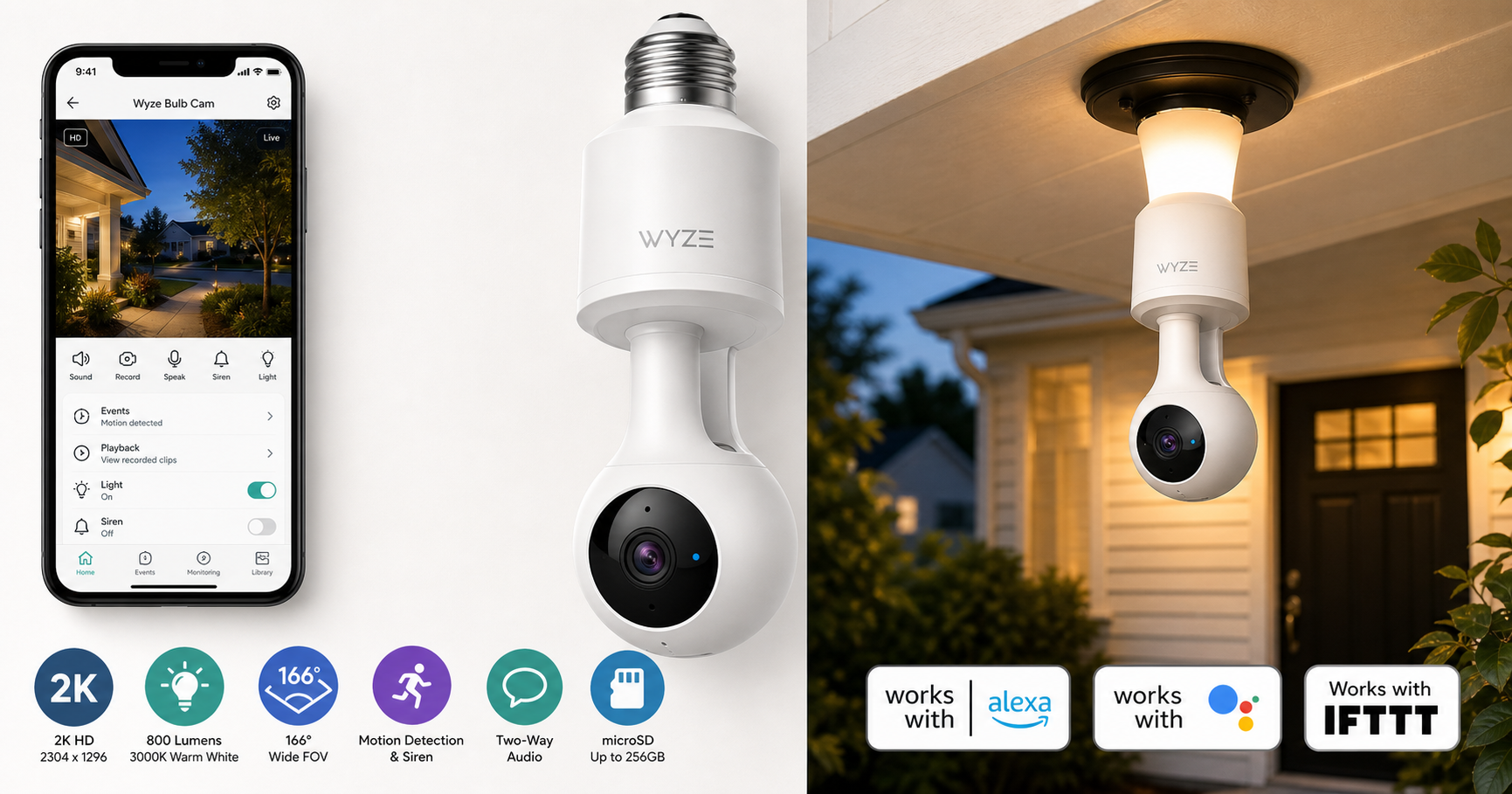
The WYZE Bulb Cam (2K HD Smart Light Bulb Security Camera) is an all-in-one device that merges an 800-lumen LED bulb with a 2K security camera and smart controls. Designed for a standard E26 socket and rated IP65 for suitable fixtures, it aims to simplify home monitoring by placing a camera exactly where you already have a light.
Instead of installing a separate camera and running power or USB cables, you screw this bulb into a compatible fixture, connect it to Wi‑Fi via the Wyze app, and get live 2K video, motion detection, two-way audio, and a built‑in siren. It also integrates with Alexa, Google Assistant, and IFTTT for voice control and automation.
For buyers comparing smart cameras and smart bulbs separately, the WYZE Bulb Cam lands in a middle ground: more discreet and convenient than a standalone camera, but with a few compromises in flexibility and lighting control.
At the time of writing, the WYZE Bulb Cam is typically available for around $49.98, making it competitive with buying an entry-level indoor/outdoor camera plus a separate smart bulb.
Key Highlights
- 2K (2304 x 1296) video resolution with color night vision for detailed monitoring.
- Integrated 800-lumen, 3000K warm white LED bulb that acts as both light source and camera housing.
- 160°–166° wide field of view (166° diagonal), covering large areas like porches or rooms.
- Motion detection with built-in siren to deter intruders or get attention.
- Two-way audio with microphone and speaker.
- Local storage via microSD card (up to 256 GB) plus optional Wyze cloud subscriptions.
- Standard E26 socket compatibility; 120V AC, 15W power draw.
- IP65-rated design for appropriate indoor and outdoor use when installed in compatible fixtures.
- Smart home integration with Alexa, Google Assistant, and IFTTT.
Core Features
Design and Installation
Physically, the WYZE Bulb Cam looks like an extended LED bulb with a telescopic rod that positions the camera lens below the socket, improving its field of view. According to Wyze’s specs, the unit weighs about 0.84 lb and uses a standard E26 base.
Installation is straightforward:
- Turn off power at the switch.
- Remove your existing bulb.
- Screw in the WYZE Bulb Cam.
- Restore power and follow the Wyze app to complete Wi‑Fi setup.
Wyze explicitly warns against using the Bulb Cam in totally enclosed fixtures or on dimmer switches and timers, and recommends leaving the wall switch in the ON position so the camera and Wi‑Fi stay powered.
Camera Performance
- Resolution: 2K (2304 x 1296), with optional lower resolutions (e.g., 360p) to save bandwidth.
- Field of View: ~166° diagonal, 144° horizontal, 82.5° vertical, wide enough to cover typical doorways, entryways, and large portions of a room.
- Frame Rate: Up to 20 fps in daylight and 15 fps at night.
- Lens & Sensor: F2.2 aperture, 1/2.8" sensor, digital zoom.
- Night Vision: Color night vision plus 850nm IR LEDs (four IR emitters) for low-light visibility.
In practice, the 2K resolution is a notable step up from 1080p for identifying faces, packages, and small details, especially when you use digital zoom in recorded clips. The wide FOV reduces blind spots, though it can introduce some fisheye distortion near the edges.
Lighting Performance
- Brightness: Up to 800 lumens—roughly equivalent to a traditional 60W incandescent bulb.
- Color Temperature: Fixed at 3000K warm white (non-tunable).
- Lifespan: Rated for about 25,000 hours.
Brightness is more than adequate for entry lights, porches, and most indoor rooms. The limitation is that you cannot change the color temperature or produce colored lighting; this is strictly a warm-white bulb. Dimming is supported through the app and automations, but not with traditional wall dimmers.
Smart Features and App Integration
Using the Wyze app, you can:
- View live 2K video and past recordings.
- Configure motion detection zones and sensitivity.
- Enable notifications for motion, sound, or specific events (depending on subscription level and AI features available at the time).
- Control brightness and schedule lighting (on/off times, dusk/dawn style routines via rules).
- Trigger or schedule the built-in siren.
- Use two-way talk via the microphone and speaker.
- Record locally to a microSD card (up to 256 GB, exFAT/FAT32) or use Wyze cloud storage plans.
The Bulb Cam works with Alexa and Google Assistant, allowing you to pull up the camera feed on compatible smart displays or control the bulb’s power and brightness by voice. IFTTT support adds basic automation with other services and devices.
Power and Connectivity
- Power Input: 120V AC, 60 Hz, 15W.
- Wi-Fi: 2.4 GHz 802.11 b/g/n.
- Bluetooth: 4.2 for simplified setup.
This is a Wi‑Fi-only camera; there’s no PoE or wired networking. Because it relies on the light switch for power, the switch must stay ON for round-the-clock connectivity, which is typical for smart bulbs but important to remember with a security device.
Usage Experience
Everyday Use
In daily use, the WYZE Bulb Cam behaves like a normal smart bulb and a typical Wyze security camera rolled into one:
- When you arrive home at night, you can have the light turn on automatically based on schedules or automation rules.
- Motion-triggered recordings provide a clear view of people approaching your door or moving through a monitored room.
- Live view loads reasonably quickly over 2.4 GHz Wi‑Fi in most modern home setups, and latency is acceptable for two-way conversation.
Users who already live in the Wyze ecosystem will find the interface familiar. Adding the Bulb Cam follows the same pattern as other Wyze cameras, and rules can tie it together with Wyze doorbells, contact sensors, and other devices.
Night and Low-Light Performance
The combination of color night vision and IR illumination delivers usable nighttime video both when the light is on and when it’s off. With the bulb on, the scene looks more natural and colorful. When off, IR LEDs step in to keep the camera effective, albeit in typical monochrome IR imagery.
Placement matters: in some outdoor settings, insects can be drawn to the light, occasionally triggering motion alerts or leaving marks on the lens. This is a common challenge for any bright outdoor fixture rather than a Wyze-specific flaw, but it’s worth noting.
Reliability and Firmware
Wyze regularly releases firmware updates to refine motion detection, improve connectivity, and address bugs. Because the Bulb Cam combines lighting and video in a single device, firmware maturity is especially important. For most users, updates happen automatically in the background after you approve them in the app.
As with many Wi‑Fi smart devices, occasional issues like temporary disconnects or the need to power cycle the bulb can occur, often resolved by checking your router placement, network congestion, or performing a quick reset.
Strengths
-
All-in-one design
- Combines bright lighting and a 2K camera, eliminating the need for extra hardware, wiring, or visible cameras.
-
Good image quality for the price class
- 2K resolution and wide field of view offer better detail than 1080p options, enhancing face and license plate recognition at close ranges.
-
Discrete and flexible placement
- Installs anywhere you have an E26 socket—porch lights, garage entry lights, indoor lamps (within fixture limitations), and hallway fixtures.
-
Strong smart home compatibility
- Alexa, Google Assistant, and IFTTT support make it easy to integrate with a broader ecosystem.
-
Local storage option
- microSD card support reduces reliance on cloud subscriptions and ensures continuous recording even if your internet connection is intermittent.
-
Integrated siren and two-way audio
- Practical for deterring suspicious activity and communicating with visitors or family members.
-
Competitive overall value
- For approximately $49.98, you get both a capable camera and a smart bulb, which can be more cost‑effective than purchasing separate devices.
Weaknesses
-
Requires always-on switch
- If someone turns off the wall switch, you lose both light and camera functionality. You may need a switch guard or behavioral adjustments in the household.
-
Fixed color temperature
- The 3000K warm white is non-adjustable. If you prefer daylight or tunable white/color lighting, this limitation may be significant.
-
Not suitable for all fixtures
- Wyze advises against fully enclosed fixtures, dimmers, and some portable lamps. Check physical space and compatibility before purchase.
-
Wi‑Fi only and 2.4 GHz
- No support for 5 GHz Wi‑Fi or Ethernet. In congested 2.4 GHz environments, performance can be impacted.
-
Limited as a pure lighting upgrade
- Brightness is decent but not exceptional compared to high-output or color-adjustable smart bulbs. The main value is in the camera, not advanced lighting effects.
-
Potential bug/insect attraction outdoors
- As with many bright warm-white outdoor lights, insects may be drawn to it, occasionally affecting image clarity and triggering motion events.
Suitable Scenarios
The WYZE Bulb Cam is most appropriate in the following use cases:
-
Front porch or entryway lighting
- Monitor deliveries, visitors, and suspicious activity while providing everyday illumination.
-
Garage and driveway areas
- Screw it into existing fixtures to cover the driveway, garage door, or side door without running new cables.
-
Rental properties and apartments
- Ideal where you cannot drill into walls or run external power but can replace a light bulb.
-
Indoor common areas
- Place it in hallways, stairwells, or entry foyers where a ceiling light can double as a security camera.
-
Budget-conscious smart home setups
- Those wanting both smart lighting and camera coverage in a specific spot may find the combined cost attractive compared to separate purchases.
It is less suitable if you:
- Need tunable white or colored lighting for ambiance.
- Have fixtures that are enclosed or on dimmer switches.
- Prefer wired networking or 5 GHz Wi‑Fi for maximum reliability.
Final Evaluation
The WYZE Bulb Cam is a clever, space-saving solution that makes a lot of sense for porches, entryways, and key indoor locations where you already have a light and want surveillance without adding a dedicated camera. Its 2K resolution, wide field of view, local recording, and integrations with Alexa/Google/IFTTT give it solid credentials as a smart security device.
On the lighting side, it performs well as a bright warm-white bulb but lacks the advanced color and temperature controls of more lighting-focused smart bulbs. The fixed 3000K temperature and reliance on an always-on switch are the main trade-offs.
For homeowners and renters who value simplicity, discretion, and combined functionality, the WYZE Bulb Cam offers strong overall value around $49.98. If your priority is the most flexible lighting or a fully wired surveillance system, you may want to pair separate specialized products instead. But for many everyday scenarios—especially front doors and porches—it’s an elegant way to add security without adding clutter.