
Ring Indoor Cam (2nd Gen) Review: Compact 1080p Security for Homes and Small Businesses
Introduction
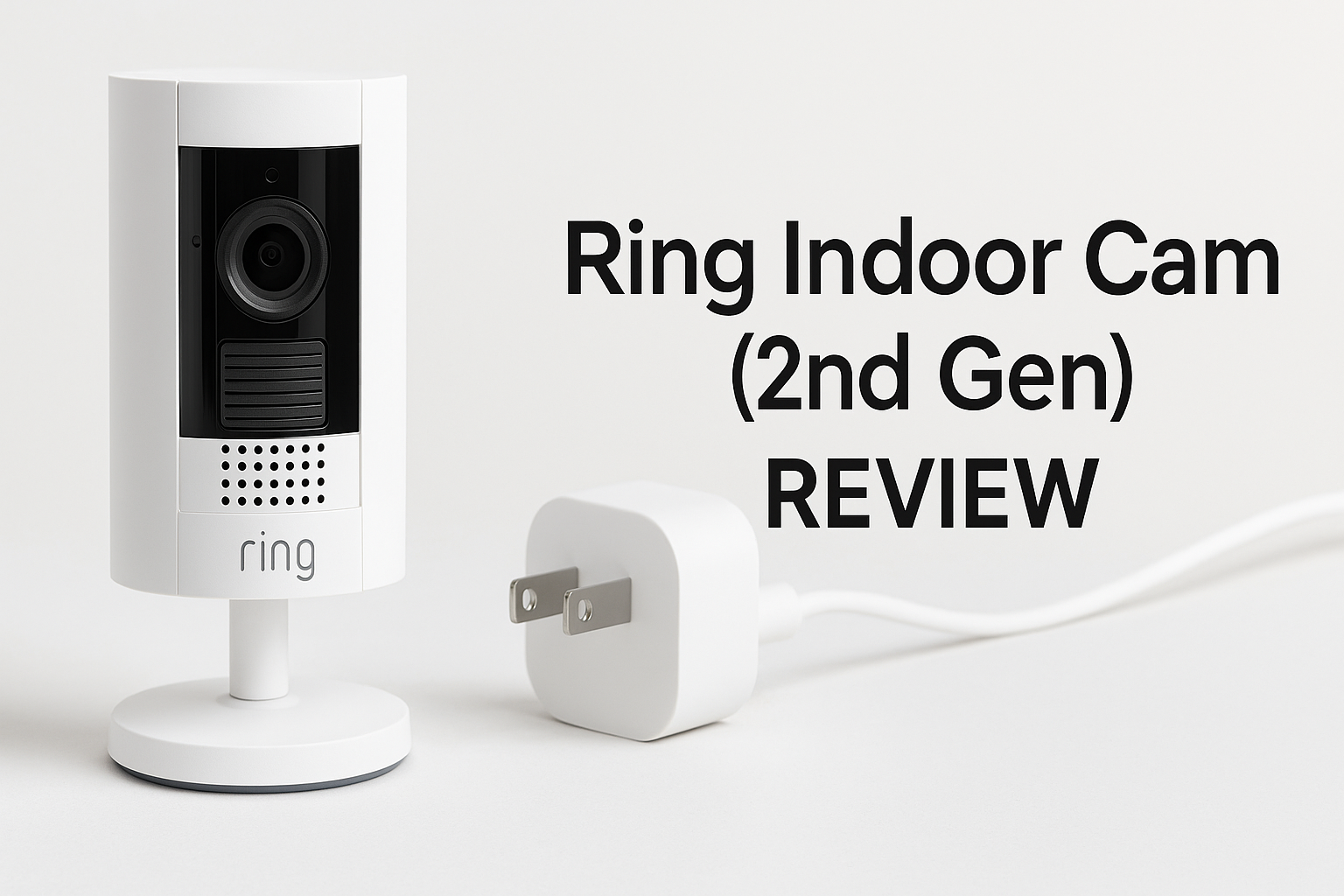
The Ring Indoor Cam (2nd Gen), model B0B6GLQJMV, is Ring’s compact, plug‑in camera aimed at users who want simple, reliable indoor monitoring for a home, apartment, or small business. It records in 1080p HD with color night vision, supports two‑way talk, and connects to the Ring app for live view, notifications, and integration with other Ring devices and Alexa.
On the hardware side, this camera is designed to be easy to place almost anywhere indoors. It uses an included power adapter and long cable, has an adjustable mount for placing on a shelf or mounting to a wall, and includes a manual privacy cover that physically blocks the lens and disables both video and audio when you want extra peace of mind.
From a value perspective, it typically sits in the entry‑level price range for branded smart cameras (around $24.99 at the time of writing), making it a relatively accessible way to extend or start a Ring system.
Typical Use Cases
1. Home Entryways and Living Areas
Many buyers use the Ring Indoor Cam to watch over:
- Front hallways and foyer areas
- Living rooms and family rooms
- Garages and interior access points from a backyard or attached garage
Here the goal is usually general awareness: knowing when family members arrive, monitoring packages brought inside, or getting alerts if unexpected motion is detected while you’re away.
2. Apartment and Rental Monitoring
For renters or people in smaller spaces, the camera’s small footprint and plug‑in design make it a straightforward choice. It can be moved between rooms as needed and doesn’t require permanent wiring, which suits:
- Apartments where drilling or major mounting might not be allowed
- College housing or shared living spaces
- Temporary setups while traveling or subletting
3. Small Business and Office Interiors
The camera can also be used in small commercial environments, such as:
- Reception areas and waiting rooms
- Small retail spaces (for monitoring the register area or back room)
- Offices, storerooms, and employee entrances
In these scenarios, the camera is typically used to monitor activity during business hours and to receive alerts after hours if motion is detected.
4. Pet and Family Monitoring
Thanks to two‑way talk and the Ring app, another popular use is keeping an eye on pets or kids:
- Checking in on pets while you’re at work
- Monitoring a playroom or common area
- Confirming that kids arrive home from school safely
The ability to pull up live view from a phone or Alexa‑enabled smart display adds flexibility in day‑to‑day use.
Performance in Each Scenario
Video Quality and Field of View
The Ring Indoor Cam records at 1080p HD and offers a wide 143° field of view (diagonal). In typical indoor lighting, image clarity is quite good for identifying people, broad actions, and general context in a room. Text on screens or very fine details at a distance may be less clear, but for its primary purpose—awareness and security—the quality is generally adequate.
In low light and at night, the camera switches to color night vision when there’s enough ambient light; otherwise it falls back to a more traditional night‑vision look. For indoor environments with some light from windows, hall lights, or electronics, the color night vision helps keep footage more natural and easier to interpret.
For homes and apartments, this level of detail is usually sufficient. In small business settings, the camera can cover a counter area, small floor space, or office adequately, though it is not a specialized high‑resolution surveillance system.
Motion Detection and Notifications
The camera uses motion detection with customizable Motion Zones. In practice, that means you can:
- Define which parts of the frame should trigger alerts (for example, a doorway rather than a television screen)
- Reduce unwanted notifications from consistent motion sources, like ceiling fans or street‑facing windows
In home and small business environments, motion alerts are generally timely, though performance can depend on Wi‑Fi signal quality and network congestion. When motion is detected, the Ring app sends a push notification, and you can jump straight into live view to see what’s happening.
Two‑Way Talk and Audio
Built‑in two‑way talk allows you to speak through the camera from the Ring app. For home use, this is helpful for:
- Asking a delivery person to leave a package in a specific place (if the area is in view)
- Reminding children of house rules
- Talking to pets—or at least trying to get their attention
In small business or office settings, it can be useful for quick remote interactions with staff in another room or after‑hours communication in monitored spaces.
Audio quality is generally clear enough to understand speech on both sides, assuming moderate background noise levels. The microphone also doubles as a way to pick up incidental sounds that might be relevant in a security event.
App Experience and Ecosystem Integration
The Ring app is central to using the Indoor Cam. Across all use cases, users can:
- View live video and review recorded clips (with an appropriate Ring Protect subscription)
- Configure motion settings, alert preferences, and privacy options
- Link the Indoor Cam to other Ring devices, such as doorbells or outdoor cameras
- Integrate with Alexa to view the camera on compatible Echo Show or Fire TV devices and use voice commands like “show me the living room.”
For homes already invested in Ring, this integration is a major advantage. For new users, the app is structured to make adding more Ring devices straightforward over time.
Reliability and Network Considerations
The camera connects over 2.4 GHz Wi‑Fi, which typically offers good range through walls and across a home. This is beneficial for placing the camera in interior rooms or far from the router, though it may be more susceptible to interference on very crowded networks.
In typical conditions, live view and notifications are responsive. However, as with any cloud‑connected camera, performance can vary with:
- The quality of your router
- Distance from the access point
- Overall internet upload speed and congestion
Because clips are stored in the cloud (with a Ring Protect plan), consistent connectivity is important for capturing and reviewing events.
Strengths Across Scenarios
1. Compact and Flexible Design
The Ring Indoor Cam is physically small and includes an adjustable mount plus a long power cable. Consistent strengths include:
- Easy placement on shelves, counters, or wall mounts
- Simple relocation between rooms
- Minimal visual impact in living spaces or customer‑facing areas
This makes it versatile whether you are in a large home or a small office.
2. Strong App and Ecosystem
Ring’s app and ecosystem are well‑established. Key benefits are:
- A unified interface for doorbells, outdoor cams, and indoor cams
- Automation options such as linking motion events from one device to actions on another
- Alexa integration for voice control and smart display support
For users who plan to expand beyond a single camera, this ecosystem can be a major advantage over standalone cameras with limited integration.
3. Clear 1080p Footage for Indoor Use
While higher‑resolution cameras exist, the Indoor Cam’s 1080p HD video is typically sufficient for indoor security tasks like:
- Identifying who entered a room
- Understanding the sequence of events in an incident
- Monitoring pets, kids, or staff activity
Combined with color night vision, it provides usable footage across a variety of lighting conditions.
4. Privacy‑Focused Features
Privacy is a strong selling point for this second‑generation model. Across home and business scenarios, the manual privacy cover and in‑app controls allow you to:
- Physically block the lens and disable audio/video when desired
- See at a glance whether the camera can record
- Configure motion detection and recording schedules or disable them temporarily
This can be especially important in mixed‑use spaces, such as a home office that doubles as a private room, or a small business where surveillance needs change between open hours and meetings.
5. Straightforward Setup
Setup is designed to be quick:
- Plug the camera into a standard power outlet.
- Use the Ring app to connect it to Wi‑Fi.
- Configure motion zones, alerts, and privacy settings.
Most users can complete installation in minutes without tools, unless wall mounting is desired.
Limitations Across Scenarios
1. Indoor‑Only Design
The camera is rated for indoor use and typical indoor temperature ranges only. That means:
- It is not suitable for exposed outdoor installations
- It should be kept away from moisture and extreme temperatures
For users needing both indoor and outdoor coverage, an additional camera type will be necessary.
2. Reliance on 2.4 GHz Wi‑Fi Only
Support is limited to 2.4 GHz Wi‑Fi, with no 5 GHz option. In most homes this is acceptable and sometimes preferable for range, but there are trade‑offs:
- Potential interference in densely populated Wi‑Fi environments (apartments, office buildings)
- No ability to shift the camera to a less congested 5 GHz band
Good router placement and a strong 2.4 GHz signal become important for stable performance.
3. Cloud‑Focused Storage and Subscription Costs
Out of the box, live view and basic alerts are available, but recording and clip history typically require a Ring Protect subscription. Across home and business settings, this leads to a few considerations:
- Ongoing subscription cost per camera or per account
- Dependence on Ring’s cloud infrastructure for storage
- No built‑in local storage option such as a microSD card
For users who want a one‑time‑purchase solution with local recording, this design may be limiting.
4. 1080p Ceiling for Detail
While 1080p is generally adequate, it is not as detailed as higher‑resolution cameras (e.g., 2K or 4K). In practice, this means:
- Fine details at longer distances, such as small text or very subtle features, may be harder to discern
- In a business context, it’s less suited for large floor‑area coverage if you need detailed evidence from a single camera
For many households and smaller rooms, this is a reasonable compromise, but it’s worth noting if you’re comparing to higher‑resolution alternatives.
5. Not a Complete Security System by Itself
Although the Indoor Cam provides valuable monitoring and alerts, it does not replace a dedicated, professionally monitored alarm system. In more demanding scenarios (for example, a retail environment with high security requirements), it is best viewed as one component in a broader security setup.
Verdict
The Ring Indoor Cam (2nd Gen) is a well‑rounded, compact indoor security camera that fits naturally into the broader Ring ecosystem. Its 1080p HD video, color night vision, two‑way talk, and manual privacy cover make it a strong choice for homeowners, renters, and small business owners who want straightforward, app‑driven monitoring.
Its main strengths lie in ease of setup, flexible placement, polished software, and tight integration with other Ring devices and Alexa. These qualities make it particularly attractive if you already own a Ring doorbell or plan to build a multi‑camera system.
On the other hand, its indoor‑only design, single‑band 2.4 GHz Wi‑Fi, and the emphasis on cloud recording with a subscription may not suit users looking for outdoor coverage, local storage, or higher‑resolution footage. If those features are essential, you may want to compare it to more feature‑rich or specialized alternatives.
For most users seeking a reliable indoor camera that’s easy to install and manage, the Ring Indoor Cam (2nd Gen) offers a solid blend of performance and usability at a relatively accessible price point (around $24.99), especially when used as part of a broader Ring‑based security setup.