
Apple EarPods with Lightning Connector Review: Simple, Reliable Wired Audio for iPhone
Introduction
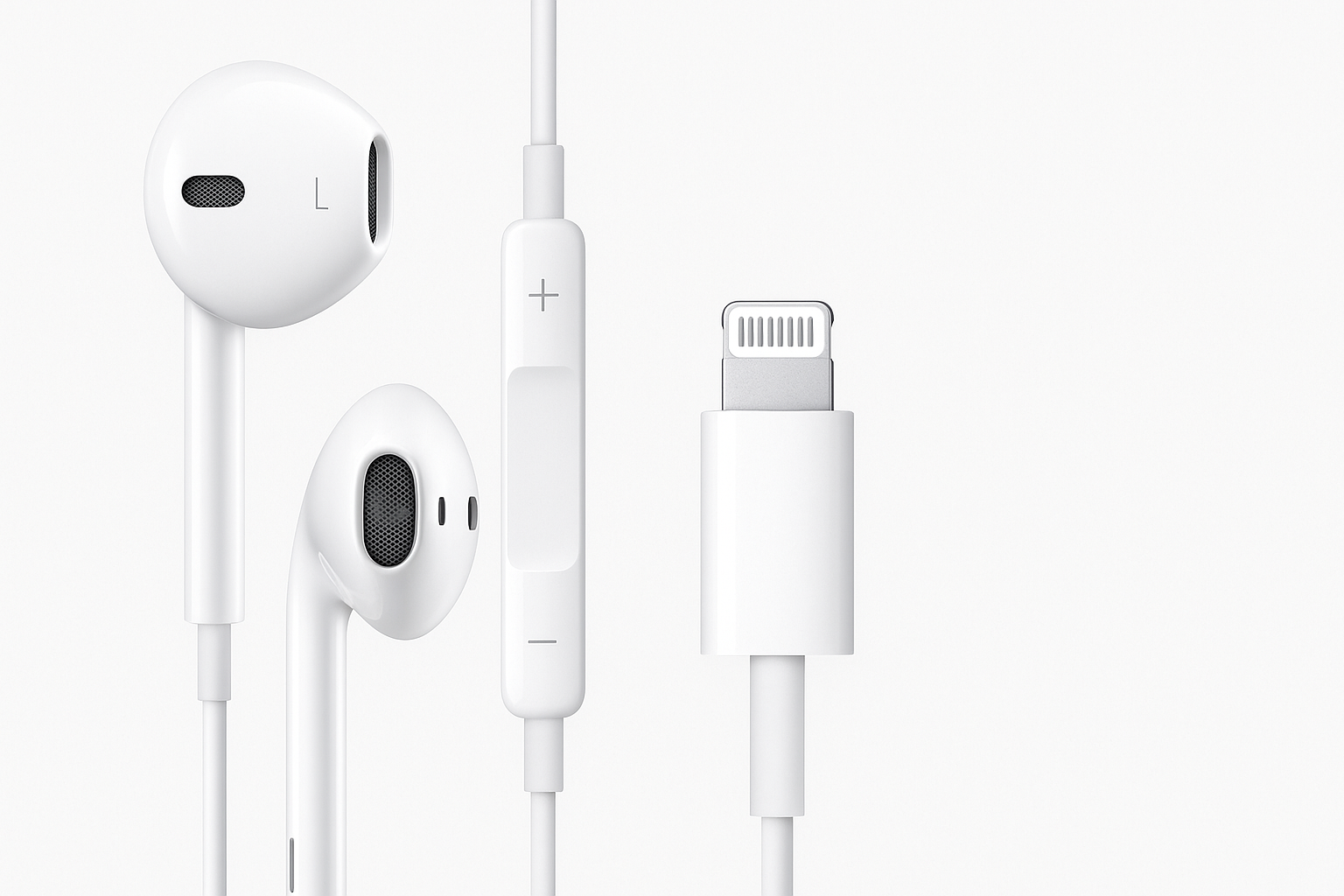
Apple’s EarPods Headphones with Lightning Connector are Apple’s own wired earbuds designed specifically for iPhones and other Apple devices that still use the Lightning port. They offer a plug‑and‑play alternative to wireless AirPods, with a built‑in remote for music, volume, and calls, plus an integrated microphone.
Positioned as an entry‑level, everyday audio option, these EarPods focus on simplicity and reliability rather than premium features. They are particularly appealing if you prefer a wired connection for convenience, latency‑free audio, or because you frequently join calls and online meetings where a stable microphone matters.
If you’re considering a straightforward wired companion for your iPhone, the Apple EarPods with Lightning Connector at $14.88 are still relevant despite the broader shift toward wireless and USB‑C.
Setup / Getting Started
Getting started with the Lightning EarPods is almost effortless:
-
Unbox and inspect
Inside the box you’ll typically find the EarPods neatly wrapped, with the familiar all‑white cable and in‑line remote on the right side. There’s no carrying case or extra accessories – this is a minimal setup. -
Plug directly into your iPhone or iPad
- Connect the Lightning plug to the Lightning port on a compatible iPhone, iPad, or iPod touch running iOS 10 or later.
- Unlike older 3.5 mm headphones, there’s no need for an adapter or external DAC – the digital‑to‑analog converter is built into the EarPods’ Lightning connector.
-
Automatic recognition
Once connected, audio should immediately route through the EarPods. There’s no pairing, no Bluetooth menu, and no charging required. -
Test the inline controls
- Volume up/down: adjust system volume.
- Center button: play/pause music, answer/end calls, and long‑press to invoke Siri on supported devices.
Overall, setup is as simple as wired audio gets. The main prerequisite is owning a device with a Lightning port; these EarPods will not plug directly into USB‑C‑only phones or laptops without additional adapters.
Daily Usage
In everyday use, the EarPods are built around three core tasks: listening to audio, taking calls, and controlling playback without reaching for your phone.
Comfort and fit
Apple designs the EarPods using a shape based on the geometry of the human ear rather than a fully round earbud. For many people this results in:
- A lightweight, semi‑open fit that rests in the outer ear rather than sealing deeply in the canal.
- Less of the “plugged‑up” feeling compared with in‑ear silicone tips.
However, fit is subjective:
- Some users find the shape very comfortable even over long listening sessions.
- Others experience looseness or occasional slipping, especially during vigorous movement, because there are no interchangeable tips to customize the size.
Controls and convenience
The inline remote on the right cable provides quick hardware controls:
- Single press (center button): play/pause media, answer/end calls.
- Double press: skip forward a track in most music apps.
- Triple press: skip backward (app‑dependent).
- Press and hold: activate Siri on supported iOS versions.
- Plus/minus buttons: adjust volume at the hardware level.
In daily commuting, office work, and study environments, these controls reduce how often you need to unlock your phone, which is particularly helpful if your phone is in a pocket or bag.
Call quality
The built‑in microphone performs well for voice calls, video meetings, and voice notes:
- Voices sound clear and intelligible to people on the other end of the call.
- The mic sits close to your mouth on the cable, helping it pick up speech reliably.
It’s not a noise‑cancelling microphone, so in very loud environments background sounds can still leak through, but for typical indoor or street use it does a solid job.
Performance & Reliability
Sound quality
The EarPods are tuned for general‑purpose listening rather than audiophile accuracy. Expect:
- Bass: Slightly emphasized compared with older Apple earbuds, providing more weight to drums and pop tracks, though not as deep or powerful as premium in‑ear monitors.
- Mids: Clear and present, which is good for vocals, podcasts, and spoken‑word content.
- Highs: Sufficient detail for everyday use, but not ultra‑sparkling; they are tuned to avoid harshness rather than to reveal every micro‑detail.
Because they do not create a tight seal, external noise can compete with your music in loud environments. At home or in an office, they sound balanced and easy to listen to for long periods.
Noise isolation and leakage
- Isolation: Minimal passive noise isolation due to the semi‑open fit. You’ll still hear traffic, conversations, and other environmental sounds.
- Leakage: At moderate volumes, leakage is limited; at higher volumes, nearby people in a quiet room may faintly hear what you’re listening to.
This design can be a positive if you want situational awareness (for example, walking outdoors) but is less ideal if you need strong isolation on noisy public transport.
Latency and gaming
As a wired digital connection, latency is very low compared with Bluetooth. This is beneficial for:
- Mobile gaming, where audio‑video sync is important.
- Watching videos, where lip‑sync issues are much less likely than with many wireless earbuds.
Reliability and durability
In practice, the EarPods are generally reliable:
- Connection stability: No wireless dropouts or pairing problems because everything is handled over the Lightning port.
- Cable: The cable is thin and flexible, which keeps weight low but can be more prone to tangling and potential wear at stress points over time if not handled carefully.
- Sweat and water resistance: They offer some resistance to sweat and light moisture, but they are not marketed as fully waterproof sports earbuds. Wiping them down after workouts is recommended.
What Works Well
-
True plug‑and‑play experience
No pairing or app is required. Plug the EarPods into your iPhone’s Lightning port and they’re ready. This simplicity is valuable if you frequently switch between calls, music, and video throughout the day. -
Integrated remote and Siri support
The inline remote handles most media and call controls, and long‑press access to Siri can be convenient when your hands are occupied. -
Consistent microphone quality
For phone calls, online classes, and basic recording, the microphone offers clear voice capture that is often more predictable than some built‑in laptop mics or cheaper third‑party earbuds. -
Balanced, non‑fatiguing sound
The tuning makes them a good match for podcasts, voice calls, streaming, and casual music listening. They are not overly bass‑heavy or sharp, which helps reduce listening fatigue. -
Works without battery management
Because they are wired, there is no charging, battery wear, or worry about one earbud dying mid‑call. -
Price‑to‑function ratio
At $14.88, the EarPods offer a dependable wired option with a built‑in DAC, remote, and microphone – all from the same company that makes the iPhone, which can matter if you value first‑party accessories.
What Could Be Improved
-
Lightning‑only compatibility
These EarPods connect exclusively via Lightning. They work well with compatible iPhones and iPads but are inconvenient if you also use:- A USB‑C iPad or MacBook.
- Non‑Apple devices or any device without Lightning.
In those cases, you’ll need additional adapters, or you may be better served by a 3.5 mm or USB‑C‑based pair of headphones.
-
Fit is not customizable
The fixed plastic shape won’t perfectly match every ear. Users who find the design too large or too small cannot swap to different tip sizes, which can affect comfort, stability, and bass performance. -
Limited noise isolation
The semi‑open design is intentional, but if you commute in very noisy environments or want strong isolation for flights, you might prefer in‑ear models with silicone tips or over‑ear headphones. -
Cable robustness
The lightweight cable keeps them comfortable, but it may not be as durable as thicker, reinforced cables. Careful handling, avoiding sharp bends at the connector, and not yanking the cord are advisable if you want them to last. -
No advanced features
You won’t find active noise cancellation, spatial audio head‑tracking, or companion‑app EQ controls here. For many buyers that’s acceptable, but it’s worth noting if you’re comparing them to modern wireless earbuds.
Overall Impression
Apple’s EarPods Headphones with Lightning Connector are a straightforward, dependable choice for iPhone users who still value wired audio. They excel at everyday tasks: listening to music and podcasts, joining calls, and controlling playback without fuss.
They are not the most immersive or isolating headphones, and the Lightning connector makes them less flexible in a world moving toward USB‑C. The one‑size‑fits‑many shape also won’t be ideal for every ear.
However, if your priority is simplicity, reliability, and clear calls on a Lightning‑equipped iPhone or iPad, these EarPods remain a sensible, budget‑friendly accessory. At $14.88, they provide an easy, first‑party solution for people who want to avoid Bluetooth complications while still enjoying Apple’s familiar design and controls.