
Amazon Kindle Paperwhite (16GB, Latest Model) Review: A Polished, Reader‑First Upgrade
Product Context
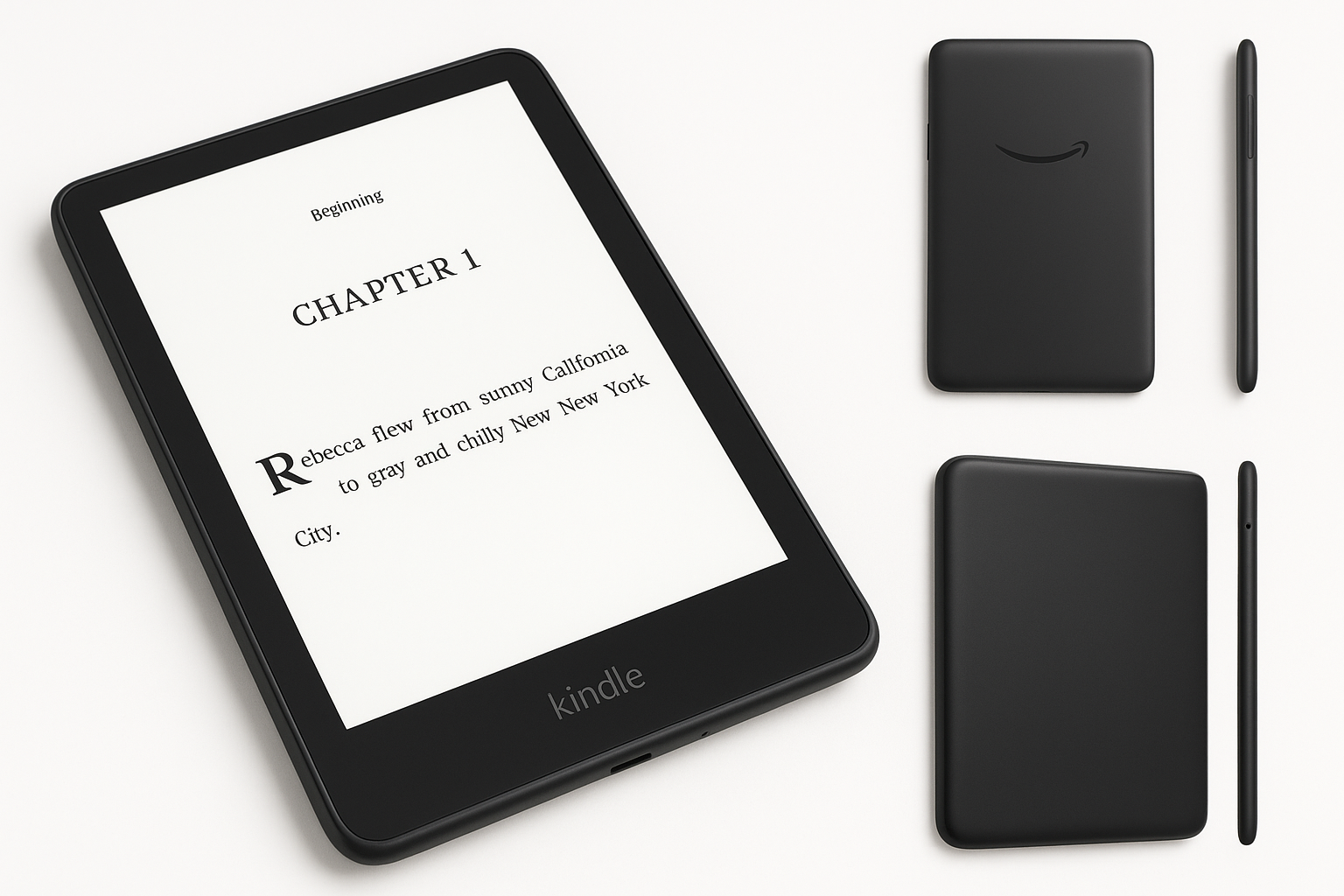
The Amazon Kindle Paperwhite 16GB (newest model) is positioned as a mid-range dedicated e-reader for users who want a high-quality E Ink display, strong battery life, and a comfortable reading experience without the distractions of a full tablet. Compared with earlier Paperwhite generations, this model brings a 7-inch display, faster page turns (Amazon claims about 20% faster), and extended battery life measured in weeks, not days.
With 16GB of storage, it targets readers who maintain a substantial digital library of ebooks, documents, and some audiobooks, but do not necessarily need the higher capacities offered by the premium Kindle Oasis or Kindle Scribe lines. At $159.99, it sits in a price bracket that appeals to avid readers who see value in a focused, distraction-free reading device.
Feature Breakdown
Display and Design
- 7-inch glare-free E Ink display: The larger screen compared to older 6-inch Paperwhites provides more text per page and a slightly more immersive reading experience while remaining compact.
- High-resolution panel: The pixel density is optimized for crisp text, making long-form reading comfortable and easy on the eyes.
- Built-in adjustable front light: LEDs illuminate the screen evenly, enabling reading in low light or complete darkness.
- Warm light adjustment: Users can shift from cool to warmer tones to reduce eye strain at night and more closely mimic paper.
- Slim, lightweight body: The design remains portable and comfortable to hold one-handed for extended sessions.
Storage and Content
- 16GB internal storage: Enough space for thousands of typical ebooks, plus room for documents and some audiobooks.
- Kindle ecosystem integration: Seamless access to Amazon’s Kindle Store, Kindle Unlimited (if subscribed), and public library loans via compatible services.
- Cloud syncing: Reading progress, notes, and highlights sync across Kindle apps and devices.
Performance and Battery
- 20% faster performance (vs previous Paperwhite): Snappier page turns, improved navigation in the library, and smoother handling of menus and settings.
- Weeks-long battery life: With typical reading use and moderate lighting settings, most users can expect to go multiple weeks between charges.
- USB-C charging: Modern, reversible cable support and better compatibility with other devices’ chargers.
Durability and Extras
- Water-resistant design: Rated to withstand accidental splashes and short submersion, making it suitable for use at the beach, pool, or bath.
- Adjustable fonts and layout: Flexible font sizes, line spacing, and margin options to tailor the reading experience.
- Accessibility features: Options like bold text, larger fonts, and audiobook integration with Bluetooth headphones improve accessibility for a range of readers.
Performance Insights
Everyday Reading
In typical use—turning pages every few seconds, browsing the library, and occasionally looking up words—the latest Kindle Paperwhite feels more responsive than older generations. Page refreshes are smoother, and the lag that used to be noticeable when opening larger books or navigating menus is significantly reduced.
The E Ink display maintains excellent contrast, so text remains readable in bright sunlight as well as indoors. The front light provides sufficient brightness for dark rooms without introducing harsh glare, and the uniformity of the illumination is strong across the panel.
Battery Behavior
Battery life can vary based on brightness level, wireless usage, and whether audiobooks are played. With Wi‑Fi disabled most of the time and modest front-light brightness, readers who use the device for around 30 minutes to an hour per day can reasonably expect to charge it only every few weeks.
Handling Large Libraries and Documents
The 16GB storage provides enough room for extensive libraries. For users who frequently move personal documents (PDFs, reports, or manuscripts), the device handles text-focused files well, although large, complex PDFs with charts or images can feel slower due to the limitations of E Ink and the device’s processing power. Scrolling and zooming in PDFs remain serviceable but not as fluid as on LCD or OLED tablets.
Usability
Reading Experience
The combination of a slightly larger 7-inch display and fine-grained font controls makes this Paperwhite well-suited to both casual readers and those with visual sensitivity. Being able to tune warmth and brightness independently gives more control over eye comfort.
The touchscreen is responsive for tapping and basic gestures such as highlighting text, adding notes, and adjusting settings. Navigation through the home screen, library filters, and settings menus is fairly intuitive once you are familiar with the Kindle interface.
Device Setup and Ecosystem
Initial setup is straightforward: connect to Wi‑Fi, sign in with an Amazon account, and the device automatically pulls in previous purchases and collections. Kindle’s ecosystem benefits include:
- Easy access to Amazon’s ebook catalog
- Support for subscriptions like Kindle Unlimited
- Library borrowing (where supported) via compatible services
- Cloud backups of purchased content and annotations
For users who want to send personal documents, Amazon’s "Send to Kindle" options (email, apps, and browser extensions) make it simple to get articles, PDFs, and manuscripts onto the device.
Portability and Comfort
The Paperwhite’s size and weight strike a good balance between screen real estate and portability. It can slip easily into bags or large pockets, and most users can hold it comfortably for long reading sessions without fatigue. The flat front and minimalist bezels give it a clean, modern look.
Trade-offs
While the latest Kindle Paperwhite offers a strong feature set, there are a few compromises to keep in mind:
- E Ink vs tablet displays: E Ink is ideal for reading static text but not suited for rich interactivity, fast scrolling, or color content such as magazines and comics.
- Limited PDF and graphic-heavy content performance: Large or complex PDFs are usable but not fluid; zooming and panning can feel slow.
- Locked-in ecosystem: The device is tightly integrated with Amazon services. While it supports sideloaded documents, users heavily invested in other ebook ecosystems may find the workflow less convenient.
- No physical page-turn buttons: All interactions are via the touchscreen, which some readers may find less tactile than side-button navigation found on higher-end models.
- Advertisements on certain variants: Some configurations are offered with lockscreen ads; opting for an ad-free version typically increases the effective cost from $159.99 upward.
Conclusion
The Amazon Kindle Paperwhite 16GB (newest model) is a mature, well-balanced e-reader that refines the core reading experience rather than radically changing it. The 7-inch glare-free display, faster performance, extended battery life, and water resistance make it an appealing choice for frequent readers who value comfort and focus.
If your primary goal is to read ebooks, articles, and text-based documents without distractions, this model delivers a polished experience at $159.99. Users who want a color screen, heavy PDF usage, or broad app support may still prefer a tablet, but for dedicated reading, the latest Kindle Paperwhite remains one of the most compelling options in its class.