
Apple AirTag (2nd Generation) Review: A Smarter, Longer‑Range Item Tracker for the Apple Ecosystem
Introduction
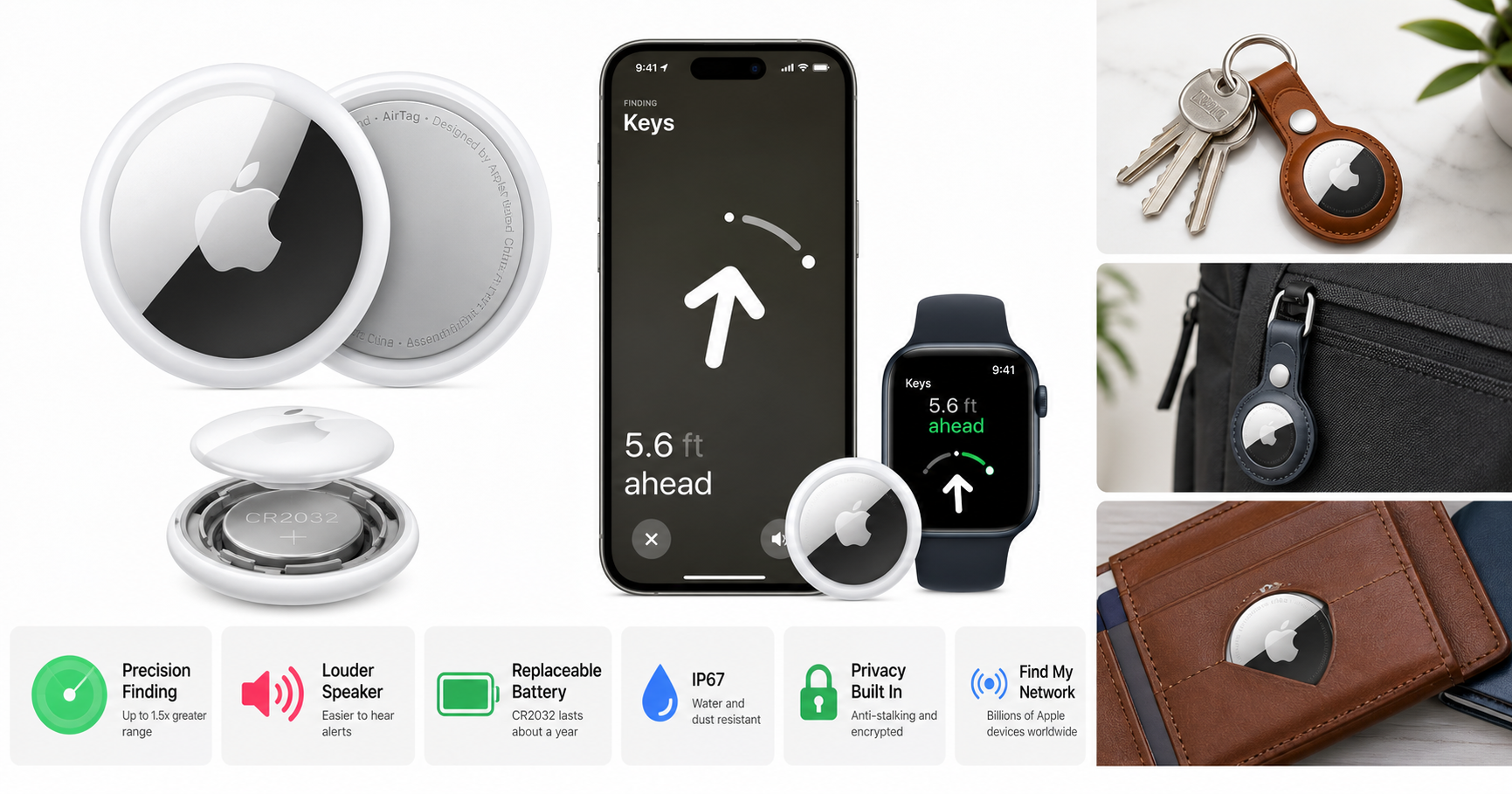
The Apple AirTag (2nd Generation) is Apple’s latest take on a compact item tracker designed to help you locate keys, wallets, luggage, backpacks, and more through the Find My network. At a glance, it looks nearly identical to the original AirTag, but internally it adds an updated Ultra Wideband (UWB) chip for up to 1.5x greater Precision Finding range, a louder speaker, and subtle durability and environmental improvements.
If you live inside the Apple ecosystem and want a simple way to keep tabs on important items, this second-generation AirTag aims to be the plug‑and‑forget solution, with a user‑replaceable CR2032 coin cell battery and tight integration with iOS and iPadOS.
Note: Pricing fluctuates, but the AirTag (2nd Generation) is generally positioned as an affordable, single‑item tracker, making $29.00 a reasonable expectation for most buyers when purchasing from the product page.
Setup / Getting Started
Setting up the AirTag (2nd Generation) is intentionally straightforward, especially if you’ve used other Apple accessories.
-
Unboxing and hardware
Inside the box you’ll find the AirTag with a CR2032 coin cell battery pre‑installed and basic documentation. The disc‑shaped tracker is small and light, with a glossy white front and metal back. The second generation now clearly lists IP67 water and dust resistance and connectivity details on the rear. -
One‑tap pairing with iPhone or iPad
- Pull the battery tab to power on the AirTag; it plays a short chime.
- Bring it close to your compatible iPhone or iPad, and a setup card pops up automatically—similar to pairing AirPods.
- You can assign the AirTag to a default label (Keys, Wallet, Backpack, etc.) or create a custom name and emoji.
-
Requirements and compatibility
- You need an Apple ID and the Find My app enabled.
- For full Precision Finding with the second‑generation UWB chip, you’ll need a recent iPhone (or supported Apple Watch) running the latest software. Older Apple devices can still see the AirTag’s location on a map and trigger sounds, but they won’t benefit from the expanded precision range.
-
Attaching to your items
The AirTag itself has no integrated loop, so for most uses you’ll need an accessory:- Keys & bags: use a key ring, loop, or holder.
- Wallets & passports: slip into a card‑style holder or a dedicated pocket.
- Luggage: attach via a tag or internal pocket to reduce the chance of it being removed.
Once assigned to an item, the AirTag appears in the Items tab of the Find My app, ready to track.
Daily Usage
In everyday use, the AirTag (2nd Generation) is designed to be largely invisible—quietly piggybacking on the vast network of nearby Apple devices to keep your item’s location updated in the background.
Finding nearby items
When your keys or bag are misplaced nearby:
- Play Sound: In the Find My app, tap the item and hit Play Sound. The updated, louder speaker on this generation makes the alert easier to hear through soft furnishings or across a room.
- Precision Finding: If you have a compatible iPhone or Apple Watch, you can use on‑screen arrows, distance indicators, and haptics to walk directly toward the AirTag. With the new UWB chip, this works up to around 1.5x farther away than on the original AirTag, which is noticeable in larger homes or office spaces.
Locating items further away
For items you’ve left behind outside the home—like a bag at the office or luggage at an airport—the AirTag relies on the Find My network:
- Nearby Apple devices owned by other people can detect your AirTag securely and anonymously.
- The approximate location is relayed back to your account so you can see your item on a map, including last‑seen time.
You can also enable Lost Mode, which:
- Notifies you when the AirTag is detected by a nearby device.
- Lets you set a phone number or message that appears when someone taps the AirTag with an NFC‑enabled smartphone (including non‑Apple devices), making it easier for an honest finder to contact you.
Living with it day to day
Because the AirTag uses a standard CR2032 coin cell battery, you don’t have to charge it. Under typical usage (periodic sound playback and regular location updates), Apple rates battery life at about a year before replacement is needed. When the battery runs low, you receive a notification on your iPhone.
Most of the time, you’ll forget the AirTag is there—until you misplace something and the combination of audible alerts, Precision Finding, and map‑based tracking becomes invaluable.
Performance & Reliability
Precision Finding and range
The marquee upgrade in the 2nd generation is Apple’s second‑generation Ultra Wideband chip, which:
- Extends the effective range of Precision Finding by up to 1.5x versus the first‑gen AirTag (assuming a compatible iPhone or Apple Watch).
- Offers more responsive and stable direction and distance updates when walking around indoors.
In practice, the improved range helps most when:
- You’re searching across a larger home, office, or parking structure.
- The AirTag is in a bag or behind objects that might attenuate signals.
Sound volume
The built‑in speaker on this model is designed to be audibly louder than the original. This matters if:
- Your keys are buried under couch cushions.
- The AirTag is in a thick backpack or suitcase.
You’re more likely to hear the alert tone in noisy environments, which reduces search time.
Location updates and network coverage
As with the original, overall reliability depends heavily on the density of Apple devices around your AirTag:
- In urban or suburban areas with many iPhones, iPads, and Macs, location updates tend to be frequent and accurate.
- In remote areas with few Apple devices, updates may be sparse.
The AirTag (2nd Generation) also supports standard Bluetooth‑based proximity finding, which helps when you’re in the same general area but still out of Ultra Wideband range.
Battery life and maintenance
The user‑replaceable CR2032 battery remains one of the AirTag’s key advantages over fully sealed trackers that must be recharged or replaced entirely:
- Expected lifespan: about one year under typical daily use.
- Replacement: twist the back cover, swap the coin cell, and re‑secure the cover; no re‑pairing is usually required.
The updated internal layout is designed to improve durability and weather resistance without changing the basic maintenance routine.
Durability and water resistance
The AirTag (2nd Generation) is rated IP67 for water and dust resistance:
- Survives splashes, rain, and short accidental submersion (up to 1 meter for up to 30 minutes under controlled conditions).
- Suitable for use on keys, bags, or pet collars that might occasionally get wet, though it’s not meant as a dedicated swim tracker.
Over time, sharp impacts, scratches, or opening the battery compartment frequently can affect water resistance, so it’s best to avoid unnecessary rough handling.
What Works Well
-
Deep integration with Apple devices
- One‑tap setup with iPhone and iPad.
- Clean integration into the Find My app, alongside your other Apple devices.
- Lost Mode and NFC support for easy contact if someone finds your item.
-
Improved Precision Finding
- Up to 1.5x longer UWB range than the original AirTag.
- Clear on‑screen guidance with direction, distance, and haptics to walk you straight to the item.
-
Louder built‑in speaker
- More audible chimes in real‑world scenarios, making it easier to locate items hidden in cushions, drawers, or bags.
-
User‑replaceable battery
- Standard CR2032 coin cell available widely.
- No need to recharge or replace the whole tracker annually.
- Low‑battery notifications reduce the risk of the tracker silently dying.
-
Compact and lightweight design
- Fits easily into wallets, bags, or small accessory holders.
- Minimal weight added to keychains or delicate items.
-
Privacy features baked in
- Anti‑stalking protections, including alerts if an unknown AirTag is traveling with you.
- Rotating identifiers and end‑to‑end encryption for location data.
-
Competitive overall value
- For a single tracker that tightly integrates with the Apple ecosystem, $29.00 is generally reasonable, especially compared with third‑party trackers that may not offer UWB‑based precision guidance.
What Could Be Improved
-
Apple‑only ecosystem dependency
- Full functionality—including Precision Finding and background network updates—requires Apple hardware and services.
- Android users can only interact with an AirTag in limited ways (e.g., scanning in Lost Mode) and cannot own or manage AirTags natively.
-
Accessory requirements for many use cases
- The lack of an integrated key loop means you’ll almost certainly need to purchase a holder, key ring, or wallet sleeve.
- This can increase the total effective cost beyond $29.00, particularly if you buy official Apple accessories.
-
Limited form factor options
- Only one shape and color are offered.
- Slimmer, card‑shaped variants integrated into wallets or luggage tags would offer more flexibility.
-
Dependence on local Apple device density
- In areas with few Apple devices, background location updates can be sporadic.
- Travelers going off the beaten path may see reduced tracking reliability.
-
Minor friction with battery compartment
- While most users can swap the CR2032 without trouble, the twist mechanism can feel stiff or awkward the first time, especially if you’re cautious about damaging the finish.
Overall Impression
The Apple AirTag (2nd Generation) is an evolutionary upgrade, not a complete rethink. If you already own first‑generation AirTags and are satisfied, you may not feel compelled to replace them immediately. However, for new buyers—or for people who rely heavily on AirTags—the combination of a longer Precision Finding range, louder speaker, and continued use of a simple, replaceable battery makes this model the more compelling choice.
Within the Apple ecosystem, the AirTag (2nd Generation) remains one of the most seamless and effective ways to keep track of your belongings. It’s especially well suited for:
- People who frequently misplace keys, wallets, or bags at home or at work.
- Travelers who want an extra layer of reassurance for checked luggage or backpacks.
- Apple Watch and iPhone users who value the convenience of guided Precision Finding and tight Find My integration.
If you already own a compatible iPhone or iPad and are comfortable with Apple’s ecosystem and privacy model, the AirTag (2nd Generation) is a practical, low‑maintenance tracker that delivers reliable everyday utility at a reasonable price point, typically around $29.00 on its product page.