
2026 Upgraded 2‑in‑1 Wireless CarPlay & Android Auto Adapter Review: A Compact Way to Cut the Cable
Product Context
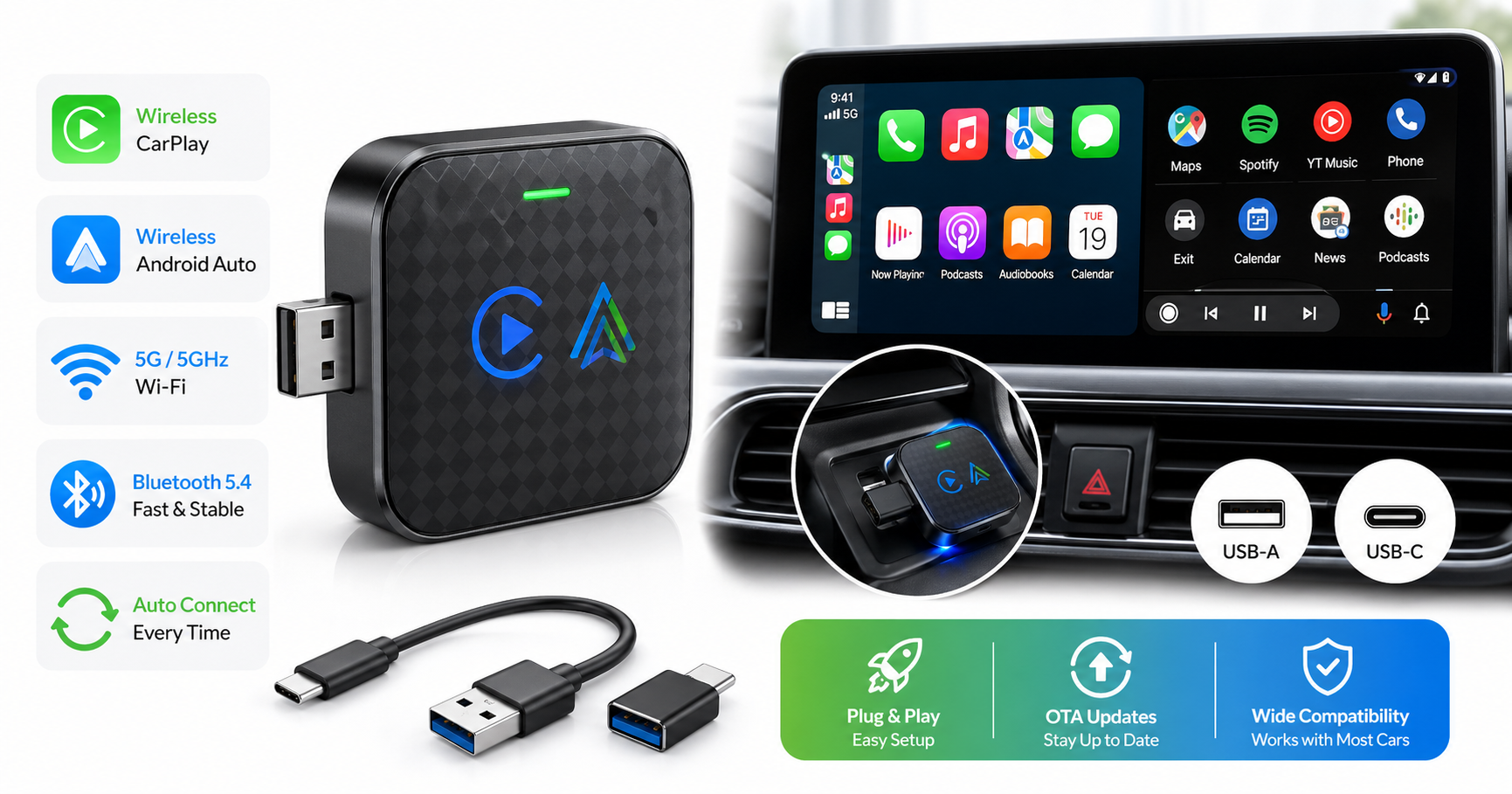
The 2026 Upgraded 2‑in‑1 Wireless CarPlay Adapter & Android Auto Wireless Adapter is designed for vehicles that already support wired Apple CarPlay or Android Auto and adds the one feature many factory systems still lack: a wireless connection.
Instead of plugging your phone into the car’s USB port every drive, this adapter plugs in once and stays there. It uses Bluetooth 5.4 for initial pairing and 5G/5 GHz Wi‑Fi for data transfer, so your CarPlay or Android Auto session can run wirelessly while preserving the car’s original controls and interface.
It targets three main use cases:
- Drivers who want wireless CarPlay without replacing the head unit
- Drivers who swap between iPhone and Android and want one adapter for both
- Anyone looking to declutter their console by removing the daily charge/data cable ritual
It is sold as a compact, plug‑and‑play dongle with USB‑A and USB‑C connection options, making it suitable for a wide range of factory and aftermarket head units.
Note: This type of adapter does not add CarPlay or Android Auto to cars that lack those features. It only converts an existing wired CarPlay/Android Auto system into wireless.
Feature Breakdown
1. 2‑in‑1 Wireless CarPlay & Android Auto
The standout capability is its dual‑mode support:
- Wireless CarPlay for iPhones running supported iOS versions
- Wireless Android Auto for compatible Android phones (typically Android 11+ with 5 GHz Wi‑Fi)
The adapter automatically negotiates the right mode based on the phone that connects first, so you don't need to manually switch profiles when different drivers share the car.
2. 5G / 5 GHz Wi‑Fi + Bluetooth 5.4
To maintain a responsive in‑car UI, the dongle uses:
- Bluetooth 5.4 for quick discovery, pairing, and reconnection
- 5G / 5 GHz Wi‑Fi for the high‑bandwidth audio, navigation, and app data stream
In practice, this means smoother map rendering and fewer audio glitches compared to older 2.4 GHz‑only adapters, especially in RF‑noisy environments like city centers or parking structures.
3. Fast Auto‑Connect
Once the initial pairing is complete, the adapter is designed to:
- Boot quickly when the car’s USB port powers on
- Reconnect automatically to the last paired phone
After the first setup, most users can expect CarPlay or Android Auto to appear automatically on the head unit without re‑pairing or tapping through menus every time.
4. Plug‑and‑Play USB‑C/A Design
The hardware is a small, lightweight dongle that works with:
- USB‑A ports common in many older or mid‑range vehicles
- USB‑C ports increasingly common in newer cars and aftermarket head units
Typically, the package includes the adapter and cables/dongles to adapt between USB‑A and USB‑C, so you can move it between vehicles without buying extra accessories.
5. OTA Firmware Updates (Typical for This Class)
While specifics vary by seller, this family of generic 2‑in‑1 adapters commonly supports over‑the‑air updates via a built‑in web configuration page. That allows bug fixes and compatibility improvements over time without replacing the hardware.
Performance Insights
Connection Speed
Under normal conditions, the adapter aims to bring CarPlay or Android Auto online within a few seconds after the car starts and the phone is in range with Bluetooth and Wi‑Fi enabled.
Expect:
- A short delay between turning on the ignition and seeing the CarPlay/Android Auto interface
- Slightly longer initial setup time on the very first pairing, especially for Android Auto (which may require enabling wireless mode in Android Auto settings)
Stability & Latency
The 5G/5 GHz Wi‑Fi link is a significant upgrade over earlier 2.4 GHz‑only devices, especially for:
- Navigation apps (Google Maps, Apple Maps, Waze) with real‑time traffic
- Music and podcast streaming via CarPlay/Android Auto
Typical behavior:
- Audio and UI interactions are near‑instant, though not quite as instantaneous as a fully wired USB connection
- Occasional brief stutters can still occur, particularly in RF‑dense areas or when the phone’s Wi‑Fi is heavily loaded
For most users, the minor latency trade‑off is acceptable in exchange for the convenience of wireless operation.
Cross‑Platform Use (iPhone and Android)
The 2‑in‑1 design is particularly helpful if:
- Two drivers use different ecosystems (e.g., one iPhone, one Android)
- You regularly switch phones for work and personal use
Behavior to expect:
- The adapter usually prioritizes the phone that connects first when the car powers up
- To switch drivers, one person may need to turn off Bluetooth/Wi‑Fi on their phone, or the other driver may need to select the adapter in their Bluetooth list
This is typical for most 2‑in‑1 wireless dongles and not unique to this model.
Usability
Setup Experience
Initial setup is generally straightforward:
- Plug the adapter into the USB‑A or USB‑C port that normally provides wired CarPlay/Android Auto.
- Wait for the adapter to boot (indicator light turns on or starts blinking).
- On your phone, enable Bluetooth and Wi‑Fi.
- Pair with the adapter’s Bluetooth name as shown on the car screen or in your phone’s list.
- Confirm pairing and allow any required permissions.
- CarPlay or Android Auto should then launch wirelessly on the head unit.
After this first‑time pairing, repeat steps are no longer necessary; the adapter typically auto‑connects whenever the vehicle powers on.
Day‑to‑Day Operation
In regular use, you can expect:
- Automatic launch of CarPlay or Android Auto within seconds of starting the car
- Continued support for steering‑wheel buttons, rotary knobs, and the car’s voice assistant button
- Phone remaining in your pocket, bag, or wireless charging tray instead of being tethered by a cable
For best results:
- Keep your phone’s Wi‑Fi and Bluetooth always on
- Avoid manually connecting your phone directly to the car’s built‑in Bluetooth for calls/music at the same time, as it can confuse some head units
Physical Design & Portability
The adapter is small enough to leave plugged in permanently or tuck out of sight in a center console. Its minimal size and low weight make it easy to:
- Move between vehicles
- Use in rental cars that have wired CarPlay/Android Auto
The USB‑C/USB‑A flexibility further helps if you drive or rent a mix of newer and older vehicles.
Trade‑offs
1. Compatibility Limits
As with any generic wireless adapter, compatibility is broad but not universal.
Typical limitations include:
- The car must already support wired CarPlay or Android Auto via USB
- Some older or brand‑specific head units may show connection errors, slow startups, or occasional disconnects
- Android Auto wireless usually requires Android 11 or later and support for 5 GHz Wi‑Fi on the phone
Checking recent user feedback for your specific car model and year is advisable before purchase.
2. Slight Latency vs. Wired
Wireless adapters inevitably add:
- Slight touchscreen input delay compared with a direct cable
- A small lag between track changes and actual audio skipping
For navigation, calls, and media, this delay is generally minor. Enthusiasts who prioritize absolute responsiveness (for example, when mirroring fast‑changing apps or using complex head‑unit UIs) may still prefer a wired connection.
3. Potential Interference & Network Quirks
Because the adapter relies on Wi‑Fi:
- RF‑heavy environments can cause brief audio dropouts or UI pauses
- Some Android phones may try to treat the CarPlay/Android Auto Wi‑Fi link as an internet connection and temporarily prefer it over mobile data, which can disrupt navigation traffic updates unless the OS correctly recognizes it as a local network only
These behaviors depend heavily on the phone’s OS and firmware; they are typical of wireless CarPlay/Android Auto adapters in general.
4. Firmware & Support Differences by Seller
This particular model is often sold under different brand names, which can lead to:
- Varying levels of firmware update frequency
- Different quality of documentation and customer support
When possible, choose a seller that clearly documents how to access the adapter’s web configuration page and provides update instructions.
Conclusion
The 2026 Upgraded 2‑in‑1 Wireless CarPlay Adapter & Android Auto Wireless Adapter is a practical solution for drivers who already have wired CarPlay or Android Auto and want to go wireless without replacing the car’s head unit.
Strengths:
- Dual support for CarPlay and Android Auto in one compact dongle
- 5G/5 GHz Wi‑Fi and Bluetooth 5.4 for faster, more stable connections than earlier‑generation adapters
- Simple plug‑and‑play setup with auto‑connect after initial pairing
- Works with both USB‑A and USB‑C ports, making it more future‑proof
Considerations:
- Wireless adds a small amount of latency compared to wired
- Compatibility can vary with specific car models and phone OS versions
- Experience and update support may differ slightly depending on the seller branding this hardware
If your primary goal is to eliminate the daily USB cable while keeping your existing infotainment system, this adapter offers a compelling, compact, and cost‑effective option. As long as your vehicle supports wired CarPlay or Android Auto, and your phone meets the wireless requirements, the overall experience is a noticeable quality‑of‑life upgrade for everyday driving.
In many listings, this adapter is positioned in the mid‑range segment at roughly $29.99, which aligns with comparable 2‑in‑1 wireless dongles that offer similar performance and feature sets.